
How to Track Baby Feeding With an Apple Watch
You can track baby feeding from an Apple Watch by starting a timer for each breastfeed, or saving a bottle amount, with a few taps on your wrist. The log is kept by an app on your iPhone. That works best at night and when one hand is busy holding the baby.
This guide covers what to write down for each feed and why, how to set up your watch, and how to log feeds in Vivi Baby. The first parts work with any app, or with a notebook.
Why a wrist log helps
Newborns eat a lot. The AAP says breastfed newborns usually nurse every 2 hours, counted from the start of one feed to the start of the next, so 10 to 12 sessions in 24 hours is the norm. It also says most bottle-fed newborns eat every 2 to 3 hours. At that pace nobody remembers whether the last feed was at 1:00 or 1:30.
A watch helps. You tap your wrist and keep holding the baby, with no phone to unlock and no bright screen. You log the feed as it starts, so you don’t rebuild it from memory at 4 a.m. A timer and a crown turn replace a form.
Use the watch for the quick taps. Notes and a formula name go on the iPhone.
What to record for each feed
You don’t need everything. Pick what you or your pediatrician will use.
| What | Why it helps |
|---|---|
| Start time | Feed spacing is counted from the start of one feed to the next, so this is the time you need to find later. |
| Breastfeed length and side | Shows which side you used last, so you can start on the other one. Shows how long each feed took. |
| Bottle amount | The number your pediatrician is most likely to ask about for a bottle-fed baby. |
| Bottle type | Breast milk, formula or a mix. Useful when you switch between them. |
| Pumped amount and time | Shows how much milk you have and when you last pumped. |
| Solids | The food, and how your baby reacted. Helpful once you start solid foods. |
| Notes | Spit-up, a fussy feed, a bottle that was refused, a new formula. These are easy to forget by the next visit. |
For general facts about feeding, use trusted sources. The AAP lists early hunger cues such as licking lips, rooting, putting a hand to the mouth and fussiness, and calls crying a late sign. The CDC says babies generally take what they need at each feeding and stop when they are full. A log records what happened. It does not tell you how much your baby should eat. For that, ask your pediatrician.
If you are new to tracking, what to track in the newborn weeks covers feeds, diapers and sleep together.
Set up your Apple Watch
Apple says an Apple Watch installs the watch versions of your iPhone apps by default, if a watch version exists. Follow these steps for a baby app with a watch app.
- Check your versions. Vivi Baby needs iOS 18 or later and watchOS 26 or later.
- Install the watch app. If it did not install by itself, open the Apple Watch app on your iPhone. Go to My Watch, then Apps. Find the app under Available Apps and tap Install.
- Connect the watch. Open Vivi Baby on the iPhone once. Until then the watch shows no data.
- Test it once in daylight. Log a test feed and check that it appears on the iPhone. Delete it afterwards.
Vivi Baby also has a complication. It opens the app from the watch face. It does not show feed data. For more on the watch side, see the Apple Watch baby tracker page.
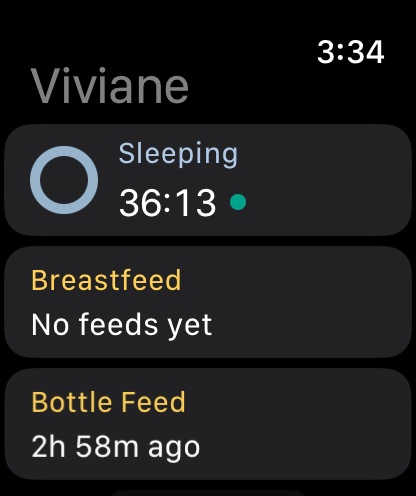
Track a feed in Vivi Baby
This is how the Vivi Baby watch app works. For a short version, see the baby feeding tracker for Apple Watch page. The watch app is free.
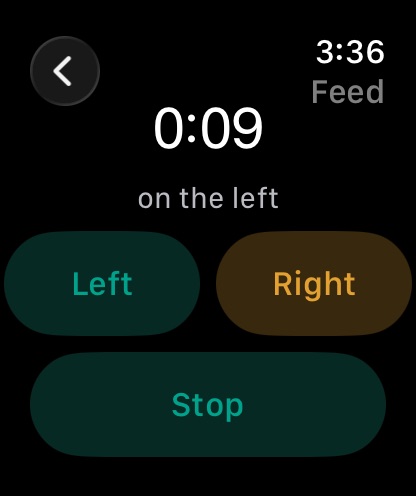
Breastfeeding
- Open Vivi Baby and tap the Breastfeed card.
- Tap Left or Right to start the timer on that side.
- To change sides, tap the other side. The timer keeps running, and Vivi records the time on each side.
- To pause or resume, tap the side that is running.
- Tap Stop when the feed ends.
The Breastfeed card on the home screen shows the running time and side. After the feed it shows the last side and how long ago it ended, so the next feed answers “which side was last?”
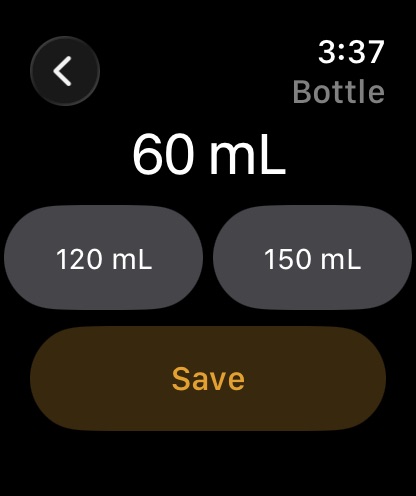
Bottle
- Tap the Bottle Feed card.
- Turn the Digital Crown to set the amount. It starts at 60 mL and moves in steps of 5 mL. The screen shows your chosen unit, mL or fl oz.
- Tap Save.
If you often feed the same amount, the watch shows your last three bottle sizes as buttons. One tap saves that amount.
A bottle saved from the watch has the amount only. The watch doesn’t ask whether it was breast milk or formula. Add that on the iPhone if you want it recorded.
Pumping
- Tap the Pump card and tap Start.
- Tap Stop when you finish.
- Add the amount on your iPhone. The watch reminds you with “Add the amount on your iPhone.”
Once the milk is in a bottle or bag, our guide to storing breast milk safely covers fridge and freezer times and how to thaw it.
Other things the watch can log
The watch also logs sleep with a timer and diapers with one tap (Wet, Dirty, Mix or Dry). Solids and notes are only on the iPhone.
Fix a feed or a mistake
The watch has no undo button. Fix mistakes on the iPhone:
- Wrong amount or a missing detail: open History on the iPhone and tap the feed. You can change the start time, sides, amounts, bottle type, the note and photos.
- Logged by mistake: open the feed in History and use Delete. Vivi asks “Delete this entry?” before it removes it.
- Logged late: a watch entry uses the time you tapped, so if you saved a bottle ten minutes late, change its start time on the iPhone.
Hand off a feed to a partner
Each caregiver logs from their own iPhone and Apple Watch. Vivi Baby shares one family folder in iCloud Drive, and invited caregivers can see, add, edit and delete everything in it.
A running feed timer shows on your partner’s iPhone, so they can see it is in progress. The timer is a file in the shared folder, so their iPhone can stop it once iCloud has delivered it. A small relay run by Vivi carries the anonymous timer state. Your baby’s log is not uploaded to Vivi’s servers.
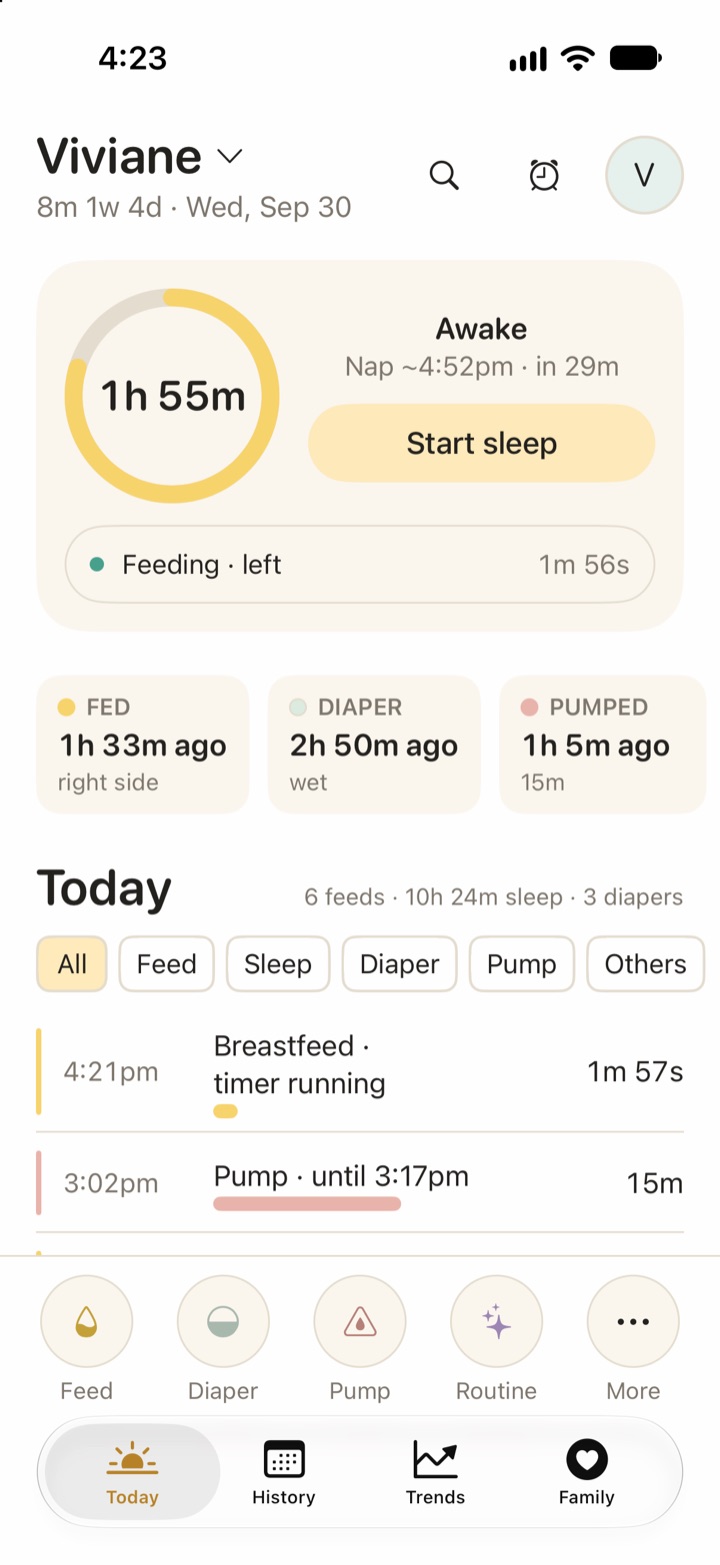
Before you hand over, check the Today screen on the phone. It shows the time since the last feed and which side. That replaces the 3 a.m. text. For a full routine, read how to share night feeds with your partner, or see Vivi Baby for couples.
Common problems
The watch shows “Open Vivi Baby on your iPhone to connect.” The watch has no data yet. Open Vivi Baby on the iPhone once and the watch will fill in. Check that the two devices are paired and that Bluetooth is on.
The phone is out of range. You can still tap. The watch keeps the entry and shows “waiting to sync”. The phone gets it when the two connect again. The entry keeps the time you tapped, not the time it arrived.
You forgot to stop a timer. Open the running timer on your iPhone. Vivi shows a warning on a timer that has been running for a long time. Change the start time, or stop the timer and edit the saved feed.
A bottle has no type. The watch saves only the amount, so add breast milk or formula on the iPhone.
What to bring to a pediatrician visit
Bring what your pediatrician asks about, plus a few things that are hard to remember:
- Rough feeds per day, and how long breastfeeds run.
- Bottle amounts, and the type.
- Any spit-up, refused feeds or feeding changes, with dates.
- Your own questions, written down.
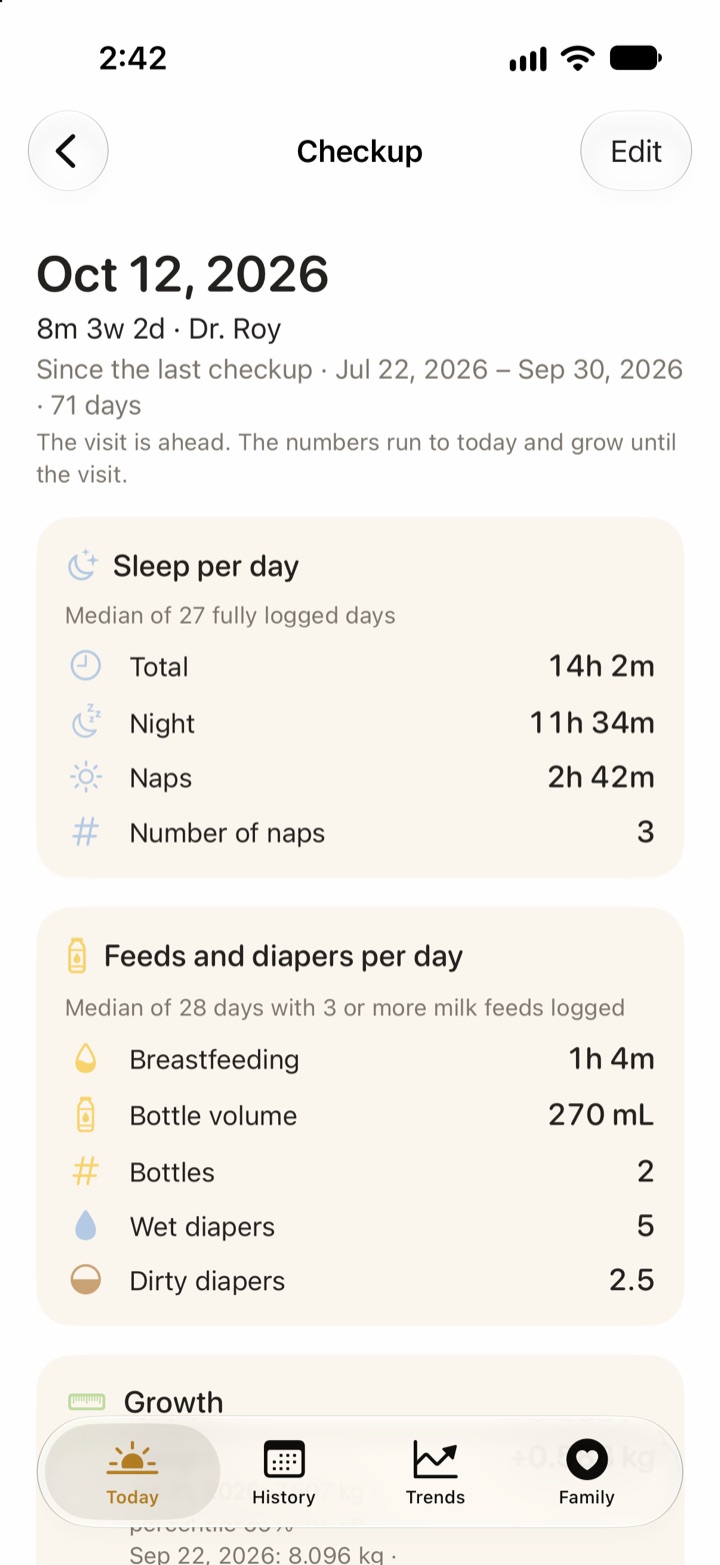
Your log has the raw entries. Vivi Plus adds a checkup summary. For a period, it shows the median breastfeeding time per day, bottle volume, number of bottles and solids, alongside diapers, sleep and growth. A day counts only if 3 or more milk feeds were logged. Checkups is one of three Plus features, with Sleepy Time and Insights. Plus costs $4.99 per month or $44.99 per year, and you get 14-day free trial when you open a Plus feature and choose it. See pricing. One subscription covers your Apple Family Sharing group. Free logging still works without Plus.
For a step-by-step list, read how to prepare for your baby’s checkup.
Vivi Baby is not medical advice. Your pediatrician decides what is right for your baby.
Where Vivi Baby fits
Vivi Baby is an iPhone and Apple Watch baby tracker. The Apple Watch app, feed logging and sharing are free. Your entries are kept in your family’s iCloud Drive folder. There is no account and no ads. A notebook works if you keep it in one place. A watch is easier when your hands are full.
Frequently asked questions
Can I track baby feeding with just an Apple Watch?
You can start and stop feeds from the watch, but the watch app talks to an app on your iPhone that stores the log. Vivi Baby needs an iPhone on iOS 18 or later and an Apple Watch on watchOS 26 or later.
What should I record for each baby feed?
Record when the feed started, and how long it lasted and on which side for a breastfeed. For a bottle, note the amount and whether it was breast milk or formula. Add a note for anything unusual, such as spit-up or a fussy feed.
How many feeds a day is normal for a newborn?
The AAP says breastfed newborns usually nurse about every 2 hours, so 10 to 12 sessions in 24 hours is the norm. Most bottle-fed newborns eat every 2 to 3 hours. Your baby's own pattern matters more, so ask your pediatrician if you are unsure.
What if I forget to stop a feeding timer on my watch?
Open the running timer on your iPhone and change its start time, or stop it and fix the saved entry in History. Vivi Baby shows a warning on a timer that has run for a long time.
Can my partner see a feed I logged from my Apple Watch?
Yes, if they are invited to the shared family folder. A running timer shows on their iPhone, and a saved feed shows in the shared log. Each caregiver uses their own iPhone.
Does Vivi Baby's Apple Watch feeding tracker cost anything?
No. Logging feeds, the Apple Watch app, sharing with caregivers and History are free. Only Sleepy Time, Insights and Checkups need Vivi Plus.