
Baby Feeding Tracker for Apple Watch
Vivi Baby’s Watch app covers breastfeeding with left and right sides, bottles with the Digital Crown, and pump timers. It leaves solids, combo feeds and edits to the iPhone. Feeding is free.
This page covers feeding on the wrist only. For sleep, diapers and the rest of the Watch app, see the Apple Watch baby tracker page. For general steps that work in any app, see the how-to guide for tracking feeding with Apple Watch.
What Vivi Baby logs on Apple Watch
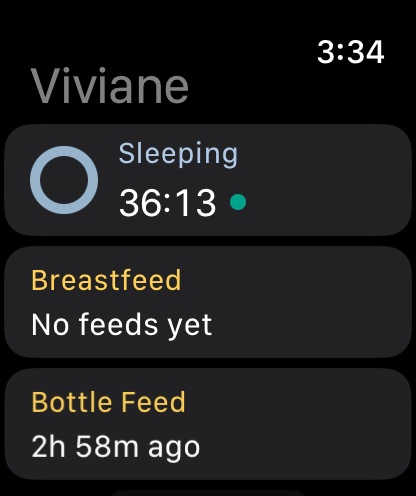
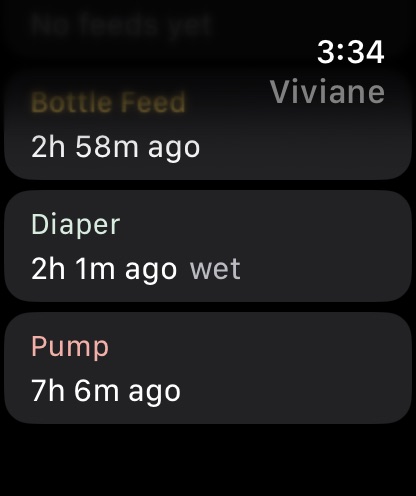
Vivi Baby needs an iPhone with iOS 18 or later and an Apple Watch with watchOS 26 or later. The Watch app shows a list of cards. The feeding cards follow the order of the buttons on the Today screen of your iPhone, and any that are missing there come after.
| Feeding task | On Apple Watch | On iPhone |
|---|---|---|
| Breastfeeding timer, left or right | Yes | Yes |
| Switch side, pause, resume | Yes | Yes |
| Bottle amount | Yes, with the Digital Crown | Yes |
| Bottle contents (breast milk, formula, both) | No | Yes |
| Pump timer | Yes | Yes |
| Pump amounts | No | Yes |
| Solids | No | Yes |
| Combo feed | Can stop one, cannot start one | Yes |
| Edit or delete an entry | No | Yes |
| Time since last feed | Yes | Yes |
Breastfeeding timer with left and right sides
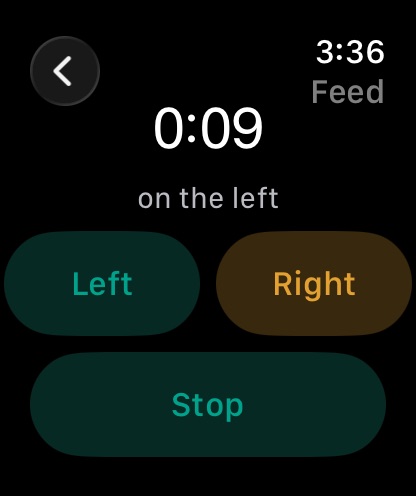
Open the Breastfeed card. You see two buttons, Left and Right.
- Tap Left or Right to start the timer. The screen shows the running time and “on the left” or “on the right”.
- To change breast, tap the other side. The timer keeps running and the side changes.
- To pause, tap the side that is running. Tap it again to resume.
- Tap Stop to save the feed.
The Watch sends the start, the switch and the stop to your iPhone. Each one carries the time it happened on the Watch, so a slow connection does not move the time of the feed. After you stop, the Breastfeed card shows the last side and how long ago it ended.
If a feed was started as a combo feed on the iPhone, the Watch shows that timer. You can switch side, pause it and stop it from the wrist. The Watch cannot start a combo feed.
Bottle amounts with the Digital Crown
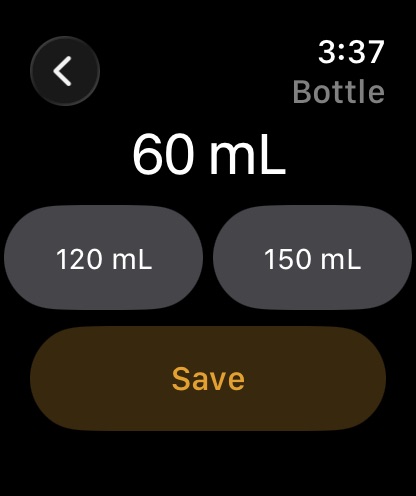
Open the Bottle Feed card. The screen shows an amount that starts at 60 mL.
- Turn the Digital Crown to change the amount. It moves in steps of 5 mL, from 5 mL up to 300 mL.
- Tap Save to log the bottle now.
- Or tap one of up to three buttons under the amount. They show sizes from recent bottle and combo feeds, smallest first, so a repeat bottle takes one tap.
The Watch shows the unit you chose on your iPhone, millilitres or fluid ounces. The amounts are stored in millilitres. In fluid ounces the display shows up to one decimal place.
The Watch does not ask what is in the bottle. It saves the entry with the contents set to Not set. Open the entry on your iPhone to choose breast milk, formula or both, and to add a formula name. To record the contents, add them on the phone.
Pump timer and amounts
Open the Pump card and tap Start. The Watch shows the running time and a Stop button. It also shows a note: “Add the amount on your iPhone.”
The Watch does not take pump amounts. On the iPhone you can enter a total or a left and right amount for the session. The pump timer belongs to the person who started it, so a partner can run a pump timer on their own Watch at the same time.
Time since the last feed
On the Watch, the Bottle Feed card shows how long ago the last feed ended. The Breastfeed card shows the last side and how long ago it ended. The Bottle Feed card counts from your latest breastfeed, bottle or combo feed. The Breastfeed card shows the side of that same latest feed. If the latest feed was a bottle, it has no side, so the Breastfeed card says “No feeds yet” even when you logged breastfeeds earlier. Before the first feed both cards say “No feeds yet”.
On the iPhone, the Today screen shows “Since last feed” with the time and the clock time it happened when the top card follows feeding. Otherwise a “Fed” chip shows how long ago. Tap either to open that entry and edit it.
The Watch shows the last data your iPhone sent. If it looks old, open Vivi Baby on the iPhone once. The Watch also asks the phone for new data each time the app becomes active.
Feed reminders
Feed reminders are set on the iPhone, not on the Watch. One kind of feed reminder counts from the start of the previous breastfeed, bottle or combo feed and repeats after the time you choose. You can also set hours for reminders. Pump reminders count from the start of the previous pump session.
We did not check how reminders show on the Watch, so this page says nothing about it.
How feeds appear for the other caregiver
Feeds you log on the Watch are saved by the iPhone app into the family folder in iCloud Drive. Any caregiver you invited sees them in the app. Invited caregivers can see, add, edit and delete everything in the shared folder. For how two parents work together, see Vivi Baby for couples.
A running breastfeeding timer also shows on the other caregiver’s devices. A small relay run by Vivi carries anonymous timer state so this works. Your baby’s log is not uploaded to Vivi’s servers.
Editing a feed afterwards
The Watch has no edit or delete screen. If you tap the wrong side or save the wrong amount, fix it on the iPhone: open the entry from Today, History or the “Since last feed” line and change the time, the amount, the contents or the notes.
If you are not sure what to log in the first weeks, the newborn tracking guide covers it. Vivi Baby does not give feeding advice, and neither does this page.
Free or paid
Feeding on the Watch is free. So are pumping, History, Trends, sharing with caregivers, widgets and import and export. Vivi Plus adds Sleepy Time, Insights and Checkups. See pricing for the terms. Plus is not needed for anything on this page.
How other apps handle feeding on Apple Watch
Other apps change fast. This table reflects pages read on 2026-09-30. “Not listed” means the page we read does not say.
| App | Apple Watch and feeding, as listed | Plan |
|---|---|---|
| Huckleberry | Its help centre lists sleep, nursing, bottle, pumping, diaper and potty, with timers for sleep, nursing and pumping that sync with the phone in real time. The App Store listing requires watchOS 10.2 or later. | Free tier, Plus and Premium memberships. The Watch app needs Plus or Premium (help centre) |
| Nara Baby | Lists “Apple watch & Siri integration”. Its FAQ lists Siri commands for bottle, breastfeeding (start, pause, restart, stop, switch side) and pumping. A Watch screen for feeding: not listed. | Both paid plans: a 7-day trial, then $9.99 per month or $99.99 lifetime. View and export only without a plan |
| Baby Tracker by Nighp | The App Store listing lists Apple Watch and requires watchOS 10.0 or later. Which feeding actions: not listed. | Free, with in-app purchases (App Store listing) |
| Talli | Apple Watch: not listed. The listing has nursing, pumping, bottle and solids tracking on the phone. | Free, with in-app purchases (App Store listing) |
Huckleberry’s Watch feeding list is close to Vivi’s: nursing, bottle and pumping. Its App Store listing says it needs watchOS 10.2 or later. Vivi needs watchOS 26 or later, so the difference matters if you have an older Watch.
Nara’s page lists Watch and Siri support, but the feeding commands we found are Siri commands. We found no description of a Nara Watch screen for feeding. For a full comparison, see Vivi Baby versus Nara Baby. For a fuller look at Huckleberry, see the Huckleberry alternatives page.
Baby Tracker by Nighp does not list what its Watch app does for feeding, and Talli does not list Apple Watch at all. Both list feeding on the phone. If you use one of them, check its Watch screens in the app before you rely on them.
Where Vivi Baby is weaker on the Watch
- Solids, starting a combo feed and bottle contents are iPhone only.
- Pump amounts need the phone.
- No edit or delete on the Watch.
- Vivi needs watchOS 26 or later and an iPhone with iOS 18 or later. There is no iPad app and no Android app. Huckleberry and Baby Tracker list older watchOS versions.
- The Watch complication opens the app. It does not start a feed.
Get Vivi Baby if you want free feeding logs on your wrist.
Frequently asked questions
Which baby feeding tracker works on Apple Watch?
Several do. Huckleberry's help centre lists nursing, bottle and pumping on its Apple Watch app, which needs a Plus or Premium membership, Baby Tracker by Nighp lists Apple Watch support on the App Store, and Nara Baby lists Apple Watch and Siri integration. Vivi Baby has a Watch app for breastfeeding timers, bottle amounts and pump timers, and feeding is free.
Can I log a bottle on Apple Watch in Vivi Baby?
Yes. Turn the Digital Crown to set the amount, then tap Save, or tap one of up to three recent bottle sizes. The Watch saves the bottle with its contents set to Not set. You can change it to breast milk, formula or both on iPhone.
Can I track breastfeeding on both sides on the Watch?
Yes. Tap Left or Right to start the timer. Tap the other side to switch, tap the running side to pause or resume, and tap Stop to save the feed. Stop also ends a combo feed that you started on the iPhone.
Can I log solids on Apple Watch with Vivi Baby?
No. The Vivi Watch app has cards for breastfeeding, bottles, pumping and diapers, plus sleep. Solids and combo feeds are logged on iPhone.
Do I need Vivi Plus to track feeding on Apple Watch?
No. Feeding, pumping, the Watch app, History and sharing with caregivers are free. Vivi Plus adds Sleepy Time, Insights and Checkups.
Does the Watch need my iPhone nearby?
The Watch sends each entry to the iPhone app, which saves it. If the phone cannot be reached, the Watch shows the entries as waiting to sync and sends them later with the time they happened.