
Baby Tracker for Couples: One Shared Log
Vivi Baby shares one log between phones with iCloud Drive. You invite each caregiver to the family folder, and each person uses their own Apple Account. Everyone sees every entry and running timer, and each entry shows who saved it. It suits couples, grandparents and nannies who all use iPhones. It does not work for a caregiver on Android.
How shared tracking works in Vivi Baby
Vivi Baby has no accounts of its own and no invitation server. Your baby’s log is a set of files in a family folder in your iCloud Drive. Sharing means you give another person’s Apple Account access to that folder with Apple’s own folder sharing. The app then reads and writes the same files on both phones.
Your baby’s log is not uploaded to Vivi’s servers. One small part uses a server. That is the timer relay, described in the live timers section below.
Sharing needs iCloud Drive turned on, on every phone. If it is off, the app tells you. It keeps the log on that iPhone until you sign in to iCloud.
How to create a family
You create a family when you first open Vivi Baby.
- Start a new family and enter your name.
- Enter your baby’s details. The family is named after your baby by default, for example “Ava’s family”. You can change the name, and caregivers you invite will see it.
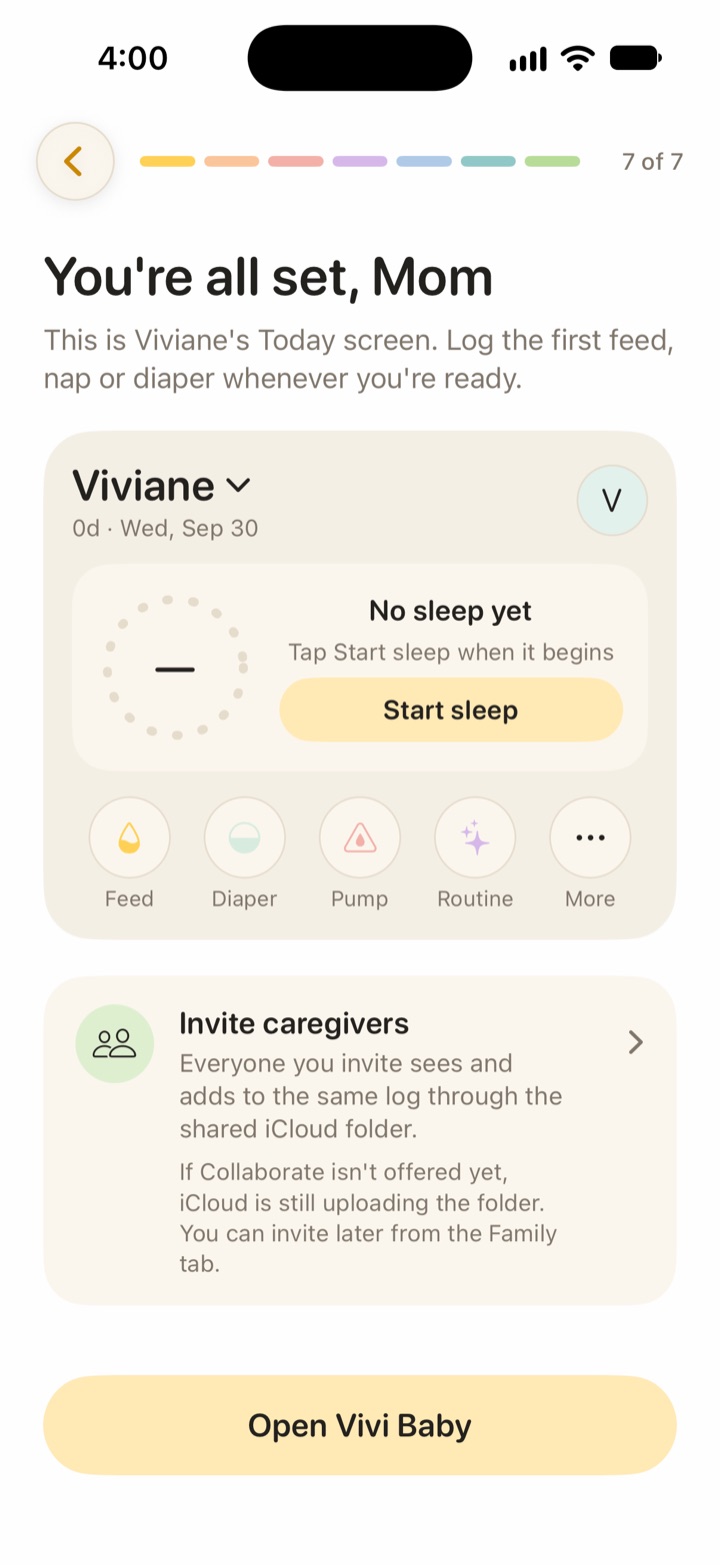
- Finish the last step. The app then offers you the invite screen.
You can also invite later from the Family tab.
How to invite a partner, grandparent or nanny
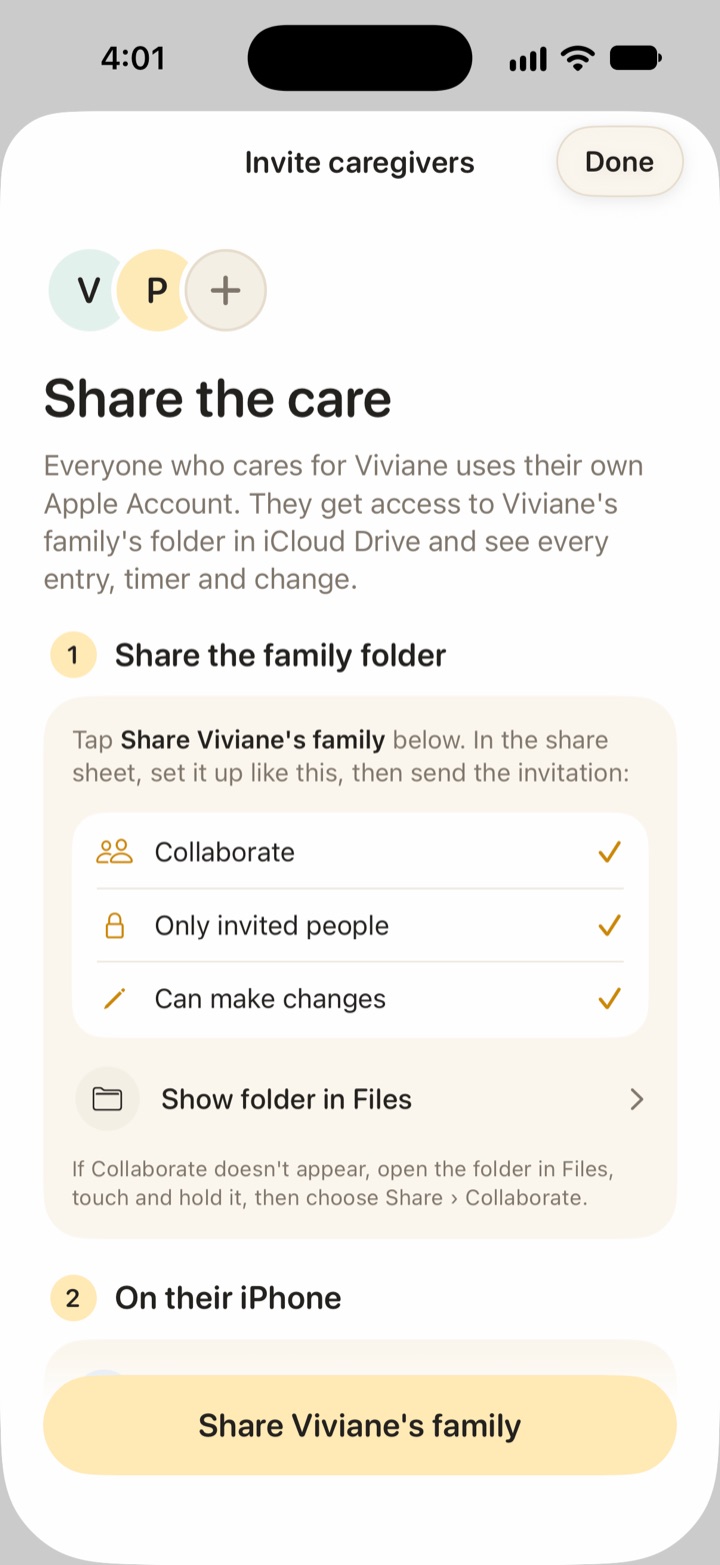
The invite screen is called Invite caregivers. It has two steps and a Share button at the bottom.
- Share the family folder. Tap Share on the family name. In the iOS share sheet, choose Collaborate, choose Only invited people, and choose Can make changes. Then send the invitation by Messages or email. A button opens the folder in Files. If Collaborate does not show, open the folder in Files, touch and hold it, then choose Share, then Collaborate.
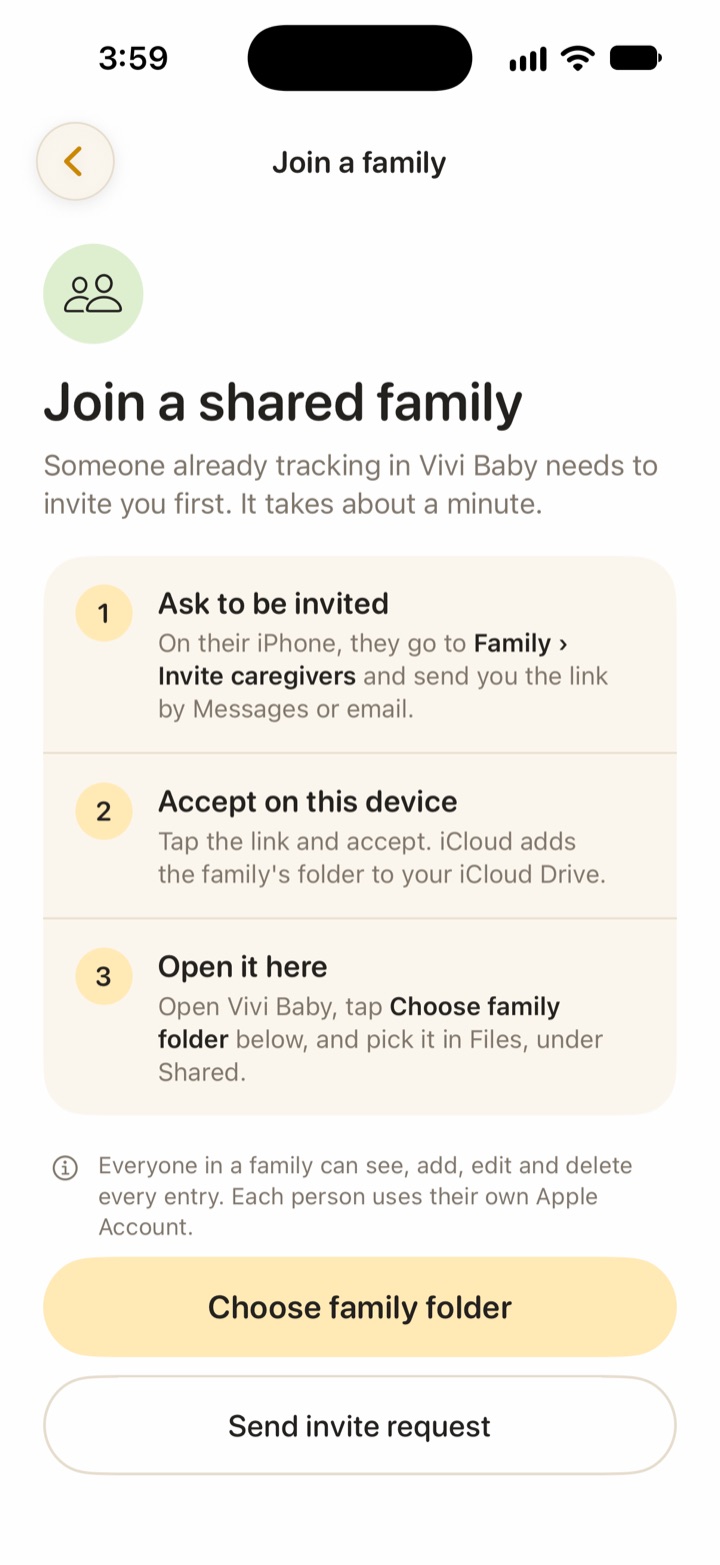
- On their iPhone: they open the invitation and accept it. iCloud adds the folder to their iCloud Drive. They install Vivi Baby, choose Join a shared family, tap Choose family folder and pick the folder under Shared in Files.
If your partner opens the app first, the join screen has a Send invite request button. It sends you a message asking you to invite them.
If Collaborate is not offered right after you create a family, iCloud is probably still uploading the folder. Wait a little, or invite later from the Family tab.
Each person uses their own Apple Account. Nobody shares a password, and there is no Vivi login to give away.
Who saved each entry
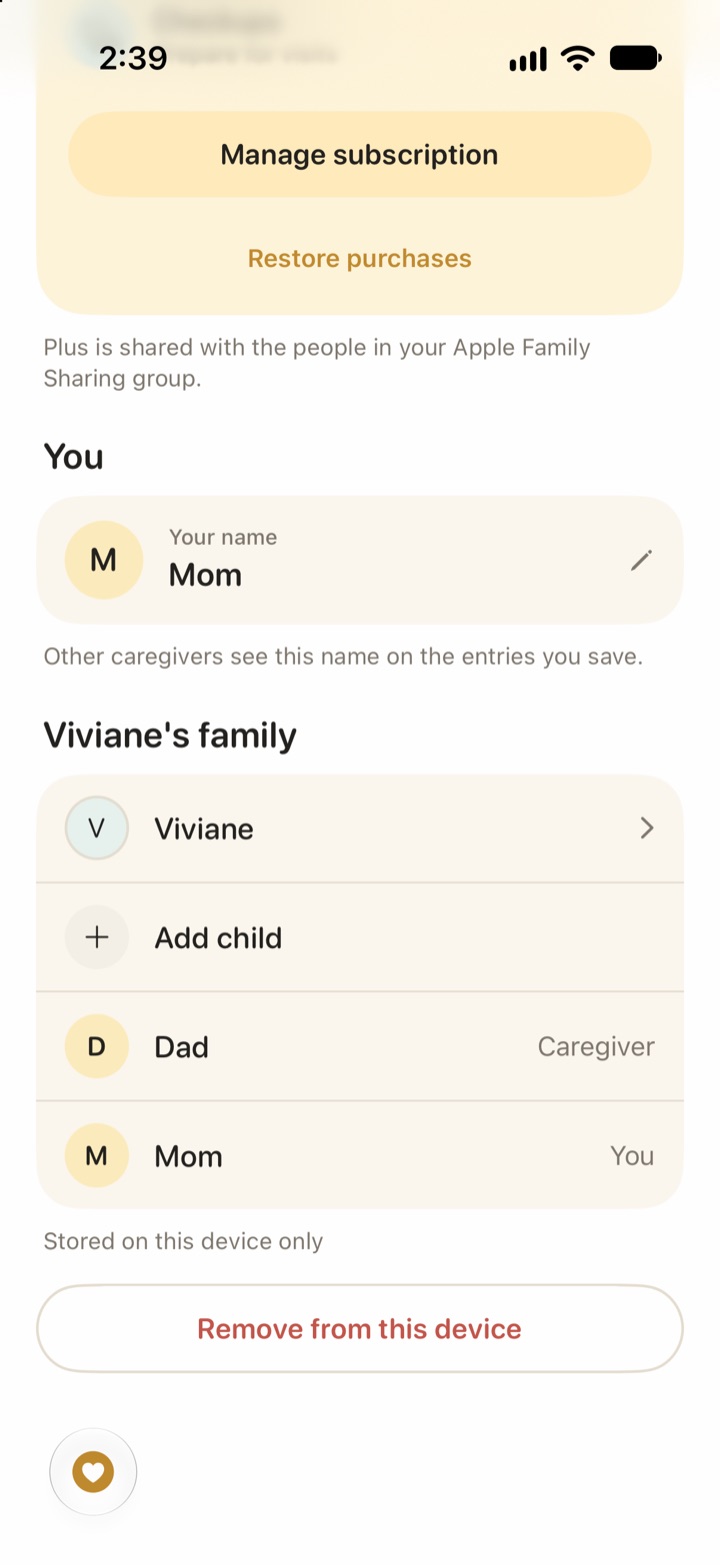
Each person sets a name in the app. Each entry records the caregiver who saved it and shows the name. On a night with two people, you can see who did which feed.
To see how two parents can split the night, read how to share night feeds with your partner.
Live shared timers and Live Activities
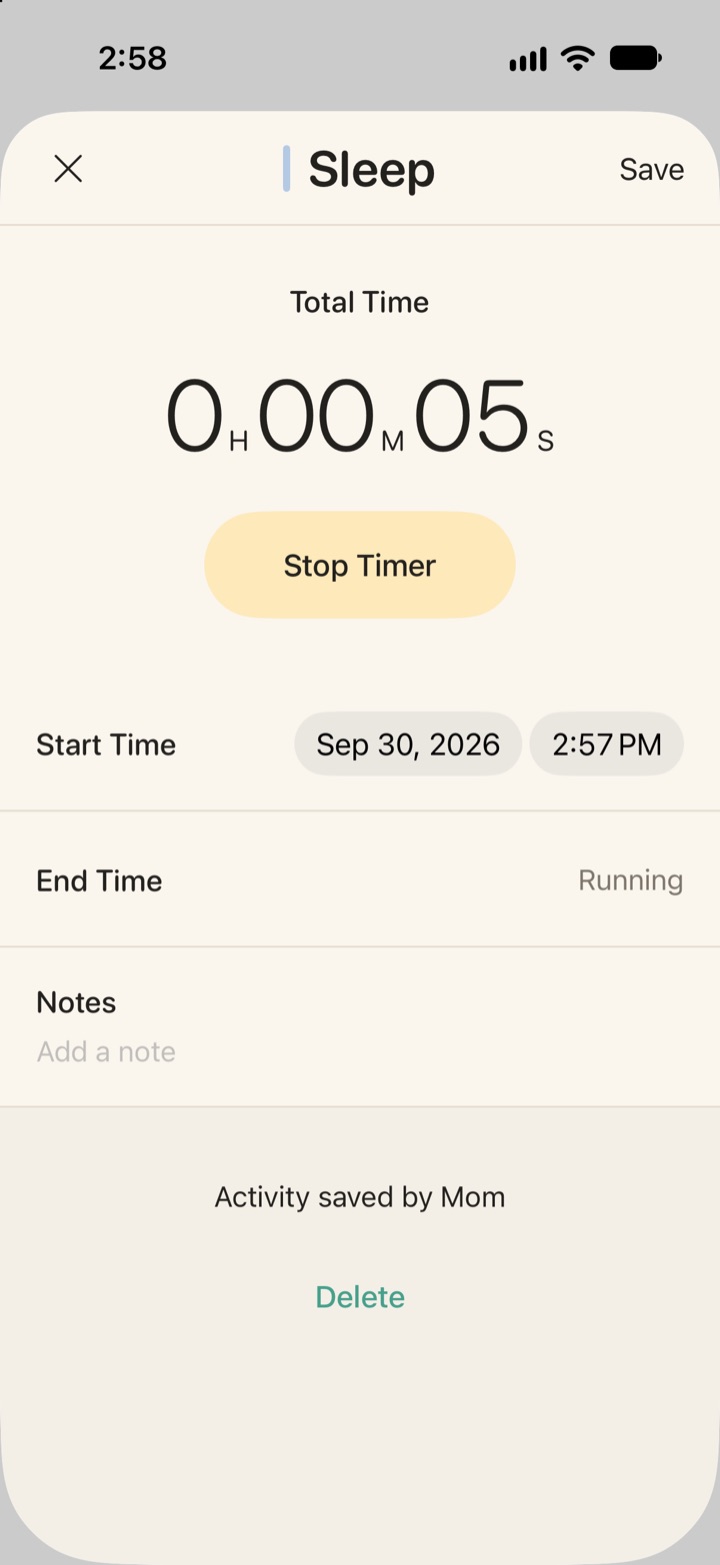
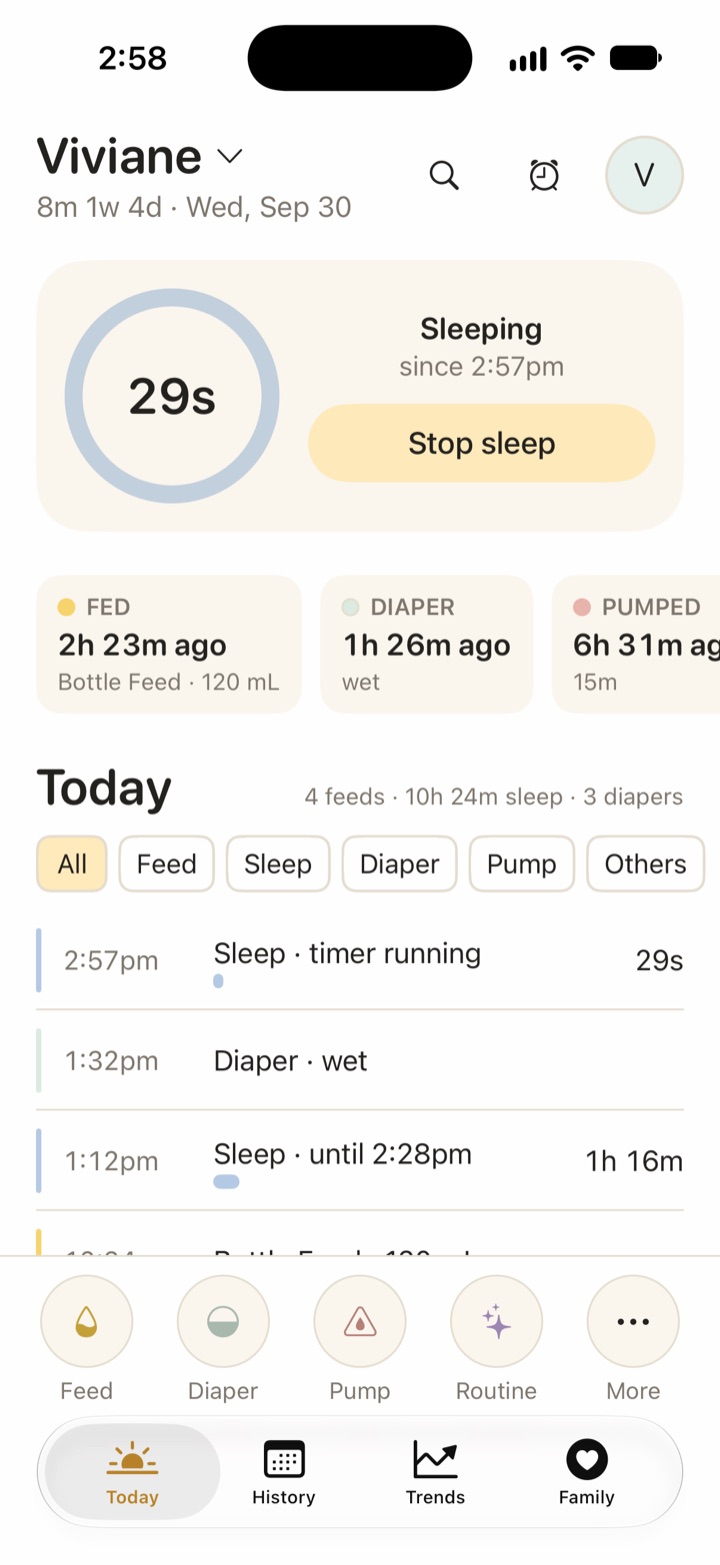
Sleep, breastfeeding and pumping use timers. A timer is a small file in the family folder. One parent can start a sleep timer and the other can stop it. Vivi Baby works out the elapsed time from the start time, so the count stays right if a phone restarts.
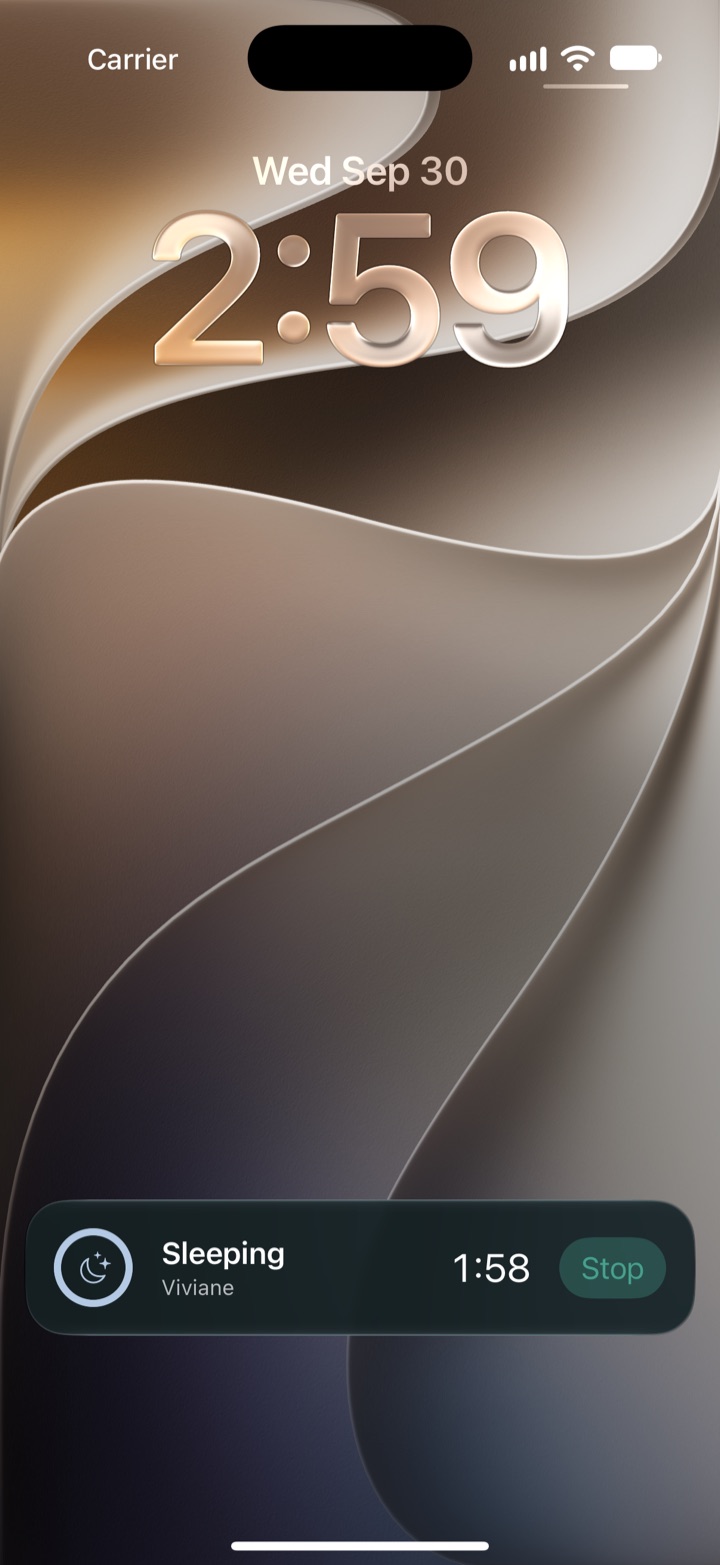
To show a running timer quickly on the other phone, Vivi Baby uses a small relay run by Vivi. The relay carries only timer state: the timer type, start time, paused state, breast side and random ids. It does not carry names, notes, photos, birth dates or measurements. The relay also carries encrypted Live Activity tokens, which let the other phone show a timer on the Lock Screen and in the Dynamic Island.
Live Activities are free. Each person can turn them on or off for each child in Preferences. The Apple Watch app and widgets show the running timer too.
If the relay is not reachable, the timer file still syncs through iCloud. Then the other phone learns about the timer when iCloud syncs and the app opens or refreshes. The speed depends on iCloud and on iOS.
For more on privacy, read the private baby tracker page.
Offline logging and sync
You can log with no signal. Vivi Baby writes each entry to the local iCloud Drive copy on the phone right away. iCloud uploads it when the phone is online again, and the other phone downloads it. The app does not keep a separate queue.
iCloud decides when changes arrive, not the app. Vivi Baby gives no fixed time.
What happens if two people log the same thing
Two people can act on the same item at the same time. Vivi Baby handles it like this:
- If both stop the same timer, the app keeps the earliest stop time and merges the notes, so a late stop cannot overwrite an early one.
- If both start a timer of the same kind for the same child while offline, the timer with the oldest start is kept after sync. The other shows on Today in a banner that says a second timer is running. Someone saves it as an entry or discards it.
- If both edit the same entry, the newest edit wins for most fields. Notes are kept and photos from both edits are joined.
- Nothing is dropped without a copy. When iCloud reports two versions of a file, the app saves the version it did not use in a
.trash/conflictsfolder inside the family folder.
Two separate entries that look alike are different. The app does not check for near-identical entries when you log by hand, so it keeps both. Delete the extra one.
What invited caregivers can see and change
A caregiver can see everything in the family folder. They can add, edit and delete every entry, child and record. Vivi Baby has no roles and no view-only access. Invite only people you trust with the whole log.
How to remove a caregiver
Removal has two parts, because iCloud owns the folder sharing.
- Open the family folder in Files, open its sharing options and remove the person.
- In Vivi Baby, open the Family tab and tap their name. Choose to mark them removed and reset timer access. Their device then stops showing live timers.
Their past entries stay in the family history. Their name moves to a Former caregiver row.
A caregiver who wants to leave can remove the family from their own device.
Several children in one family
Add another child in the Family tab. The fields are the same as in onboarding. Everyone you invited sees all the children in the family folder. The app has a child switcher. You can turn Live Activities on for each child. If someone belongs to more than one family, the switcher groups children by family.
Vivi Plus and families
Logging, History, Trends, search, sharing, timers, Apple Watch, widgets and Live Activities are free. Vivi Plus adds Sleepy Time, Insights and Checkups.
Vivi Plus supports Apple Family Sharing. One subscription covers your Apple Family Sharing group. Plans cost $4.99 per month or $44.99 per year, and the 14-day free trial starts only when a parent opens a Plus feature and chooses it.
A nanny or grandparent outside your Family Sharing group can log for free. They need their own subscription only if they want the Plus features on their phone. See pricing for the terms.
How other apps share
The facts below come from each app’s own pages, checked on 2026-09-30. “Not listed” means the official pages we read do not say. “Not checked” means we could not open the source.
| Vivi Baby | Huckleberry | Nara Baby | Baby Tracker (Nighp) | Talli | |
|---|---|---|---|---|---|
| How you share | iCloud Drive folder sharing | Not checked | Invite from the Family tab by email | Sync group made with an email and password | Invite from More, Account Sharing |
| Account needed | Your own Apple Account | Not checked | Each person creates an account | Sync group login | Same email as the invite |
| Platforms | iPhone, Apple Watch | iOS and Android | iOS and Android | iOS and Android in one sync group | Not listed |
| Caregiver access | Everything in the folder | Each person signs in to the same account | Full access | Not listed | “See/manage everything”, roles not listed |
| Removing a caregiver | Two steps: Files, then the Family tab | Not listed | The account that created the family removes them in the Family tab | Not listed | Not listed |
| Extra cost to share | None | Sync is in the free plan (pricing page) | One payment covers the caregiver circle | Basic sync is in the free version | Not listed |
Notes on each app:
- Huckleberry: its help centre says to sign in to your account on your partner’s phone. The app then syncs across devices while both are online, and an out-of-date app or a phone in low-power mode can stop syncing. That article was several years old, so check that it still matches the app. See also Vivi vs Huckleberry.
- Nara Baby: invitations go by email from the Family tab, and the invited person needs an account. Nara says caregivers get full access, that one payment covers everyone you invite, and that the account that created the family can remove others. That one payment is now required: after a 7-day trial Nara costs $9.99 a month or $99.99 lifetime, and without a plan the family can only view and export. See what Nara Baby costs now and Vivi vs Nara Baby.
- Baby Tracker by Nighp: devices join a sync group. Nighp says it tested up to 4 devices in one group. iOS and Android can join the same group. Its iCloud and Dropbox options are for backup, not sync. It says in-app purchases do not work with Apple Family Sharing, so its Pro app must be bought directly.
- Talli: the account owner invites caregivers by email, and the invited person must use that same email. Talli says all invited caregivers can see and manage shared data in real time. Its FAQ does not list roles or a limit on caregivers.
Other apps do better here: Baby Tracker and Nara Baby work on iPhone and Android, and Baby Tracker syncs between them. Vivi Baby needs an iPhone (iOS 18 or later) and iCloud Drive for every caregiver who logs.
Frequently asked questions
Can my partner and I use the same baby tracker on two phones?
Yes. In Vivi Baby you share the family folder in iCloud Drive with your partner. They install the app, choose Join a shared family and pick the folder. Each of you uses your own Apple Account.
Does my nanny need a Vivi Baby subscription?
No. Logging, History, Trends and sharing are free. Someone outside your Apple Family Sharing group needs their own subscription only if they want the Vivi Plus features.
Can my partner see what I log while we are in different places?
Yes. Entries save to the shared iCloud folder and appear on the other phone after iCloud syncs. Running timers also show on the other phone, and the app can start a Live Activity there.
What can an invited caregiver see and change in Vivi Baby?
Everything in the family folder. They can see, add, edit and delete every entry. Vivi Baby has no roles and no limited access.
How do I remove a caregiver in Vivi Baby?
Remove them from the folder's sharing options in Files, then mark them removed in the Family tab and reset timer access. Their past entries stay in the family history.
Does Vivi Baby work for more than one child?
Yes. Add each child in the Family tab. Everyone invited to the family folder sees all the children in it.