
Private Baby Tracker: Where Your Data Lives
Vivi Baby keeps your baby’s log as plain files in your own iCloud Drive. It has no account, no ads and no tracking. Your baby’s log is not uploaded to Vivi’s servers. There is one exception: a small relay run by Vivi carries anonymous timer state so a running timer shows on other phones. This page lists what it sees.
Vivi Baby runs on iPhone with iOS 18 or later, and on Apple Watch with watchOS 26 or later.
Where your baby’s data lives
Vivi stores each family as a folder named “Vivi Baby” in your iCloud Drive. Inside it:
- Entries (feeds, sleep, diapers, pumping, growth, health, vaccines, teeth, firsts, journal, routines) are Markdown files with YAML front matter.
- Settings are YAML files.
- Photos are HEIC images. Vivi resizes them and removes location (GPS) and other EXIF metadata before saving.
You can open all of it in the Files app or in any text editor, with or without Vivi. No database locks the files to one app.
Each device also keeps a local index of your entries so History, Trends and search are fast. It is a cache built from the files. It stays on that device. Deleting the app removes it.
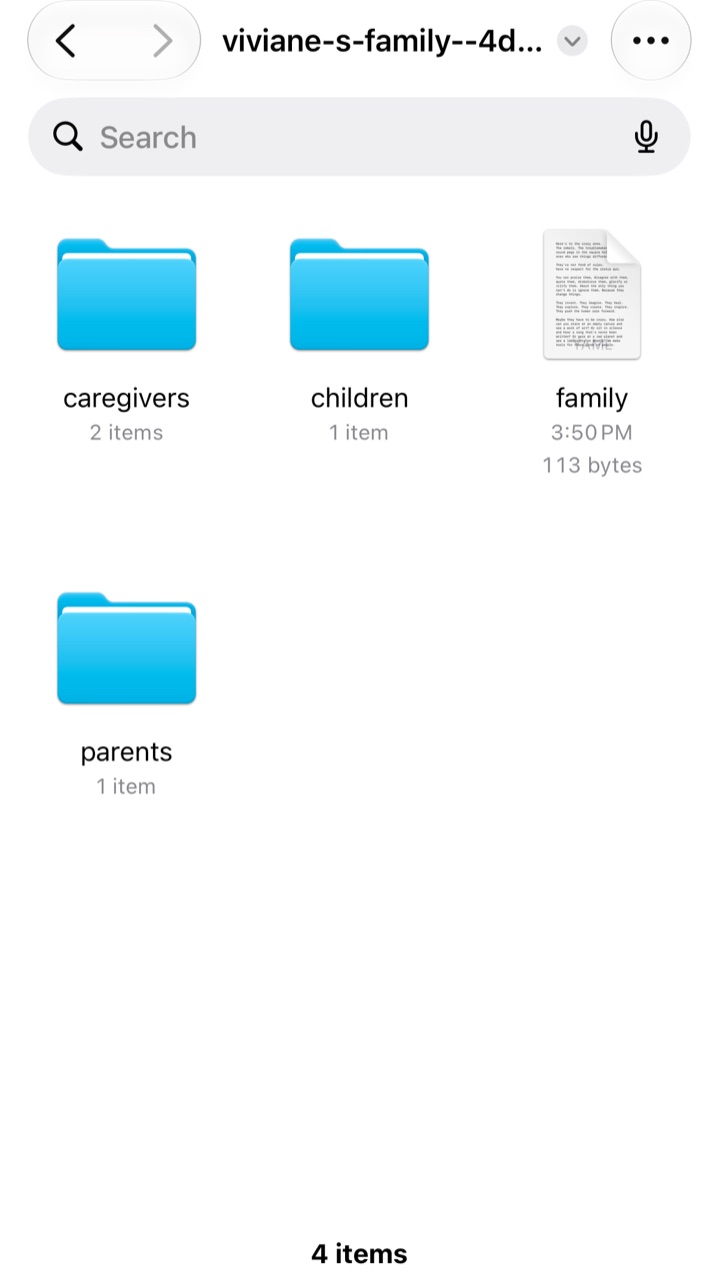
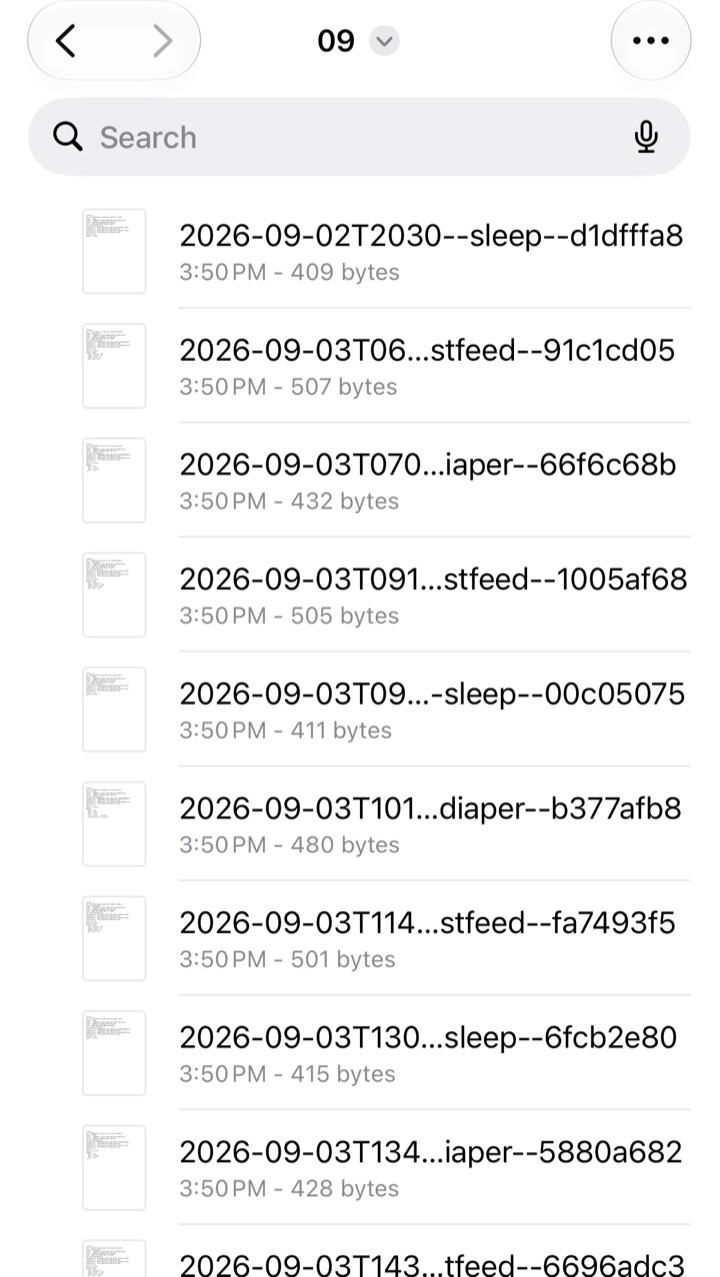
A demo family opened in the Files app. On your iPhone, the same folders sit in iCloud Drive, in a folder named Vivi Baby.
Who can read it
Only you and the caregivers you invite can read your baby’s log. Apple’s iCloud stores the files and handles the sharing. Vivi does not run a service that receives, stores or processes your entries, and it cannot list, read or recover anything in your iCloud Drive.
Your Apple Account and your iCloud settings protect the files in iCloud. This includes Advanced Data Protection if you turn it on. Apple’s own policy governs that storage. See Apple’s iCloud security overview.
No account, no ads, no tracking
- No Vivi account. There is no sign-up, password or profile. Vivi uses the Apple Account already on your iPhone through iCloud Drive and never receives its name, email or identifier. The page on a baby tracker with no account covers what that means day to day.
- No ads. The app contains no advertising code and no advertising identifier.
- No tracking. Vivi does not link your data with other companies’ data for advertising, and does not share it with data brokers.
Vivi Plus is bought through Apple. The developer receives no name, email or payment details. The app asks StoreKit on your device whether you have Plus and keeps the answer on the device.
The one exception: the timer relay
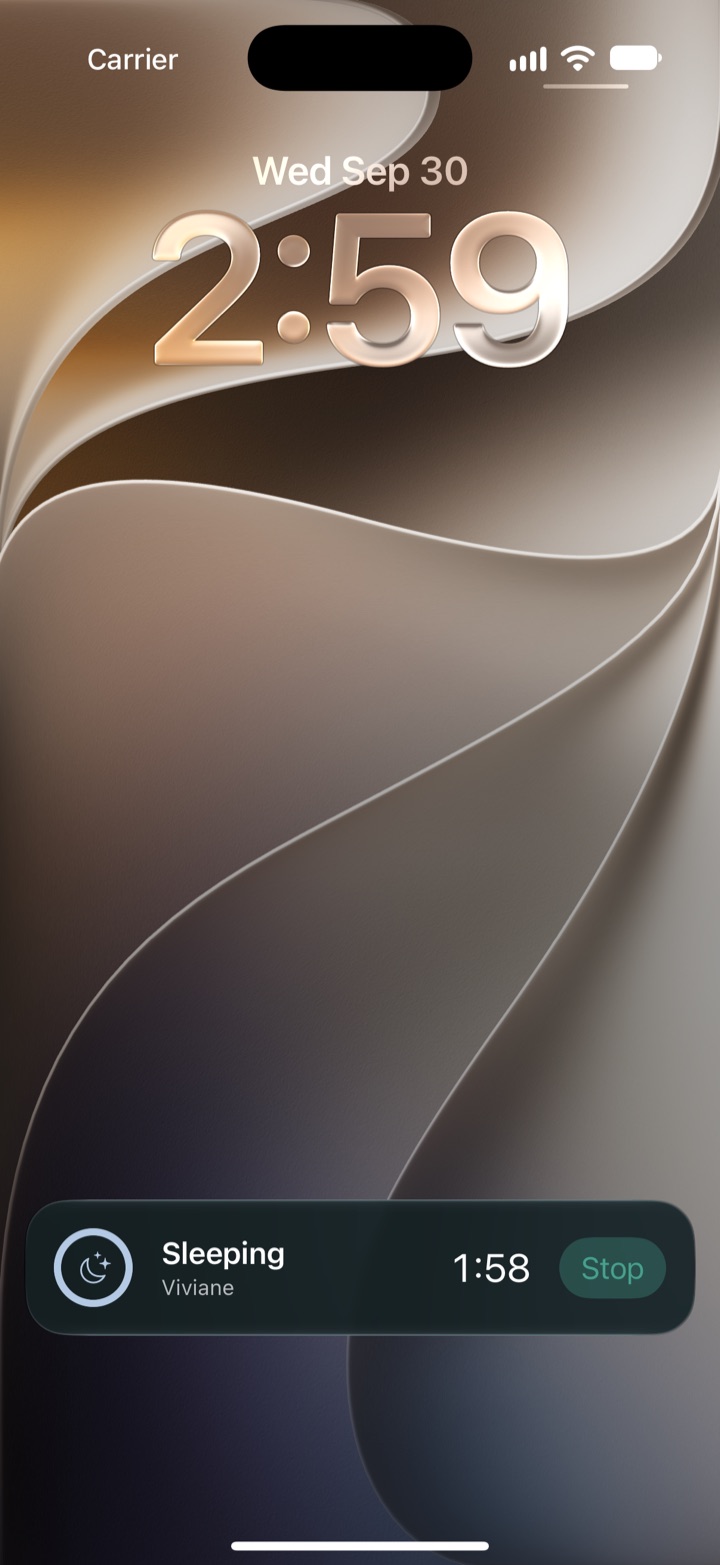
When you start a sleep or feed timer on one phone, Vivi can show it on the other caregiver’s Lock Screen. To do that, the app talks to a small relay server that Vivi runs on Cloudflare Workers. The app talks to no other Vivi server. The relay does not hold a copy of your baby’s log.
What the relay sees:
- The state of a running timer: whether it is a sleep, breastfeed, combo or pump timer, its start time, the side, whether it is paused, and when it stopped.
- Random IDs for your family’s timer channel, each timer, child and caregiver. The app makes them up, and they are not linked to your name or Apple Account.
- Hashed credentials for each device in the family, so only your family’s devices can read your channel.
- Live Activity push tokens issued by Apple. The relay stores them encrypted, so it can ask Apple’s push service to update a timer on the other phones.
What the relay never sees: names, notes, photos, measurements, entry history, iCloud file locations or Apple Account identifiers.
How long it keeps things:
- A running timer’s live state is removed when the timer ends, and expires after 48 hours at most.
- Records of stopped timers are kept for seven days, so every device settles on the same result.
- A device’s membership expires after 90 days without contact.
- Request logging is off. Cloudflare may keep backup copies of stored data for up to 30 days, and like any host it sees the IP address that connects to it.
If the relay is down, timers still sync through iCloud Drive, only more slowly.
What the website tracks
This website has analytics. vivibaby.app is a static website hosted by Cloudflare. It has no advertising scripts. It uses two analytics services: GoatCounter, which counts page views without cookies, and Google Analytics, which sets cookies and records the pages you view, your approximate location, and your device and browser type. Cloudflare processes your IP address to deliver pages and block abuse. This is separate from the app. The privacy policy has the full text.
What invited caregivers can see
When you invite a caregiver, iOS shares your family folder with their Apple Account through iCloud collaboration. They can see, add, edit and delete everything in that folder: entries, children’s details, notes and photos. Vivi has no roles and no limited access. Each entry records which caregiver saved it, using the name they chose in the app.
Invite only people you trust with the whole log. For sharing with a partner, see Vivi Baby for couples.
To stop sharing, remove the person from the shared folder in the Files app, then reset shared timer access in Vivi. Do the reset. Removing someone in Files alone cannot revoke a relay access they already hold.
If you stop using Vivi
Your files stay in your iCloud Drive without the app.
- Open the files. Copy the Vivi Baby folder out of iCloud Drive. Markdown and YAML open in any text editor.
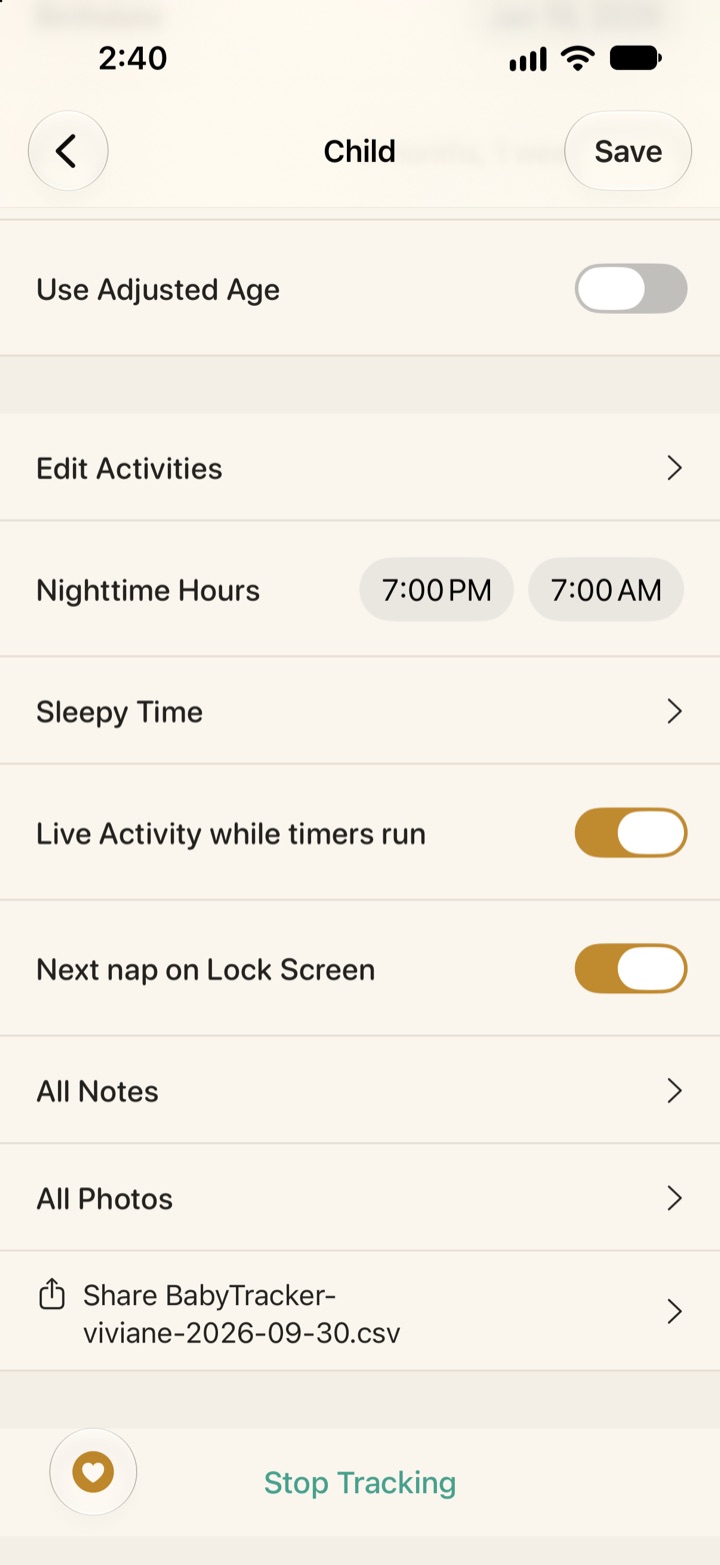
- Export a CSV. Export a CSV for each child from the app. It opens in any spreadsheet. The layout follows Nara Baby’s CSV format, with extra columns for things Nara does not have, so it round-trips through Vivi’s importer.
- Delete an entry. Deleting it in the app removes the file on every device in the family.
- Delete everything. Delete the Vivi Baby folder in iCloud Drive and remove the app. Caregivers you shared with lose access when the folder is deleted.
Vivi holds no copy of your log, so there is no account to close and no deletion request to send about it.
How other trackers describe their data handling
Each tracker makes its own choices. These facts come from each company’s own privacy policy on 2026-09-30. Policies change, so read the current version before you decide. Quotes are short and exact.
| App | What its policy says |
|---|---|
| Huckleberry | Policy last updated December 9, 2025 (per Huckleberry’s site). You can request deletion of your personal information, though it says it may be required to keep some. It also says it may partner with third parties, such as Google, Microsoft or Facebook, to place its advertising on other sites. |
| Nara Baby | Nara’s policy (last updated August 25, 2025) covers the app. It lists account data, device and IP data, and web analytics. It says advertising partners may receive “Contact Data, Device/IP Data, Web Analytics”. Deletion is by request. Nara Baby isn’t free anymore: a 7-day trial, then $9.99 per month or $99.99 lifetime. Without a plan you can only view and export. |
| Baby Tracker by Nighp | Says it “will not obtain your personal information” if you do not use sync. With its own server sync it may obtain the baby’s name, email, birth date, records and photos. With iCloud or Dropbox sync, it says iCloud or Dropbox may collect information. It lists ad partners such as AdMob. |
| Talli Baby | Says you must be an adult account holder. Data includes name, email and child’s name and birthday. Lists Google Analytics, and says health and baby tracking data is not shared with analytics or advertising providers. You can delete entries or request account deletion. |
This table does not accuse anyone. A company can hold your data on its servers and handle it carefully. Many parents want the cloud features that come with that, such as sync across platforms. Vivi does not work on Android. The difference is where the data sits and how many parties handle it.
For more, see Vivi Baby vs Huckleberry and Vivi Baby vs Nara Baby. If you are leaving Nara Baby, see moving from Nara Baby for how to move your data.
What to ask of any baby tracker
Use this list on any app, including Vivi. Look for the answers in the app’s privacy policy or help pages.
- Account. Do I need an account? What does it hold: my name, email, my child’s name and birth date?
- Servers. Are my entries stored on the company’s servers, or in storage I own? Who at the company can read them?
- Ads. Does the app or its policy allow advertising partners? What do they receive?
- Export. Can I get every entry out in an open format, without asking support?
- Deletion. How do I delete one entry, all entries, and my account? What does the company keep afterward?
Also ask who can see the log when you share it. In Vivi, every invited caregiver sees the whole folder.
Vivi’s short answers: no account. Your log is in your iCloud Drive, not on Vivi’s servers. No ads. No tracking. Export as files or CSV. Delete by deleting the folder. The timer relay described above is the exception.
Limits of this design
- Sync and sharing depend on iCloud. You need iCloud Drive and enough iCloud storage to sync and share. Without iCloud Drive, Vivi keeps the log on that iPhone only. Sharing works between Apple Accounts. There is no Android app.
- No fine-grained sharing. An invited caregiver sees everything in the family folder.
- The relay is a real server. It sees the anonymous timer state described above, and Cloudflare sees connecting IP addresses.
- Apple is still in the chain. iCloud stores and syncs the files under Apple’s terms. Vivi cannot promise anything about Apple’s systems.
- Not a security guarantee. Anyone with your unlocked phone can open the app. Widgets and Live Activities show details such as time since the last feed on the Home Screen and Lock Screen. You can turn them off in iOS Settings.
To learn what to log in the first weeks, see what to track in the newborn weeks.
Frequently asked questions
Is Vivi Baby a private baby tracker?
Your baby's log is stored as files in your own iCloud Drive and is not uploaded to Vivi's servers. The app has no account, no ads and no tracking. One small relay run by Vivi carries anonymous timer state so a running timer shows on other phones.
Can Vivi Baby or its developer read my baby's entries?
No. Entries live in your iCloud Drive, and Vivi has no access to it. Apple's privacy policy and your iCloud settings govern what is stored there.
What does the Vivi timer relay see?
It sees anonymous timer state (the timer kind, start time, side and paused state, under random IDs) and Live Activity push tokens, which it stores encrypted. It never receives names, notes, photos, measurements or entry history.
What happens to my baby's data if I stop using Vivi Baby?
The files stay in the Vivi Baby folder in your iCloud Drive. You can open them in the Files app or any text editor, copy them, or export a CSV for each child from the app.
What can an invited caregiver see in Vivi Baby?
Everything in the shared family folder. They can see, add, edit and delete entries, children's details, notes and photos.
What should I ask before choosing any baby tracker?
Ask whether it needs an account, whether your entries sit on the company's servers, whether it shows ads, whether you can export everything, and how deletion works. The checklist on this page has all five.