
Vivi Baby vs Nara Baby (Nara Isn't Free Anymore)
Nara Baby is no longer free. After a 7-day trial it costs $9.99 a month or $99.99 lifetime, and without a plan you can only view and export your data. Logging in Vivi Baby is free. Both apps track feeds, sleep and diapers and let several caregivers log for one baby. Nara Baby suits families on Android or a mix of phones, and parents who want its age-based sleep and feeding guides. Vivi Baby suits families on iPhone who want free logging, no account and a log in their own iCloud Drive.
Quick comparison
| Vivi Baby | Nara Baby | |
|---|---|---|
| Platforms | iPhone (iOS 18 or later), Apple Watch (watchOS 26 or later) | iOS and Android; App Store lists iPhone, iPad, Mac, Apple Vision and Apple Watch |
| Cost to log | Free | 7-day trial, then a paid plan to add entries |
| Paid plans | Vivi Plus: $4.99 per month or $44.99 per year for Sleepy Time, Insights and Checkups | $9.99 per month or $99.99 lifetime per Nara’s FAQ; the App Store lists a range of prices |
| Trial | 14-day free trial, for Plus features only | 7 days, full access, starts at your first log |
| After the trial | Logging stays free | View and export only |
| Caregivers | Free, unlimited sharing through iCloud | One plan covers all invited caregivers |
| Account | None | Email and password |
| Data storage | Files in your family’s iCloud Drive | Nara says its services are hosted in the United States |
| Apple Watch | Watch app and complications | Apple Watch and Siri integration |
| Export | CSV per child, in Nara’s column layout | CSV |
| Import | Nara Baby, Huckleberry and Baby Tracker CSV files | Not listed on Nara’s pages |
What Vivi Baby does better
Feeds, sleep, diapers, pumping, growth, health, vaccines, teeth, firsts, journal and routines are free. There is no trial limit and no paywall. Vivi Plus adds only Sleepy Time, Insights and Checkups. See Vivi Baby pricing.
There is no account. You do not make an email login. Your baby’s entries are Markdown files, plus photos, in your family’s own iCloud Drive.
Your baby’s log is not uploaded to Vivi’s servers. The app has no ads and no tracking. One small exception: a relay run by Vivi carries anonymous timer state and encrypted Live Activity tokens, so a running timer shows on other devices.
You can bring a Nara CSV export into Vivi Baby, and Vivi can export in Nara’s column layout. Details are in the import section below.
Vivi has a status widget, a timer widget and Live Activity timers on the iPhone. The Watch app shows the last feed, last diaper and running timers.
What Nara Baby does better
Nara Baby runs on iOS and Android, and its App Store listing also shows iPad, Mac and Apple Vision. Vivi Baby has no Android app and no iPad app. If one parent uses Android, Nara works for both and Vivi does not.
Nara’s pages list pregnancy tracking, postpartum recovery and mood logging. Vivi Baby tracks the baby only.
Nara’s app page says it includes sleep and feeding guides that follow AAP and CDC guidance. Vivi Baby has no guide library.
A caregiver joins Nara with the email address that received the invitation, and one paid plan covers everyone. In Vivi, family sharing works through iCloud, so caregivers need an Apple device.
Pricing
Nara Baby has a 7-day free trial with full access. The trial starts when you log your first entry, and you do not need a payment method. When it ends you are not charged unless you choose a plan. Nara’s FAQ lists $9.99 per month or $99.99 once for a lifetime plan that covers future children. The App Store listing shows a range of prices, so check the price at checkout. For the full plan details, see is Nara Baby still free?. We also compare Nara Baby with Huckleberry directly.
After the trial, the app becomes read-only for everyone in the family. You can view and export what you logged. You cannot add new entries until someone subscribes. One payment covers every invited caregiver, and Nara says both plans have the same features.
Vivi Baby logging is free. Vivi Plus costs $4.99 per month or $44.99 per year, and adds Sleepy Time, Insights and Checkups. The 14-day free trial starts only when a parent opens a Plus feature and chooses it. Vivi Plus supports Apple Family Sharing, so one subscription covers your Apple Family Sharing group. Someone outside that group logs for free and needs their own subscription only for Plus features.
Which costs less depends on what you need. If you only want to log, Vivi costs nothing. If you want pregnancy tracking or Android support, Nara has those. See the full Vivi pricing page for terms.
Privacy and data storage
Vivi Baby writes your baby’s entries as Markdown files with YAML front matter, plus photos, into your family’s iCloud Drive. There is no Vivi account. Your baby’s log is not uploaded to Vivi’s servers. The exception is the anonymous timer relay described above. For a longer explanation, read about the private baby tracker and about a baby tracker with no account.
Nara’s privacy policy says its services are hosted and operated in the United States. The policy names ad networks, marketing providers, analytics vendors and retargeting cookies. It covers Nara’s services in general, so it does not show which parts apply to the app and which to the website. The App Store listing lists contact information, usage data and analytics data. Read Nara’s policy if this matters to you.
The policy also says that other people on a shared account can access and export certain data you add to it.
What each app says about your data
| Vivi Baby | Nara Baby | |
|---|---|---|
| What is collected | No account. The baby’s log stays in your iCloud Drive and Vivi cannot see it. The timer relay holds anonymous timer state. | Policy: contact data, payment data, device and IP data, web analytics, purchase history, and photos or videos you upload. App Store label: email, name, user ID, photos and videos, crash and performance data, and usage data. |
| Advertising and analytics | No ads. No tracking. | Policy: names Google Analytics and says “ad networks”, “data brokers” and “marketing providers” help with advertising. App Store label: usage data is listed under “Data Used to Track You”. |
| Sale or sharing | We do not sell or share your baby’s log. We cannot: it is in your iCloud Drive and we have no access to it. | Policy: “We do not ‘sell’ your Personal Data for monetary consideration.” It also says that giving data to third parties for targeted advertising “may be deemed a ‘sale’ or a ‘share’” under some U.S. state laws, and offers an opt-out. |
| Deletion | Delete the files in your iCloud Drive. The relay keeps only anonymous timer state, and timers expire after 48 hours. | Policy: send a request to hello@nara.com or call 1-877-GOT-NARA. |
| Policy date | Not applicable | Effective 08/25/2025 |
Sources: Nara’s privacy policy and its App Store privacy label, both read on 2026-10-01. The policy says it covers the Nara website and mobile app, in its words “our Services”. The label is what Nara reported to Apple. Nara can change either page, so check them before you decide.
Apple Watch
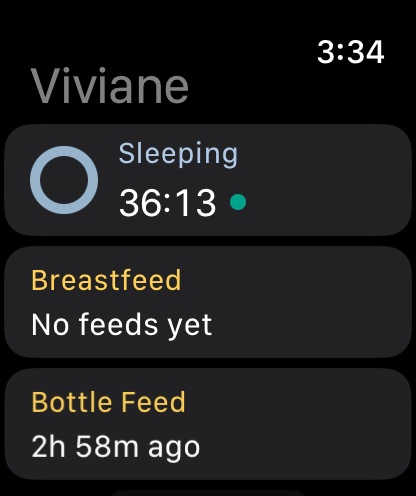
Vivi Baby has a Watch app for watchOS 26 or later. It shows the last feed, last diaper and running sleep or feeding timers, and it has a Watch complication. Siri understands phrases such as “Log a diaper in Vivi Baby” and “Start sleep in Vivi Baby”.
Nara Baby lists Apple Watch integration, Siri and Live Activity timers. Nara’s pages do not describe its Watch features in detail, so a screen-by-screen comparison is not possible. For more on Vivi’s side, see baby tracker apps for Apple Watch.
Sleep tracking and predictions
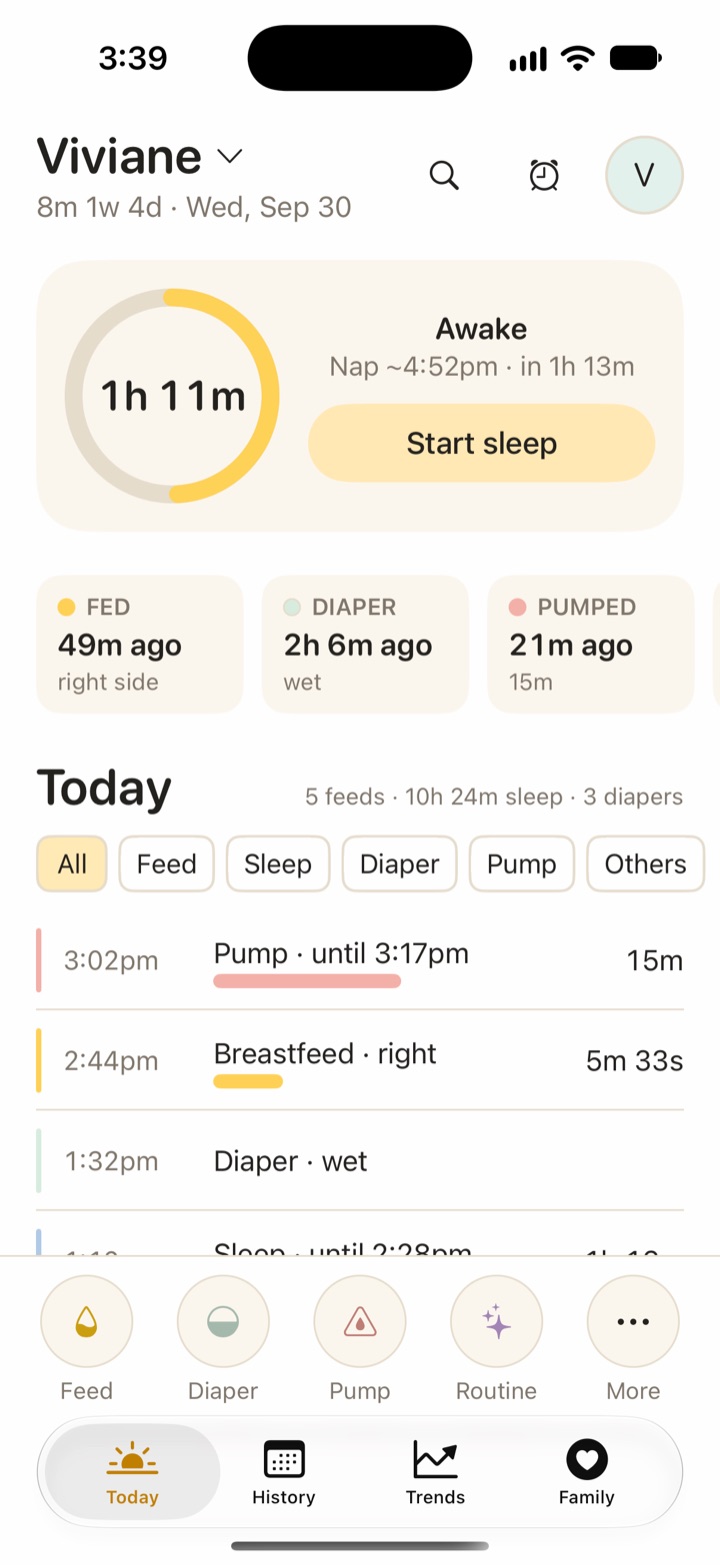
Both apps log naps and night sleep with timers. Vivi Plus adds Sleepy Time, an estimate of the next nap and bedtime. Sleepy Time is a set of rules that run on your device. It is not AI, and its wake-window values are not published by any medical body. Treat it as an estimate and a likely time, not a promise about how your baby will sleep.
Nara’s pages list sleep timers, wake window tracking and age-based sleep guides. They do not list a nap or bedtime prediction.
Family sharing
In Nara, you invite caregivers by email. They create an account and join with the same email address, and the invitation appears under Account, then Family. Nara says invited caregivers get full access and that one paid plan covers them all. Nara’s app page mentions privacy controls for caregivers. The pages do not explain roles or limits.
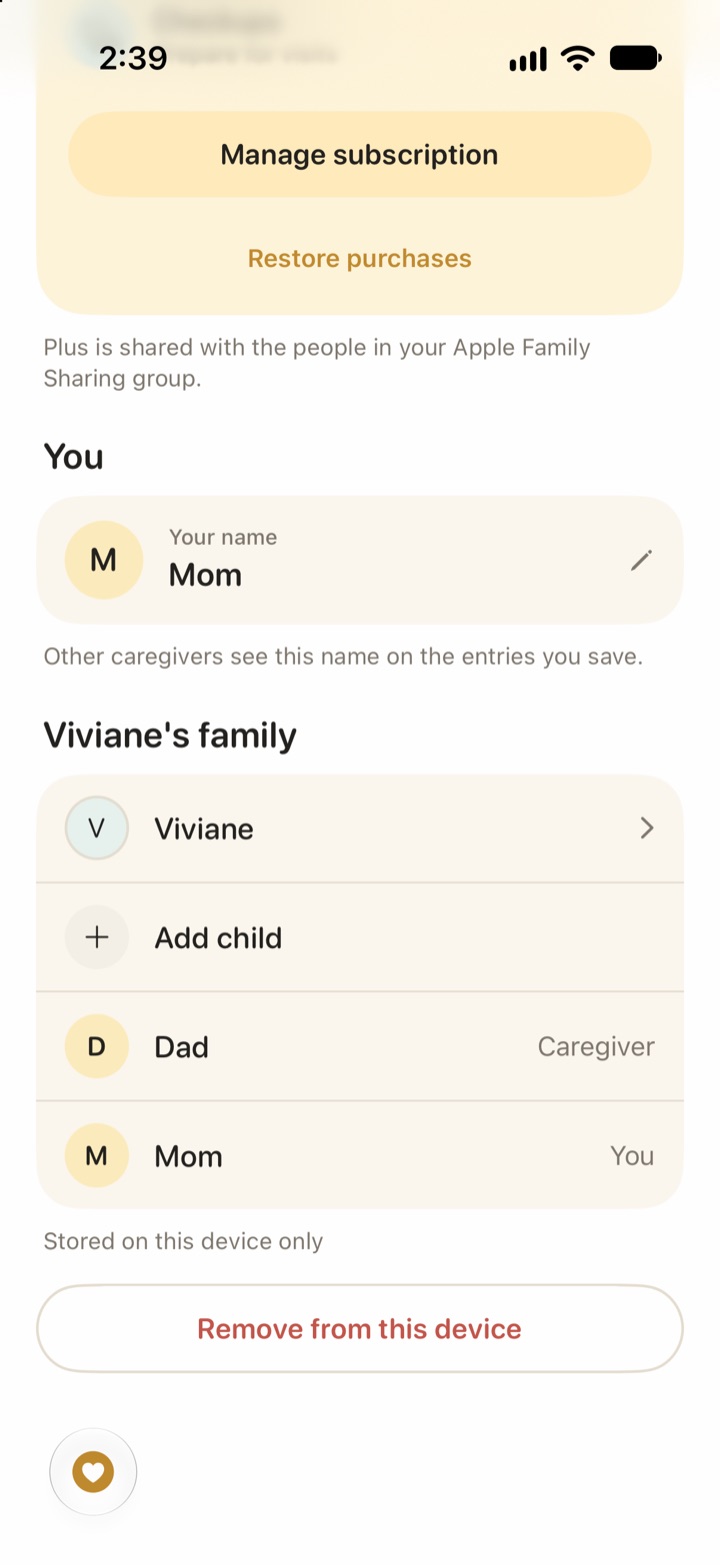
In Vivi Baby, you share the family folder in iCloud. Invited caregivers can see, add, edit and delete everything in the shared folder. Sharing and live timers are free. Someone you invite needs a Vivi Plus subscription, or a place in your Apple Family Sharing group, only for Plus features.
Import and export
Export from Nara: in Nara Baby, open the Activity screen, tap the avatar next to your child’s name, then tap Export Data. Nara gives you a CSV file.
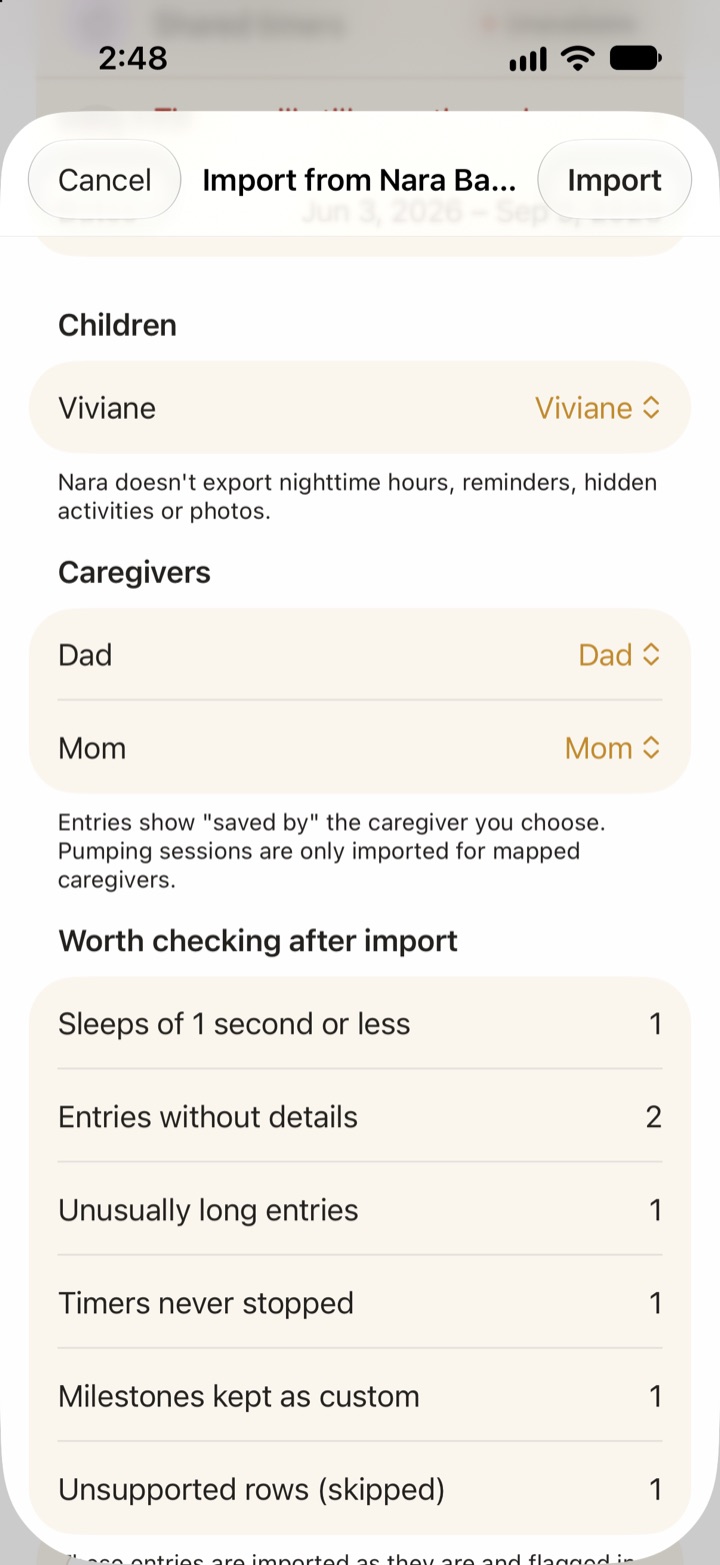
Import into Vivi: in Vivi Baby, open Preferences and choose Import from Nara Baby. Pick the CSV file. Vivi shows a preview, lets you match Nara children and caregivers to Vivi ones, then imports. It reads these Nara entry types: Sleep, Breastfeed, Bottle Feed, Combo Feed, Pump, Diaper, Routine, Solid Feed, Growth, Medical, Vaccine, Milestone, Baby First, Journal, Tooth and Checkup. Rows it cannot read are listed as skipped. Importing again later adds only new rows and does not create duplicates.
Nara’s CSV does not include night hours or which activities are turned on, so those do not come across. Save your photos somewhere else before you leave Nara.
Export from Vivi: Vivi exports a child’s full history as a CSV in Nara’s column layout, with a few extra columns at the end. It opens in any spreadsheet, so your data can leave with you later.
Nara’s pages do not list a way to import other apps’ data. If you are thinking about leaving Nara, see how to export your Nara data and switch and other Nara Baby alternatives.
Who should choose which app
Choose Nara Baby if:
- Anyone in your family uses Android.
- You want pregnancy or postpartum tracking in the same app.
- You want built-in age-based guides.
- You want one plan to cover everything for every caregiver, and you are fine with an account.
Choose Vivi Baby if:
- Everyone who logs uses an iPhone, and you want an Apple Watch app.
- You want logging to stay free, with no trial limit.
- You do not want another account and want your baby’s log in your own iCloud Drive.
- You want to move your Nara history with an import.
Export from Nara at any time, and get Vivi Baby when you are ready to import.
Frequently asked questions
Is Nara Baby free?
Nara Baby is free to download with a 7-day trial that starts when you log your first entry. After the trial you can view and export your data, but you need a paid plan to add new entries. Nara's FAQ lists $9.99 per month or $99.99 for a lifetime plan.
Does Nara Baby have a lifetime plan?
Yes. Nara's FAQ lists a one-time lifetime plan at $99.99 that covers your family for the lifetime of the app, including children you add later. The App Store lists several lifetime prices, so check the price at checkout.
What happens to my data when the Nara Baby trial ends?
Per Nara's FAQ, you can still view and export everything you logged during the trial. You cannot add new entries until someone subscribes. Nara says you are not charged automatically when the trial ends.
Can I move my Nara Baby data to Vivi Baby?
Yes. In Nara Baby, tap your child's avatar and choose Export Data to get a CSV file. In Vivi Baby, open Preferences, choose Import from Nara Baby and pick that file. Importing the same file again does not create duplicates.
Does Nara Baby need an account?
Yes. Nara's FAQ says an email and password are needed to create an account and join a family. Vivi Baby has no account. Your family's log lives in your own iCloud Drive.
Do both apps let several caregivers log for one baby?
Yes. In Nara, one paid plan covers every caregiver you invite. In Vivi Baby, sharing with caregivers is free, and invited caregivers can see, add, edit and delete everything in the shared family folder.
Does Vivi Baby work on Android?
No. Vivi Baby is for iPhone and Apple Watch only. Nara Baby is also on Android, so a family with mixed phones should look at Nara or another cross-platform app.
Sources
- Nara Baby & Pregnancy Tracker FAQ
- Nara Baby & Mom Tracker FAQs (trial, plans, caregivers)
- Nara Baby & Mom Tracker app page
- Nara: how caregivers join your family
- Nara Baby & Pregnancy Tracker on the App Store
- Nara privacy policy
- Nara Baby App Store privacy label (read on 2026-10-01)
Details about other apps come from their own websites and app listings, and they change often. Found a mistake? Write to support@vivibaby.app and we will fix it.