
Nara Baby Alternatives (It's Not Free Anymore)
Nara Baby isn’t free anymore. After a 7-day free trial it costs $9.99 per month or $99.99 for a lifetime plan, and without a plan you can only view and export your data. If you want to keep tracking without paying Nara, the choice depends on your phones and your budget. Vivi Baby suits iPhone and Apple Watch families who want free logging and their data in their own iCloud Drive. Huckleberry and Baby Daybook suit families who want many features, and Baby Daybook’s Premium page says it works on Android too. Vivi Baby is one of six options here, and it does not fit every family. For the plan details, read is Nara Baby still free?.
Prices and features below are from each company’s own pages, checked on 2026-09-30, with Nara rechecked on 2026-10-04. They change often. Check the current listing before you pay.
What changed at Nara Baby
Nara’s FAQ says “Nara families get a 7-day free trial with full access to the app,” and that the trial starts when you log your first track. You do not need to give payment details. After the trial, the app costs $9.99 per month or $99.99 one time (lifetime), with occasional promotions. One payment covers your whole family group, including partners and other caregivers you already invited.
If nobody subscribes, the family becomes read-only. Nara says you can still view and export existing data, but you cannot add new entries.
Nara’s FAQ answers “Is Nara Baby a paid app?” with yes, and lists no free tracking tier after the trial. Two Nara pages show different prices. The FAQ lists $9.99 per month and $99.99 for lifetime. The App Store listing shows the app as free to download, with in-app purchases from $6.99 to $99.99. Check the price at checkout.
Nara does some things better than Vivi. It runs on iPhone and Android, and its FAQ says Apple Watch and Siri work on Apple devices. One payment covers every caregiver you invited, and a lifetime plan exists. The catch is the price: after the trial you need a plan to add new entries, though you can still view and export. See how to export your Nara data and switch for the steps.
What to check before you switch
- Export first. Export a CSV for each child while your Nara access works. Read-only mode still allows export, but do not wait.
- Your platforms. Nara runs on iPhone and Android, but some alternatives are iPhone only. Check every caregiver’s phone.
- Who pays. Some apps charge one person and cover everyone. Others charge each caregiver. Check the sharing rules.
- What you use daily. This may be feeding timers, sleep, diapers, pumping, growth, the Apple Watch, widgets and reports. Try your daily routine in the free tier before you pay.
- Where the data lives. Some apps keep your log on the company’s servers. Others keep it in your own cloud storage. Read the privacy page.
- What the import keeps. A CSV moves entries, not photos or settings. See the import section below.
- Predictions. Nap predictions are estimates. No app can know when your baby will sleep.
Quick comparison
| App | Platforms | Price (from official pages) | Free tier | Notes |
|---|---|---|---|---|
| Vivi Baby | iPhone, Apple Watch | Free logging. Plus $4.99 per month or $44.99 per year, 14-day free trial | Yes | Imports a Nara CSV. Log stored in your iCloud Drive |
| Huckleberry | iOS and Android, with sync across devices | Premium $9.99 per month billed yearly or $14.99 monthly. Plus $5.74 per month billed yearly or $11.99 monthly | Basic tracking and reports | Sleep plans, SweetSpot predictions |
| Baby Tracker (Nighp) | iPhone, iPad, Apple Watch, Vision | Plus $5.99 monthly or $49.99 yearly. Remove Ads $4.99 | Yes, with ads | Sharing and PDF export. Plus removes ads |
| Baby Daybook | iPhone, iPad, Apple Watch, Mac, Vision. Premium page: Android too | Lifetime $59.99 to $99.99 on the listing. Other Premium prices vary: check the listing | Yes | Family sync is Premium |
| Talli Baby | iPhone, iPad, Vision Pro | $3.99 monthly or $39.99 yearly | Yes | Works with a one-button device |
| Baby Tracker (Sprout) | iPhone, iPad, Apple Watch, Mac, Vision | Weekly $5.99, yearly $39.99 to $59.99, monthly varies | Free with in-app purchases | Sleep Forecast, family sharing |
Vivi Baby
Vivi Baby is our own app, so keep that in mind as you read this part. It runs on iPhone (iOS 18 or later) and Apple Watch (watchOS 26 or later). There is no iPad or Android version.
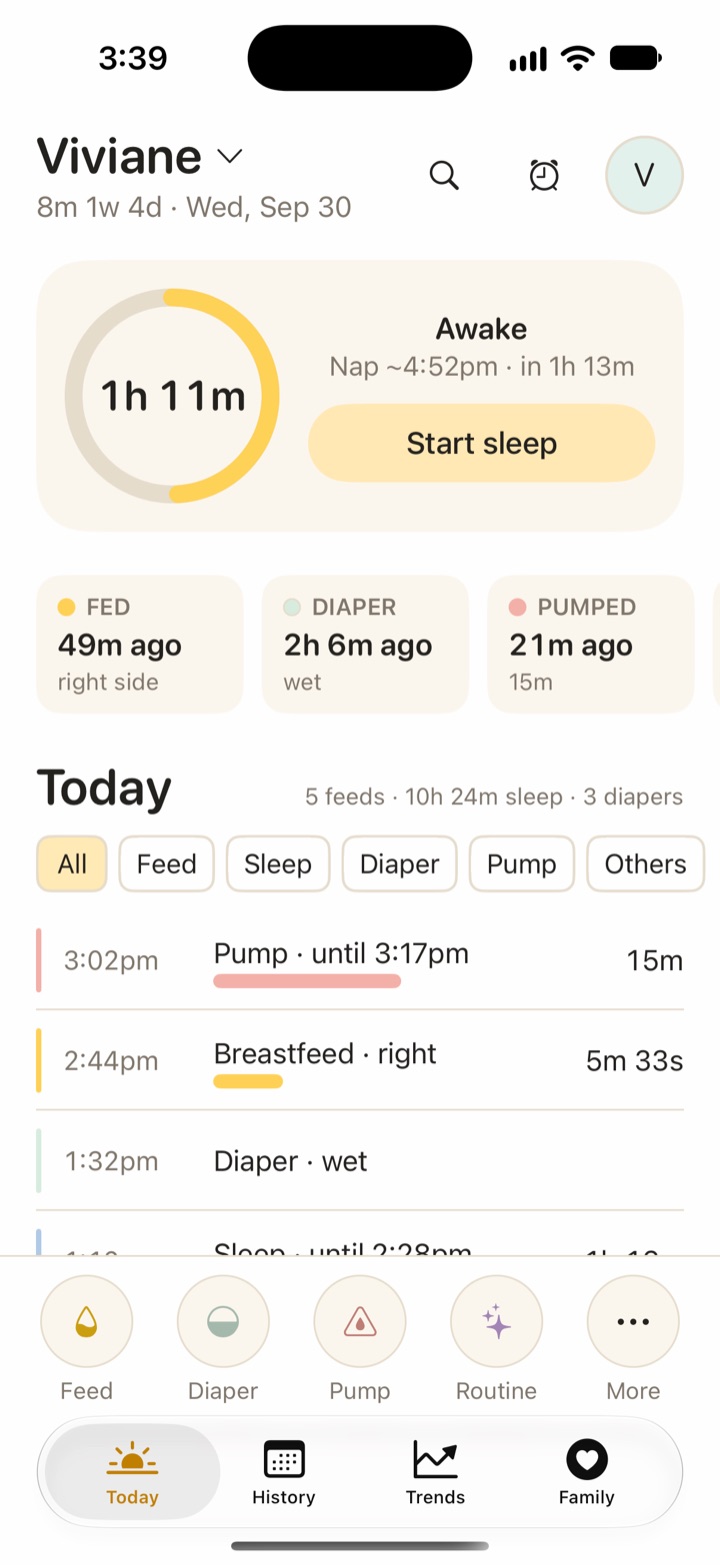
- Free: logging feeds, sleep, diapers, pumping, growth, health, vaccines, teeth, firsts, journal and routines. Also History, Trends, search, sharing with caregivers and live timers, the Watch app, widgets, Live Activities, Siri, and import and export.
- Vivi Plus: adds Sleepy Time (a next nap and bedtime estimate), Insights and Checkups. It costs $4.99 per month or $44.99 per year, with a 14-day free trial that starts only when you open a Plus feature and choose it. Vivi Plus supports Apple Family Sharing. See Vivi Plus pricing.
- Data: entries are Markdown files, plus photos, in your family’s own iCloud Drive. There is no account, no ads and no tracking. A small relay run by Vivi carries anonymous timer state so a running timer shows on other devices. Your baby’s log is not uploaded to Vivi’s servers. Read more on private baby tracking and tracking without an account.
- Caregivers: invited caregivers can see, add, edit and delete everything in the shared family folder. Someone outside your Family Sharing group logs for free and needs their own subscription only for Plus features.
- Sleepy Time and Insights are rules that run on the device. The wake-window values are not published by any medical body, and the results are estimates.
Vivi loses on a few points. It has no Android app, no iPad app, and no community or sleep-coaching content. If a grandparent uses Android, Vivi will not work for them. For a side-by-side view, read Vivi Baby vs Nara Baby.
Huckleberry
Huckleberry is a tracker that focuses on sleep. Its pricing page lists three tiers. Free covers basic tracking and reports. Plus adds SweetSpot predictions and data-driven Insights. Premium adds personalized sleep plans and an AI parenting assistant called Berry, on top of the Plus features. New members get two weeks of advanced features.
Multiple caregivers can sign in to the same account on different devices, and updates sync. The page lists AI logging, widgets and Apple Watch integration on iOS. Huckleberry offers more sleep plans and coaching than Vivi does, and it costs more. See Vivi Baby vs Huckleberry for details. Vivi can also import a Huckleberry CSV, one child per file. If you’re deciding between Nara and Huckleberry, see Nara Baby vs Huckleberry.
Baby Tracker by Nighp
The App Store lists Nighp Software as the developer. Core tracking is free. In-app purchases are Remove Ads at $4.99, and Plus at $5.99 monthly or $49.99 yearly, which removes ads and turns on a “What’s Next” feature. That feature gives sleep, feed and diaper timing cues using on-device AI. The listing names feeding, sleep, diapers, pumping, growth and milestones. It lists sync, caregiver sharing, PDF export, Apple Watch, Siri Shortcuts, widgets and Live Activities. It runs on iPhone, iPad, Apple Watch and Vision. Compare it in Vivi Baby vs Baby Tracker.
Baby Daybook
Baby Daybook (BALTAPIS UAB) is free with in-app purchases. The listing shows iPhone, iPad, Apple Watch, Mac and Vision. Its Premium page says one subscription works on Android and iOS with a single account. The listing shows lifetime prices of $59.99 to $99.99. Other Premium prices vary, so check the listing. Premium includes family sync, sleep predictions, statistics, growth charts, reminders and PDF export. Caregivers on connected baby profiles get Premium with no separate purchase. We found no mention of importing a Nara file.
Talli Baby
Talli Baby Tracker (BabyLogger, LLC) is free, with a $3.99 monthly or $39.99 yearly subscription. It tracks feeding, sleep and diapers with buttons you can change, shares live with caregivers and exports CSV. It also has a separate one-touch hardware button that logs events. The listing names iPhone, iPad and Vision Pro. It does not list Android or Apple Watch. For a closer look, read Vivi Baby vs Talli.
Baby Tracker by Sprout
Baby Tracker & Newborn Log by Med ART Studios is free with in-app purchases: weekly $5.99, yearly $39.99 to $59.99, monthly $14.99 to $19.99, and a $29.99 Short Term Care option. It logs feeding, sleep, diapers and milestones, adds a Sleep Forecast, and has Apple Watch logging and real-time family sharing. The listing says the developer collects health data and contact information linked to identity.
Moving your Nara Baby history to Vivi
Nara does the export and Vivi reads the file. The steps are below.
- In Nara Baby, open the main Activity screen and tap the avatar icon next to your child’s name. Tap Export Data. Repeat for each child. If you have questions about the file format, Nara’s FAQ lists help@narababy.com.
- Save the CSV file to your iPhone.
- In Vivi, open the gear on the Family screen to reach Preferences. In the Import section, choose Import from Nara Baby, then pick the file. You can also do this while setting up Vivi for the first time.
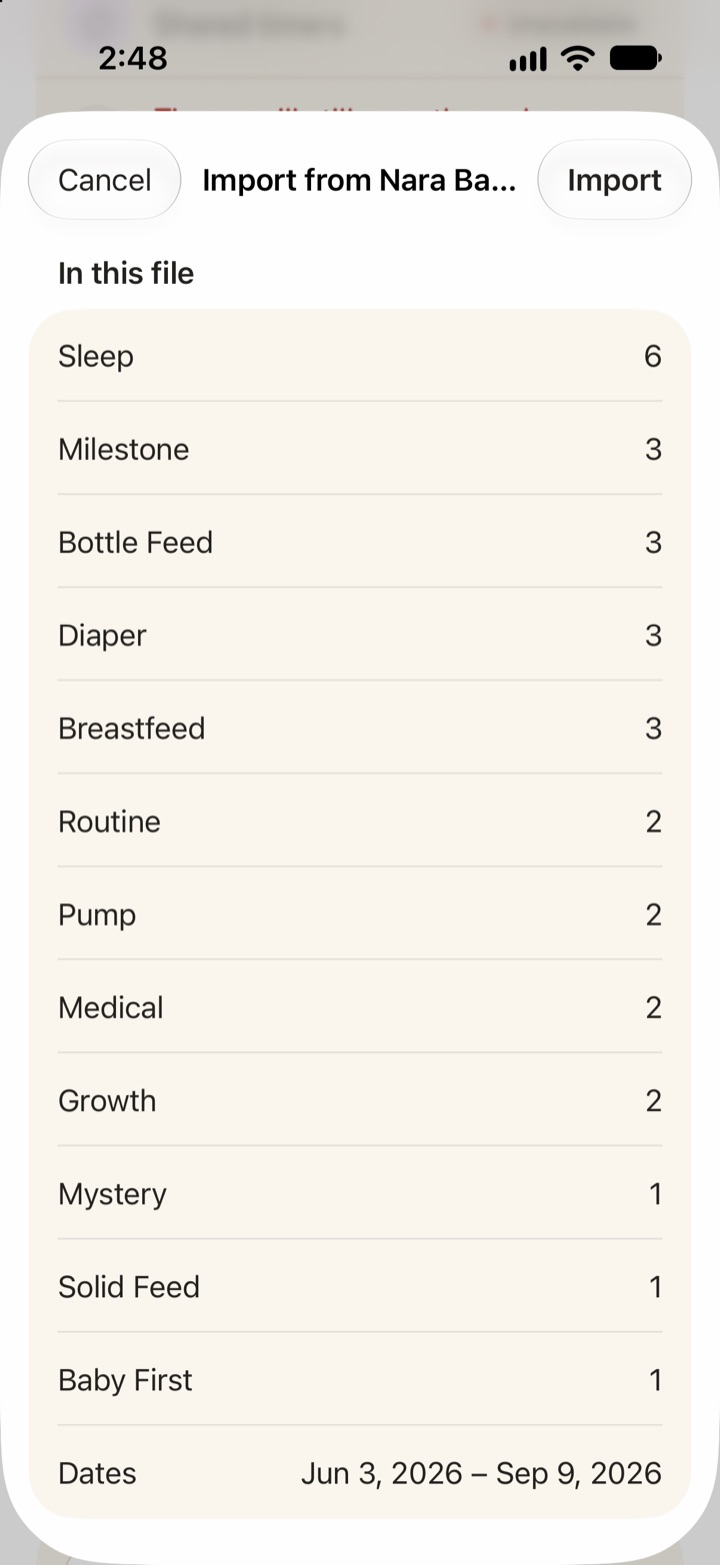
- Review the preview. Vivi shows the count for each entry type and the date range in the file.
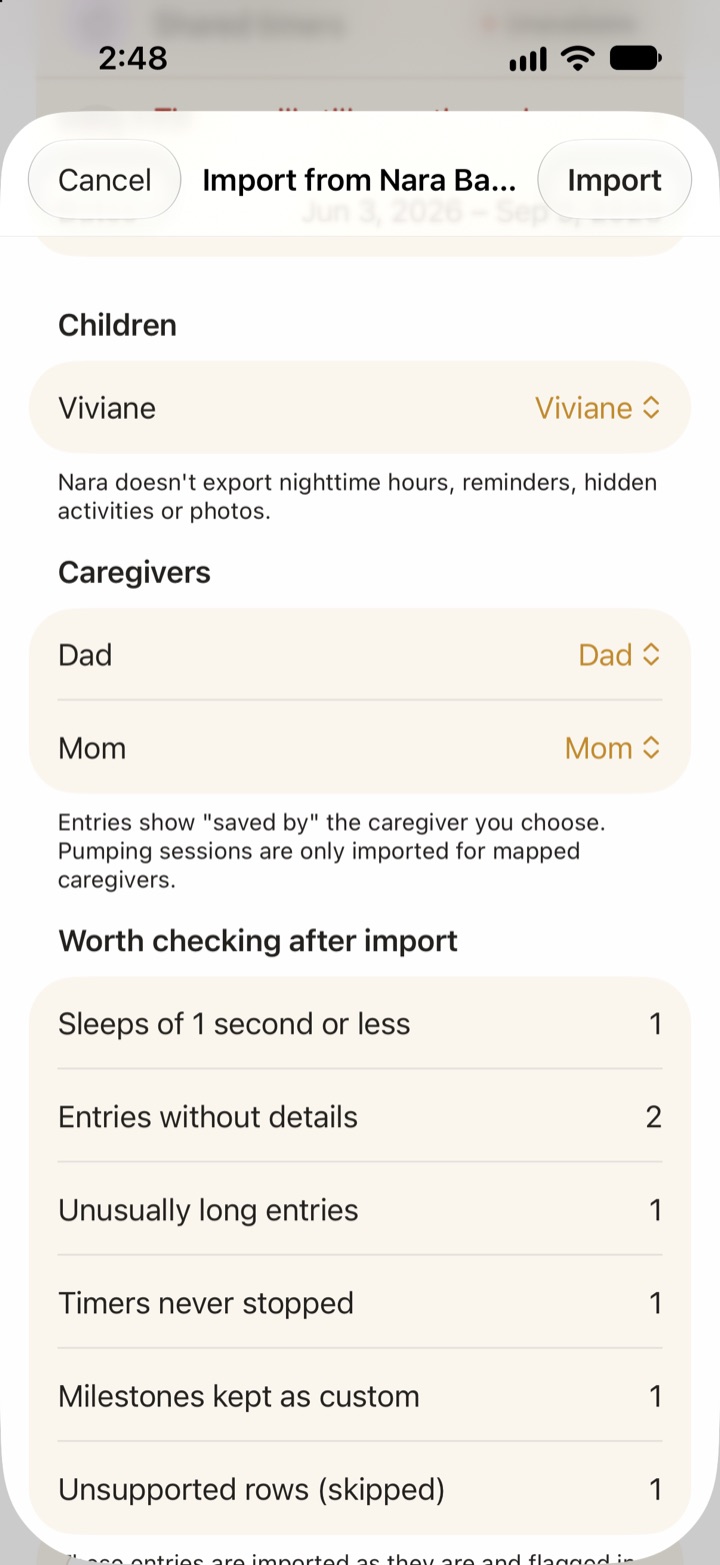
- Choose a child for each Nara profile, either a new child or one you already made. Vivi matches by first name. If a child is new, set nighttime hours.
- Map each caregiver name in the file to a caregiver in Vivi. Entries show as saved by the person you choose.
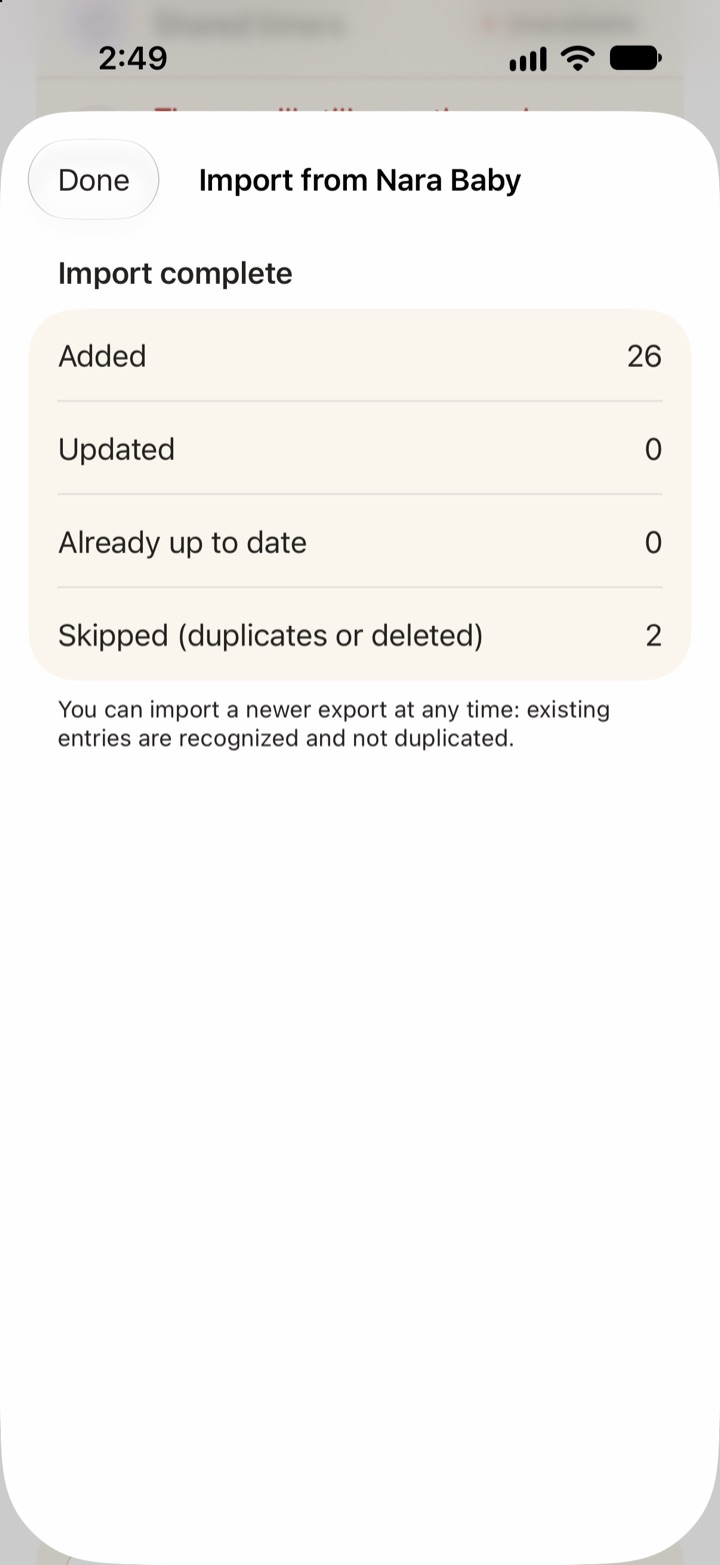
- Tap Import. Vivi checks for likely duplicates and for entries you deleted after an earlier import, and asks before it replaces anything.
What comes across: children, caregivers and entries of these types: sleep, breastfeeding, bottle and combination feeds, solids, pumping, diapers, routines, growth, medical, vaccines, milestones, firsts, journal, teeth and checkups.
Limits:
- Vivi reads CSV files only. The file must be a Nara Baby export, or Vivi rejects it.
- Nara does not export nighttime hours, reminders, hidden activities or photos. Save your photos from Nara yourself.
- Pumping entries are imported only for caregivers you map.
- Rows of an unsupported type or that Vivi cannot read are skipped. Odd entries, such as timers that never stopped, are imported and flagged in History. A full list is saved in the family folder under imports/nara.
- Importing the same file again does not create duplicates. Entries you edited in Vivi stay as you edited them. If a file version replaces an earlier import, the old version is archived.
Who should choose which app
- You use iPhone and Apple Watch and want free logging, with your data in iCloud Drive: Vivi Baby. Move your history with the Nara CSV import. Add Plus only if you want Sleepy Time, Insights or Checkups.
- You want sleep plans and coaching, and accept a higher price: Huckleberry.
- You have Apple devices and accept ads in the free tier: Baby Tracker by Nighp.
- Your family mixes iPhone and Android: Baby Daybook, whose Premium page says one subscription works on both.
- You want to log with a hardware button: Talli Baby, if you already own the device.
- You want to stay with Nara: the monthly plan is $9.99, or $99.99 for lifetime, and one payment covers your whole family group. That may be fair if Nara does everything you need and everyone uses it.
For cost details on Vivi, see pricing.
Frequently asked questions
Is Nara Baby still free?
No. Nara's FAQ says the app has a 7-day free trial, then costs $9.99 per month or $99.99 once for a lifetime plan, with occasional promotions. Without a subscription the app becomes read-only: you can view and export, but not add entries.
Can I keep my Nara Baby data if I do not pay?
Yes. Nara's FAQ says you can still view and export everything you logged, but you cannot add new entries until someone subscribes. Export a CSV before you switch.
How do I export my data from Nara Baby?
On the main Activity screen, tap the avatar icon next to your child's name, then tap Export Data. This gives you a CSV file for that child.
Which baby tracker can import a Nara Baby CSV?
Vivi Baby can. It reads the Nara CSV, maps children and caregivers, and can be run again without creating duplicates. We did not find an official Nara import on the App Store pages of the other apps below.
What happens when my Nara Baby trial ends?
Nara's FAQ says you are not charged unless you choose a plan. The app becomes read-only: you can view and export what you logged, but you cannot add new entries until someone in the family subscribes.
What is the best free alternative to Nara Baby?
It depends on your phones. On iPhone and Apple Watch, Vivi Baby logs for free with no trial limit, and Vivi Plus is optional. Huckleberry, Baby Tracker by Nighp, Baby Daybook and Talli list free tiers, and Sprout is free to download with in-app purchases. If your family also uses Android, Baby Daybook's Premium page says it works on both. Compare what each free tier lets you do before you commit.
Sources
- Nara Baby FAQ (trial, prices, read-only, export)
- Nara Baby FAQ (second page)
- Nara Baby on the App Store
- Huckleberry: Baby Tracker on Google Play (Android)
- Huckleberry membership pricing
- Baby Tracker by Nighp on the App Store
- Baby Daybook on the App Store
- Baby Daybook Premium
- Talli Baby Tracker on the App Store
- Baby Tracker by Sprout on the App Store
Details about other apps come from their own websites and app listings, and they change often. Found a mistake? Write to support@vivibaby.app and we will fix it.