
Vivi Baby vs Baby Tracker: Price and Privacy
Baby Tracker - Newborn Log by Nighp is a free-with-ads app for iPhone, iPad and Android. It suits families who want one app on several platforms and want to start for free. Vivi Baby is a new app for iPhone and Apple Watch. It keeps the log in your own iCloud Drive, with no ads and no account. It suits Apple families who want plain files they own.
Quick comparison
| Vivi Baby | Baby Tracker - Newborn Log | |
|---|---|---|
| Platforms | iPhone (iOS 18 or later), Apple Watch (watchOS 26 or later) | iPhone and iPad (iOS 15 or later), Apple Watch (watchOS 10 or later), Apple Vision (visionOS 1 or later), Android |
| Base price | Free to log | Free, with ads |
| Paid tier | Vivi Plus: $4.99 per month or $44.99 per year, with a 14-day free trial | Plus: $5.99 per month or $49.99 per year (US). Remove Ads: $4.99 |
| What the paid tier adds | Sleepy Time, Insights, Checkups | Ad-free tracking and personalized sleep, feed and diaper cues. The FAQ says a full version unlocks CSV and PDF export |
| Ads | None | Yes, from several ad partners |
| Account | None | None needed for iCloud or Dropbox sync. The privacy policy describes a Nighp sync that uses an email address, but the FAQ says the app uses no Nighp server |
| Where your log lives | Files in your family’s iCloud Drive | On the device. Sync goes through iCloud or Dropbox. The privacy policy also names a Nighp sync |
| Family sharing | Shared iCloud folder, live timers | Sync group across devices. The App Store page also mentions caregiver sharing |
| Apple Watch | Yes, free | Yes |
| Widgets and Live Activities | Yes, free | Yes |
| Export | CSV, free | PDF listed on the App Store. CSV and PDF listed in the FAQ as part of a paid full version |
| Import | Nara Baby, Huckleberry and Baby Tracker CSV files, free | Not covered here |
| Apple privacy label | See the section below | Identifiers used for tracking. Health, contact and photo data linked to you |
What Vivi Baby does better
Vivi Baby has no ads and no tracking. Baby Tracker shows ads in its free version. Its privacy policy names ad partners that can collect a device identifier and an IP address.
Vivi saves each entry as a Markdown file with YAML front matter, and photos next to them, in your family’s own iCloud Drive. You can open them in the Files app or a text editor without Vivi. Baby Tracker keeps data on the device and syncs it.
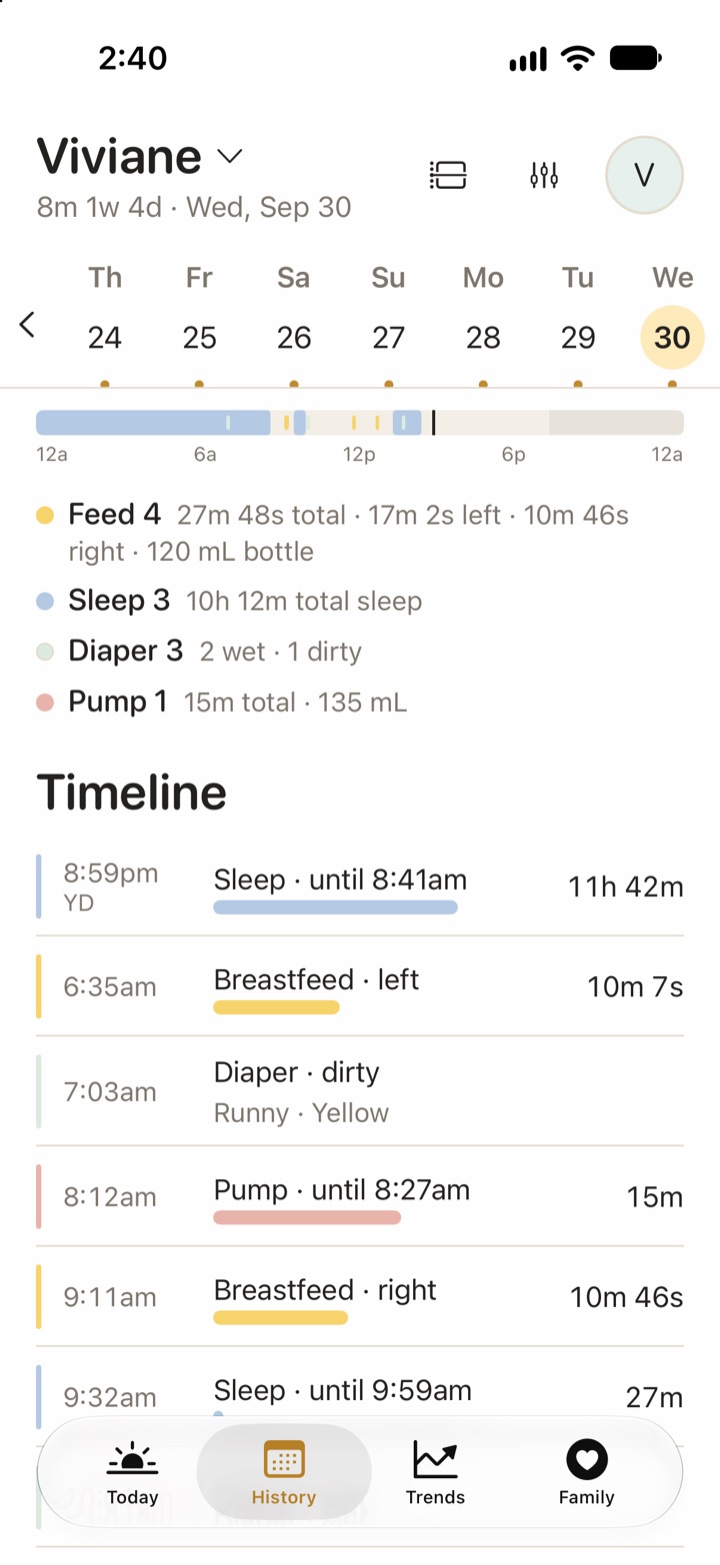
A family is one iCloud Drive folder. Invited caregivers see, add, edit and delete everything in it. Live timers show on other devices too. See how Vivi Baby works for couples.
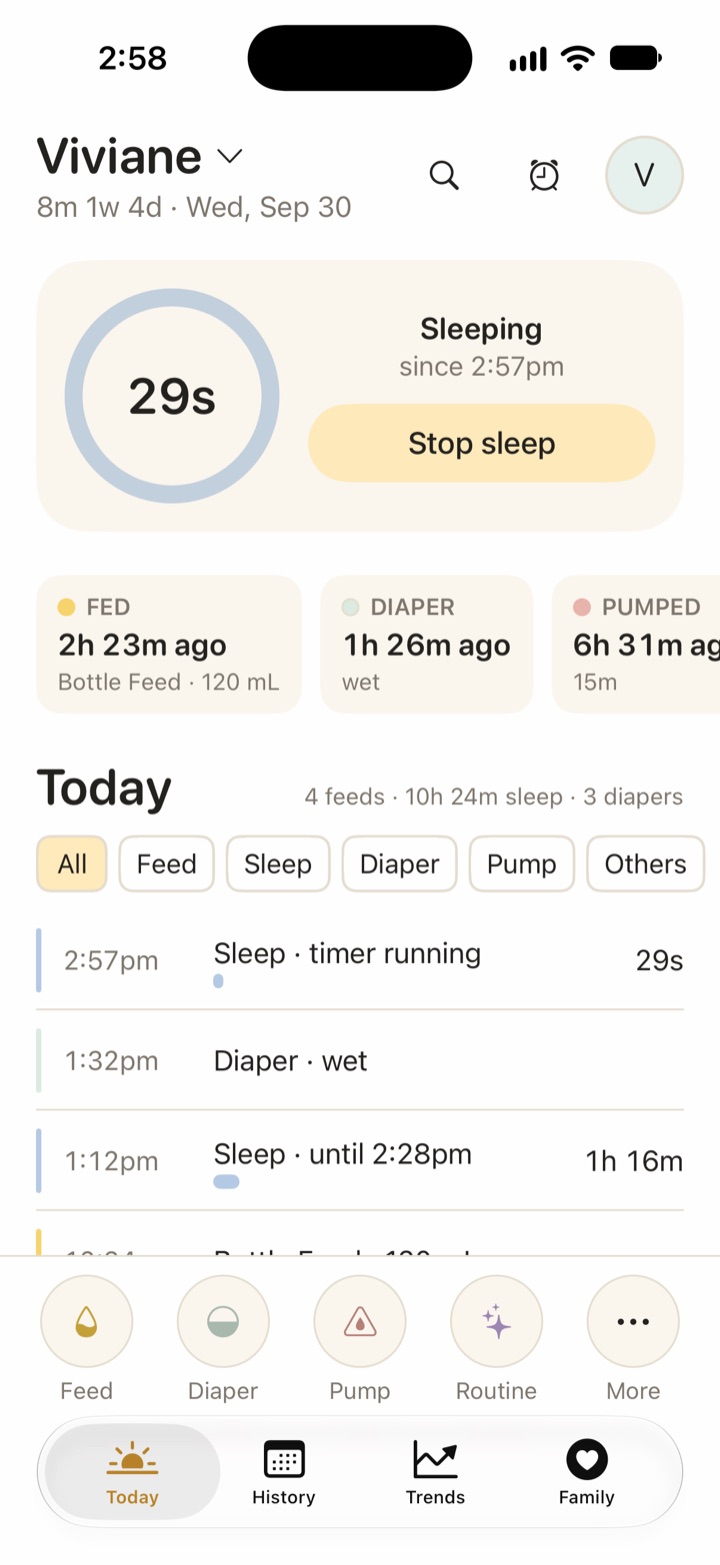
Logging, History, Trends, search, sharing, the Watch app, widgets, Live Activities, Siri, import and export are all free. Vivi Plus adds only Sleepy Time, Insights and Checkups.
One Vivi Plus subscription covers your Apple Family Sharing group.
What Baby Tracker does better
Baby Tracker runs on Android, iPad, Apple Vision and iPhones back to iOS 15. Vivi Baby needs iOS 18 or later and has no Android or iPad app. If one parent uses Android, Vivi cannot work for that family. This is the biggest difference between the two apps.
The App Store page lists English and 13 other languages, including French, German, Spanish, Japanese and Chinese. Its developer also publishes a FAQ and a privacy policy. Vivi Baby is new.
You can log and use the app at no cost if you accept ads. Vivi is also free to log, but a family that wants Sleepy Time, Insights or Checkups will need Vivi Plus.
If you only want to hide the ads, Baby Tracker charges $4.99 (US). Vivi has no ads to hide.
The App Store page says you can export records as a PDF for a caregiver or a doctor. Vivi Baby exports CSV only.
Baby Tracker syncs over iCloud or Dropbox. Vivi uses iCloud only.
Privacy and data storage
All Baby Tracker facts below are from Nighp’s privacy policy, its FAQ and the App Store privacy label, read on 2026-10-01.
Nighp’s privacy policy says it is effective as of 8/30/2026. It says that with iCloud or Dropbox sync, “Baby Tracker will not obtain your personal information”, and that iCloud or Dropbox may collect it. It also describes a “sync feature with Baby Tracker Server”. For that sync it lists your baby’s name, your email address, your baby’s date of birth, growth data and all records you enter. The FAQ says “Baby Tracker will never collect or send your data to our server.” It says backup and sync data goes to your own iCloud or Dropbox account. The FAQ has no date. The two pages disagree and neither explains why. The policy has a date and the FAQ has none, but this page cannot say which one the current app follows. Check what the app asks for before you sync.
The policy names Admob, MoPub, InMobi, AppLovin and Amazon as ad partners. It says they may collect “app session activity, device identifier, MAC address”. On sale and sharing, it says Nighp may use the uploaded information to improve Baby Tracker and its AI models, and then: “We do not sell it, use it for advertising, or share it with third parties for their independent advertising or AI training.” The policy has no text about deleting data. It says it keeps data “as long as you use Baby Tracker and for a reasonable time thereafter”, and gives babytracker@nighp.com as a contact. The App Store label lists identifiers under data used to track you. It lists health data, name, email address, photos and a user ID as linked to you, and device ID and usage data as not linked to you.
What each app says about your data
| Vivi Baby | Baby Tracker (Nighp) | |
|---|---|---|
| What is collected | The baby’s log is in your iCloud Drive. Vivi cannot see it. A small relay run by Vivi carries anonymous timer state | Policy: name, email, birth date, growth data and records, for Nighp’s own sync. FAQ: nothing is sent to Nighp. iCloud and Dropbox sync: policy says Nighp does not obtain it |
| Advertising and analytics | No ads. No tracking | Policy names Admob, MoPub, InMobi, AppLovin and Amazon. The label lists tracking, advertising and analytics data |
| Sale or sharing | We do not sell or share your baby’s log. We cannot: it is in your iCloud Drive and we have no access to it. | Policy: “We do not sell it, use it for advertising, or share it with third parties for their independent advertising or AI training.” |
| Deletion | Delete the files in your iCloud Drive. The relay keeps only anonymous timer state, and timers expire after 48 hours. | The policy has no deletion text. It gives babytracker@nighp.com as a contact |
| Policy date | Not applicable here | Effective 8/30/2026 (FAQ: no date) |
Vivi Baby has no account, no ads and no tracking. Your baby’s log is not uploaded to Vivi’s servers. It lives in your iCloud Drive. One exception: a small relay run by Vivi carries anonymous timer state, and encrypted Live Activity tokens, so a running timer shows on other devices. It never receives names, notes, photos or measurements. Read more in the no-account baby tracker guide.
Apple Watch
Both apps have an Apple Watch app. Baby Tracker lists watchOS 10 or later and describes Live Activities on its App Store page. Vivi Baby needs watchOS 26 or later. The Vivi watch app logs feeds, sleep timers, diapers and pumping. Bottle amounts use the Digital Crown. Entries show as waiting to sync until the iPhone confirms them. The Vivi watch face complication opens the app. It does not show data.
Baby Tracker’s own pages give few details on its watch app, so this page does not compare the two feature by feature. See what the Vivi Apple Watch app does.
Widgets and Live Activities
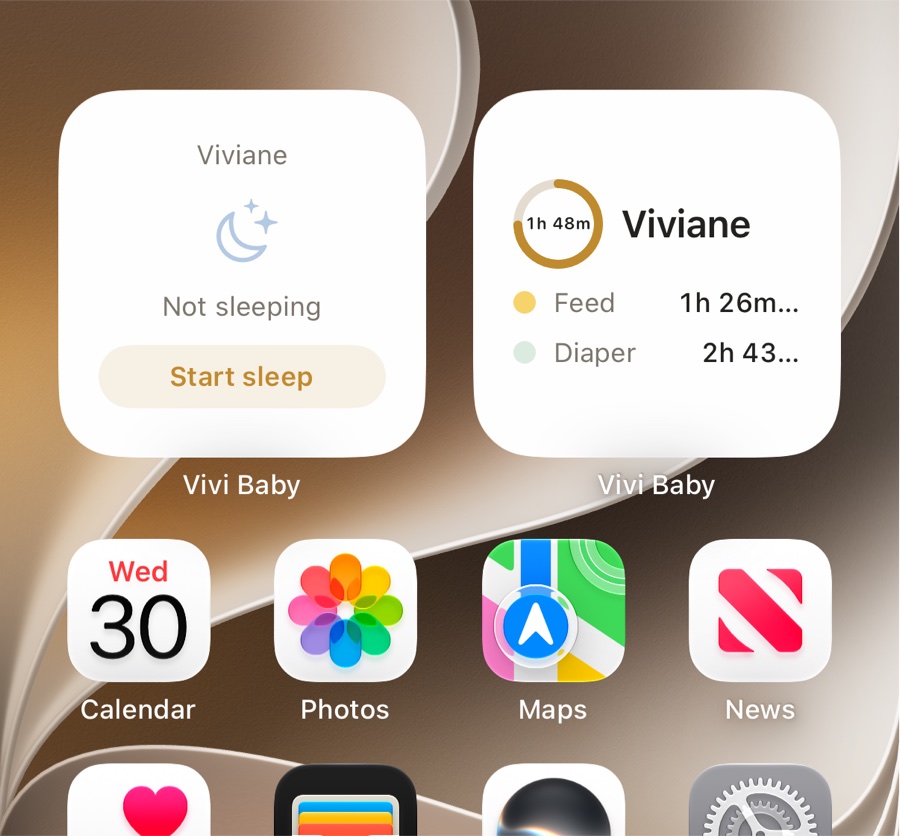
Baby Tracker lists Home Screen and Lock Screen widgets, Live Activities and Siri Shortcuts. Vivi Baby has a “since last” widget, a sleep-timer widget with a start and stop button, Lock Screen versions, and a Live Activity for running timers. Siri can start and stop timers and log diapers and bottles. All of these are free. See Vivi Baby widgets for details.
Sleep tracking and predictions
Both apps offer timing cues. Baby Tracker Plus offers personalized sleep, feed and diaper cues. Its App Store page says these are made on the device.
In Vivi, this is Sleepy Time, part of Vivi Plus. It estimates the next nap and bedtime from your logged sleep. It uses rules that run on the device. It gives an estimate, not a promise, and the wake-window values it uses are not published by any medical body. Free users can still log all sleep and see sleep in Trends.
Family sharing
Baby Tracker’s FAQ describes a sync group. You create it on one device, and other devices join it. The FAQ warns that data on a joining device is overwritten. It also says to wait about five minutes after you create a group before you work on another device. The App Store listing also mentions caregiver sharing, but the FAQ does not describe how it works, so this page cannot say more.
In Vivi, each family is one iCloud Drive folder. You invite a caregiver with an iCloud share, and they use their own Apple ID. Everyone with access can see, add, edit and delete everything in that folder. Vivi does not have roles.
Pricing
Both apps are free to start. Baby Tracker shows ads until you pay. On the US App Store its purchases are Remove Ads at $4.99, Plus Monthly at $5.99 and Plus Yearly at $49.99. The Canadian listing shows higher numbers, so check your own storefront.
Baby Tracker’s FAQ describes a one-time full version that unlocks CSV and PDF export. The current listing sells a Plus subscription and an ad removal. The two pages do not match, so confirm in the app what you get for your money before you buy.
Vivi Baby is free to log, with no ads. Vivi Plus costs $4.99 per month or $44.99 per year, with a 14-day free trial. The trial starts only when you open a Plus feature and choose it. It covers Sleepy Time, Insights and Checkups. Someone outside your Apple Family Sharing group logs for free and needs their own subscription only for Plus features. See Vivi Plus pricing.
Import and export
Our guide to exporting Baby Tracker data has the full steps and explains how backups differ from a CSV.
Baby Tracker’s FAQ lists a data clone file (.btcp) for moving data between devices and backups by email. The FAQ lists CSV and PDF export as part of the paid full version. The App Store page mentions PDF export.
Vivi Baby exports a CSV from each child’s settings, and it can import CSV files from Nara Baby, Huckleberry and Baby Tracker. If you’re also on Nara, it stopped being free: after a 7-day trial it costs $9.99 a month or $99.99 lifetime, and without a plan you can only view and export. What happens after the Nara trial covers the details.
To move your Baby Tracker history into Vivi:
- In Baby Tracker, open Settings and choose Export Data to CSV. This is part of Baby Tracker’s paid version. It makes a file named csv.zip.
- In Vivi Baby, open Preferences, find the Import section and choose Import from Baby Tracker. First-time setup offers the same option on its import step.
- Pick the csv.zip file. Vivi also accepts the folder Files makes when you unzip it, or a single CSV.
- Check the preview. If the export holds several babies, pick one, and import each child on its own. Pick the time zone, because the file has none. Pumping rows have no baby in the file, so you pick the caregiver they belong to. Vivi works out whether dates are day first or month first, and asks only when the dates cannot tell.
- Import. Nothing is saved before this step.
Vivi brings in sleep, breastfeeding with sides, bottles of expressed milk or formula, pumping, diapers (wet, mixed, dirty and dry), medication, other activities as routines, growth and temperature. Bath, milestones, vaccines, solids and journal entries are imported too, but flagged for checking in History. Columns Vivi has no field for are kept in the entry’s note.
Importing the same file again does not create duplicates. Likely duplicates of entries already in Vivi are skipped by default. Vivi keeps a copy of the imported files in your family folder under imports/nighp. Vivi reads only the CSV export, not Baby Tracker’s backup files (.btbk) or Data Clone files. For more on leaving the app, read the Baby Tracker alternatives guide.
Screenshots
Who should choose which app
Choose Baby Tracker if anyone in your family uses Android or an iPad, your iPhone runs iOS 17 or earlier, you want to start free and can live with ads, you need PDF export, or you want Dropbox as an option.
Choose Vivi Baby if your family uses iPhones and Apple Watches on iOS 18 or later, you want no ads and no account, you want your log as files in your iCloud Drive, or you want live shared timers between caregivers. Logging is free, so you can skip Vivi Plus unless you want Sleepy Time, Insights or Checkups.
Frequently asked questions
Is Baby Tracker - Newborn Log free?
The app is free to download and shows ads. On the US App Store, Remove Ads costs $4.99, and Baby Tracker Plus costs $5.99 per month or $49.99 per year. Prices differ by country.
Does Baby Tracker work on Android?
Yes. Nighp lists Baby Tracker for iPhone, iPad and Android. Vivi Baby is for iPhone and Apple Watch only.
Does Vivi Baby need an account?
No. Vivi Baby has no account. Your baby's log is saved as files in your family's own iCloud Drive, and it is not uploaded to Vivi's servers.
Can I move my Baby Tracker history into Vivi Baby?
Yes. In Baby Tracker, use Settings > Export Data to CSV, which is part of the paid version, to get a csv.zip file. In Vivi Baby, open Preferences and choose Import from Baby Tracker. Vivi shows a preview before it saves anything, and importing the same file again does not create duplicates.
Which app has more ways to export data?
Baby Tracker lists PDF export on its App Store page. Its FAQ lists CSV and PDF export as part of a paid full version. Vivi Baby exports CSV only, from each child's settings, and it is free.
Do both apps have Apple Watch and widgets?
Yes. Baby Tracker lists Apple Watch, widgets and Live Activities on its App Store page. Vivi Baby has a Watch app, widgets, Live Activities and Siri, all free.
Sources
- Nara Baby app FAQs (paid plans, trial, read-only)
- Baby Tracker - Newborn Log on the US App Store
- Baby Tracker - Newborn Log on the Canadian App Store
- Baby Tracker FAQ (Nighp)
- Baby Tracker privacy policy (Nighp)
- Baby Tracker (Nighp)
Details about other apps come from their own websites and app listings, and they change often. Found a mistake? Write to support@vivibaby.app and we will fix it.