
Baby Tracker With No Account or Sign-Up
Vivi Baby has no account of its own. You do not give Vivi an email or a password, and you do not sign up. The app uses the Apple Account already on your iPhone, and it saves your baby’s log as files in your iCloud Drive. Most other baby trackers ask you to register first. This page explains what “no account” means and what it costs you.
Vivi Baby needs an iPhone with iOS 18 or later. It also runs on Apple Watch (watchOS 26 or later).
What “no account” means in Vivi
- No email and no password. Vivi never asks for either.
- No Vivi profile. The privacy policy says the app never learns your name or email. The name you type in setup is saved in your own family folder.
- Your Apple Account does the work. iCloud Drive keeps the files and syncs them to your other devices. Apple handles sign-in, storage and sharing.
- No Vivi server holds your log. Entries, children’s details, notes and photos are files in your iCloud Drive. One small exception: a relay run by Vivi carries anonymous timer state so a running timer shows on other devices. Your baby’s log is not uploaded to Vivi’s servers.
For the full list of what is stored where, read the privacy policy. For the wider picture, see how Vivi keeps a baby tracker private.
What happens on first launch
Setup has seven short steps. The first three matter for accounts.
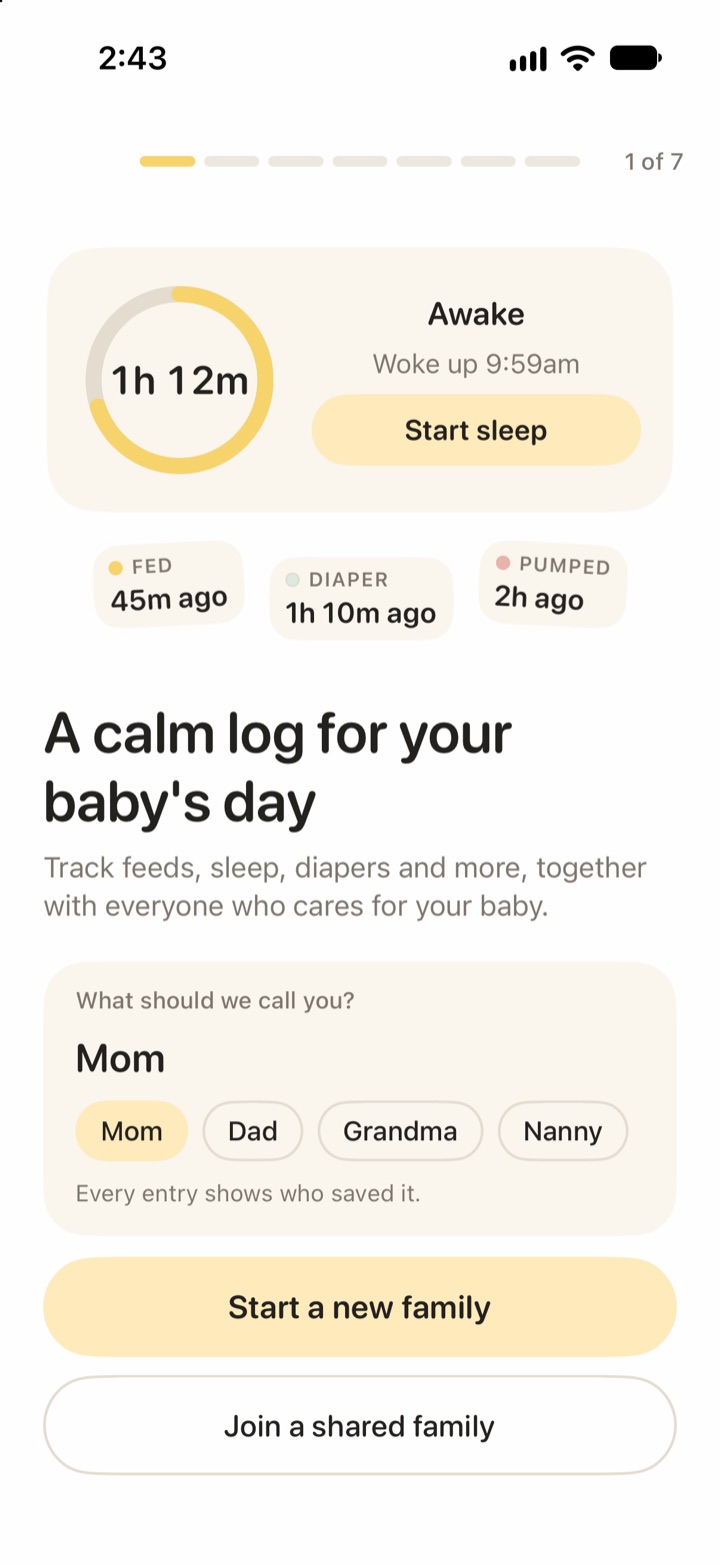
- Your name. The first screen asks “What should we call you?” You can also tap a role such as Mom or Dad. Every entry shows who saved it, so your partner sees this name.
- Your baby. You enter the baby’s details and a family name. Caregivers you invite see the family name. You can change the details later in the child’s settings.
- Your history. Setup offers to import your history from Nara Baby, Huckleberry or Baby Tracker by Nighp. You can also start fresh.
Later steps pick what to track and set day and night hours. Setup ends with an invite card, so you can invite a second caregiver right away or later from the Family tab.
The app never asks for an email address or a password.
How a second person joins without an account
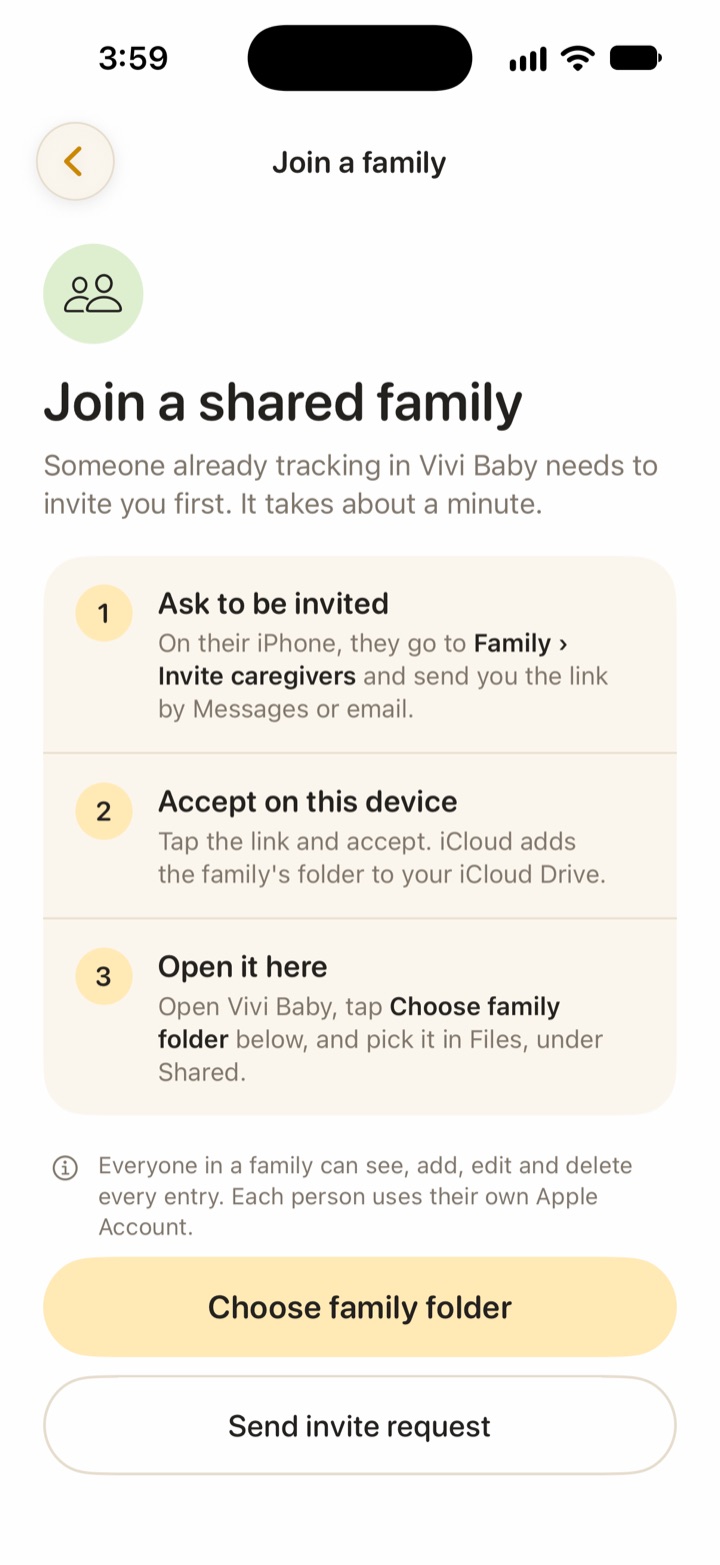
Your partner does not create a Vivi login. They use their own Apple Account, and iCloud shares the folder with them.
On your iPhone
- Open the Family tab and choose Invite caregivers.
- Share the folder with iCloud’s Collaborate option. Vivi shows the settings to use: “Only invited people” and “Can make changes”.
- Send the link by Messages or email.
On their iPhone
- Open the invitation and accept it. iCloud adds the family’s folder to their iCloud Drive.
- Install Vivi Baby. In setup, type a name and tap Join a shared family.
- Tap Choose family folder and pick the folder in Files, under Shared.
Both phones then read and write the same folder. Everyone in a family can see, add, edit and delete every entry, and each person uses their own Apple Account. Vivi has no roles or limited access.
Someone who is not in your Apple Family Sharing group still logs for free. They need their own subscription only for Plus features. See Vivi Plus pricing for details. For a longer guide to sharing, see Vivi Baby for couples.
If iCloud Drive is off
Vivi needs iCloud Drive for sync and sharing. Setup shows the status at the bottom of the first screen.
- iCloud Drive on: “Your data is stored as files in your iCloud Drive.”
- iCloud Drive off: “iCloud Drive is off. Your log stays on this iPhone until you sign in to iCloud.”
If you start a family with iCloud Drive off, the app still works. It stores that family on the iPhone only. In that case:
- The invite card says sharing needs iCloud Drive, and does nothing until you turn it on.
- The log is not in your iCloud Drive, so it is not synced to another device.
- We found no step in the app that moves a local family into iCloud later. If you plan to share, turn iCloud Drive on before you create the family.
Joining someone else’s family also needs iCloud Drive. The join screen tells you to turn it on in Settings first.
If you lose or replace your iPhone
Your log is a set of files in the “Vivi Baby” folder of your iCloud Drive. You can open them in the Files app or any text editor. That means the log is not locked inside one phone.
You can count on this:
- Your files stay in iCloud Drive. Losing the phone does not delete them. Sign in to iCloud on the new iPhone and they are there in Files.
- Your caregiver identity follows your Apple Account. Vivi keeps your caregiver id and name in iCloud key-value storage, so devices on the same Apple Account use the same id. iCloud must deliver it first, so it may take a moment on a new install.
- Your partner’s copy is a second copy. If you share a family, their phone reads the same folder.
What to expect, and what we cannot promise:
- Vivi keeps its list of families on each device. Vivi does not find your existing folder by itself on a new install. Open Vivi Baby, tap Join a shared family, then Choose family folder, and pick your family’s folder in Files. It is under iCloud Drive, in the “Vivi Baby” folder.
- If you delete the “Vivi Baby” folder in iCloud Drive, the log is gone. Vivi cannot get it back. Apple’s own iCloud tools are the only route.
- A family made with iCloud Drive off lives on that iPhone only, so losing the phone can lose it. Export a CSV for each child from the app now and then if you want a copy outside iCloud.
Trade-offs
No account has costs.
- No web login. You cannot open your baby’s log in a browser.
- No Android. Vivi runs on iPhone and Apple Watch only. A caregiver on Android cannot join. See how Vivi compares with Nara Baby if you need both platforms.
- Vivi support cannot see or recover your data. The privacy policy says Vivi has no access to your iCloud. If you delete files, Vivi cannot restore them.
- Everything depends on iCloud. If iCloud Drive is off, full or stuck, sync slows or stops. The app shows a warning when a file waits too long to upload.
- Every caregiver needs an Apple Account. There is no guest link.
- Shared timers use a relay. A small server run by Vivi carries timer state so a running timer shows on other phones. It sees anonymous timer state only.
Which other baby trackers need accounts
We checked each tracker’s own pages on 2026-09-30. Where a page does not say, the table says “not listed”. Products change, so check the current app before you decide.
| App | What its own pages say about accounts |
|---|---|
| Vivi Baby | No account. Uses your Apple Account and iCloud Drive. |
| Huckleberry | The App Store listing mentions Google Sign In, accounts, and a User ID linked to you. It does not say whether you can skip an account. |
| Nara Baby | The FAQ says the app requires an account to track activities, and that each person should register with their own email and password. Nara Baby isn’t free anymore: a 7-day trial, then $9.99 per month or $99.99 lifetime. Without a plan you can only view and export. |
| Baby Tracker (Nighp) | Sync groups need an email and password. The FAQ also lists iCloud and Dropbox for data backup. Use without a sync group: not listed. |
| Talli | The FAQ describes a confirmation code sent to your email when you create an account. Use without an account: not listed. |
Some notes to keep the table fair:
- An account is not bad. It can give you web access and an Android app. Vivi gives up both.
- Baby Tracker by Nighp lists iCloud and Dropbox for backup in its FAQ. The same FAQ says restore is not supported in sync mode.
- An account does not mean poor privacy. What matters is where your baby’s log lives and who can read it. Check each app’s privacy page.
For a closer comparison, read Vivi Baby vs Huckleberry or the list of Nara Baby alternatives.
Who this suits
Vivi suits you if:
- Everyone who logs has an iPhone.
- You already use iCloud Drive and want your baby’s log kept in your own storage.
- You do not want another password.
Look elsewhere if a grandparent or nanny uses Android, or if you want to see the log in a web browser.
Frequently asked questions
Does Vivi Baby need an account?
No. There is no email, password or Vivi sign-up. The app uses the Apple Account already signed in on your iPhone, through iCloud Drive.
Can I use Vivi Baby with iCloud Drive turned off?
Yes, but only on that one iPhone. Setup shows a warning that your log stays on the iPhone until you sign in to iCloud, and sharing with another caregiver needs iCloud Drive.
How does my partner join without making an account?
You invite them from the Family tab with an iCloud link. They accept it with their own Apple Account, install Vivi Baby, and pick the shared folder in the app.
What happens to my data if I lose my iPhone?
The log is stored as files in your iCloud Drive, so the files are not tied to one phone. On a new iPhone you point Vivi Baby at that folder again. Vivi cannot recover the files for you.
Can I log in to Vivi Baby on a website or on Android?
No. Vivi Baby runs on iPhone and Apple Watch only. There is no web login and no Android app.
Can Vivi Baby support see my baby's log?
No. The log is in your iCloud Drive, and Vivi cannot see, read or recover it. A small relay run by Vivi carries anonymous timer state only.