
Vivi Baby vs Huckleberry: Price, Privacy, Watch
Huckleberry is the bigger app. It runs on iPhone and Android, and its paid plans add sleep plans, a parenting chat and nap predictions. Vivi Baby is smaller and iPhone only. Logging, sharing, Apple Watch, widgets and export are free. Your data stays in your own iCloud Drive, and nap estimates are a paid add-on. If you use Android, or you want guided sleep plans, choose Huckleberry. If your household is on iPhone and you want a free, private tracker, try Vivi.
Quick comparison
| Vivi Baby | Huckleberry | |
|---|---|---|
| Platforms | iPhone (iOS 18 or later) and Apple Watch (watchOS 26 or later) | iPhone, iPad, Apple Watch and Android |
| Free tier | Logging, History, Trends, search, sharing, Watch, widgets, Live Activities, Siri, import and export | Basic tracking, reports and multi-device sync |
| Paid plans | One plan, Vivi Plus: $4.99 per month or $44.99 per year, with a 14-day free trial | Plus and Premium, on monthly or yearly billing |
| Nap and bedtime predictions | Sleepy Time, in Vivi Plus. Rules on your device, no AI | SweetSpot, in Plus and Premium |
| Sleep plans and parenting chat | Not offered | Premium |
| Apple Watch app | Free | Plus or Premium (help center) |
| Home screen widgets | Free | Plus or Premium (help center) |
| Sharing with a partner | Share the family folder in iCloud; caregivers can see, add, edit and delete everything | Sign in to the same account on each phone; sync is free |
| Where the log is kept | Your own iCloud Drive, as Markdown files | Huckleberry’s service |
| Account | No Vivi account | Huckleberry account |
| Export | CSV for each child, and the Markdown files themselves | CSV for each child, emailed from the app as a link that works for 24 hours |
| Import | From Huckleberry, Nara and Baby Tracker CSV exports | Not listed |
What Vivi Baby does better
More of the app is free. Logging, History, Trends, search, sharing, the Watch app, widgets, Live Activities, Siri, import and export cost nothing in Vivi. Vivi Plus adds Sleepy Time, Insights and Checkups. Huckleberry’s help center says its Apple Watch app, widgets and Lock Screen updates need Plus or Premium.
Your log is kept in your iCloud. Each entry is a Markdown file with YAML front matter, next to your photos, in your family’s iCloud Drive. You can open the files without Vivi. The app has no ads and no tracking. Read more in how Vivi keeps a baby tracker private.
There is no account to make. You do not sign up with an email address. Your iPhone’s iCloud sign-in is enough.
One subscription can cover the family. Vivi Plus supports Apple Family Sharing, so one subscription covers your Apple Family Sharing group.
Vivi can import from Huckleberry, so you can bring your history in. See the import section below.
What Huckleberry does better
Huckleberry runs on Android. Its website links to a Google Play app. Vivi has no Android app. If one parent uses Android, Vivi cannot serve that household.
Sleep guidance is the main thing Huckleberry sells. Its Premium plan gives custom sleep plans and a 24/7 chat called Berry. Huckleberry says sleep consultants design the plans from your child’s sleep data, for children from birth to age 5. Vivi has neither. Sleepy Time is an estimate of the next nap and bedtime, not a plan.
Huckleberry has an iPad version, listed on the App Store. Vivi has none.
Huckleberry lists a contraction timer, a Schedule Creator and Enhanced Reports. Vivi has no contraction timer.
Vivi shares through an iCloud folder, so every caregiver needs an iPhone with iCloud. Huckleberry lists multi-device sync for free and runs on Android too.
Huckleberry’s Watch app needs watchOS 10.2 or later. Vivi’s Watch app needs watchOS 26 or later. An older Apple Watch can work with Huckleberry and not with Vivi.
Sleep tracking and predictions
Both apps estimate the next nap and bedtime, and both put that feature behind a paid plan.
Huckleberry calls its feature SweetSpot. The pricing page lists it in Plus and Premium.
Vivi calls its feature Sleepy Time. It is part of Vivi Plus and it is not AI. It starts from a usual wake window for your baby’s age, then moves toward your baby’s own pattern after about five days of logged sleep. It cuts the window after a short nap. It keeps the result inside a range for that age, and you can change the values. The “Why this time?” screen shows each step. No medical body publishes the wake-window values, so treat the time as an estimate. It is not a promise about how your baby will sleep.
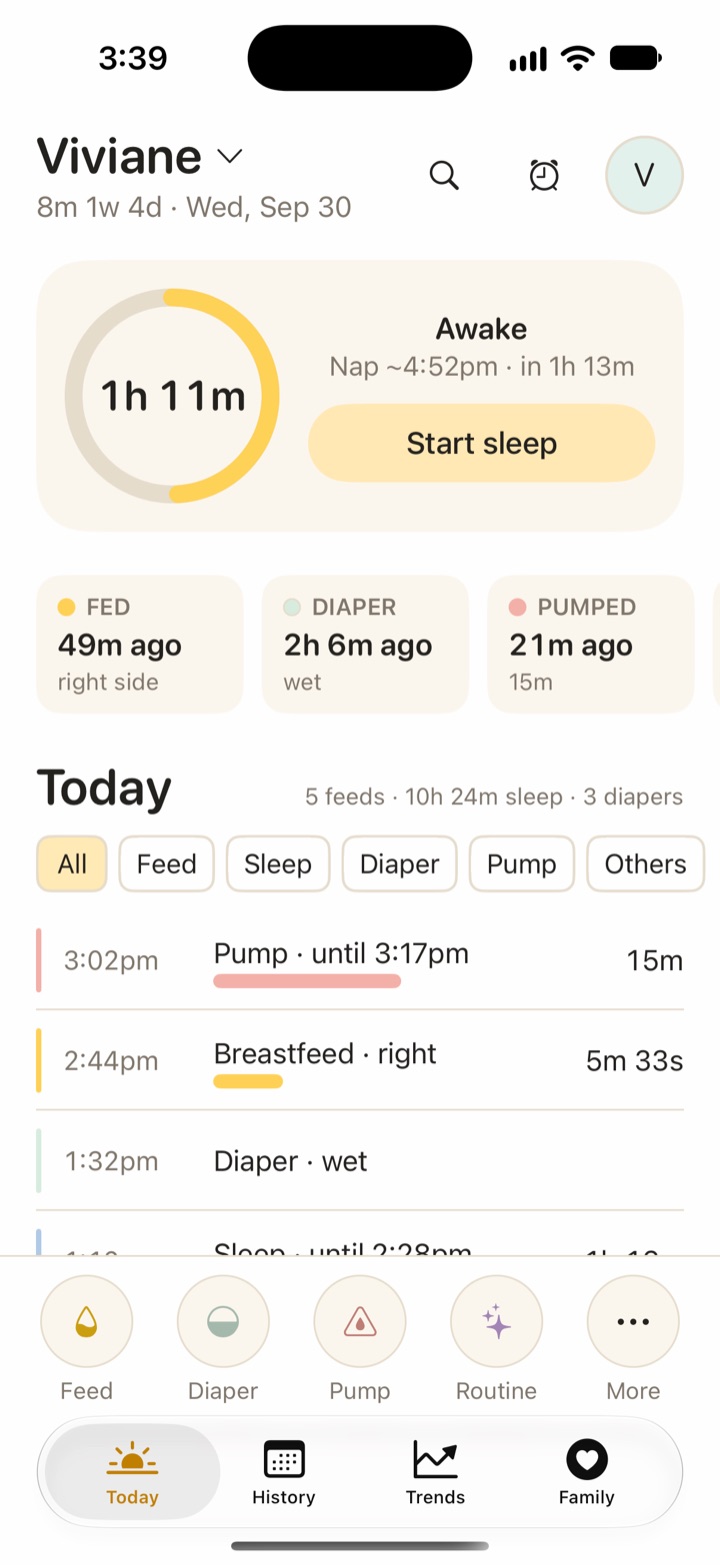
To learn more, read how baby sleep predictions work. Huckleberry also has sleep plans, and no Vivi feature matches them.
Apple Watch, widgets and Live Activities
Huckleberry’s help center says the Apple Watch app comes with Plus and Premium. It tracks sleep, nursing, bottle, pumping, diaper and potty. You can start and stop timers for sleep, nursing and pumping from the wrist, and they sync with the phone in real time. The Watch also shows Live Activity updates for SweetSpot and for when your baby last ate. The App Store page says the Watch app needs watchOS 10.2 or later. The pricing page words the Watch line differently and lists it under Premium, so check the plan at checkout.
Huckleberry’s widgets go on the Home Screen. They cover SweetSpot, sleep, feeding, diapers, pumping and solids, and they need Plus or Premium. Its help center says Lock Screen access comes from Live Activities instead. Those show a sleep timer, a nursing timer, SweetSpot and the last feed, also with Plus or Premium. They need iOS 16.1 or later, they work offline, and they support Dynamic Island. Vivi also has Lock Screen widgets.
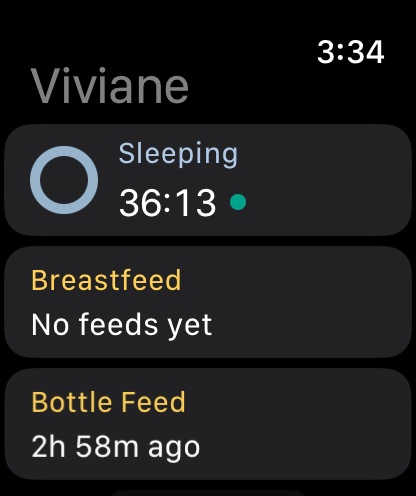
Vivi’s Watch app, widgets, Live Activities and Siri are all free. On the Watch you can run a sleep timer and left and right breastfeeding timers, start a pump timer, and log a diaper in one tap. You set a bottle amount with the Digital Crown. The Watch complication is a launcher icon, not a data display. Widgets show time since the last feed, sleep and diaper, and a sleep timer. The Live Activity shows a running timer on the Lock Screen and in Dynamic Island. See Vivi’s Apple Watch baby tracker for the steps.
Family sharing
Huckleberry: its help center says to sign in to your account on your partner’s phone. The app then syncs across devices while both are online. That article was several years old, so check that it still matches the app. The pricing page lists multi-device sync in the free plan.
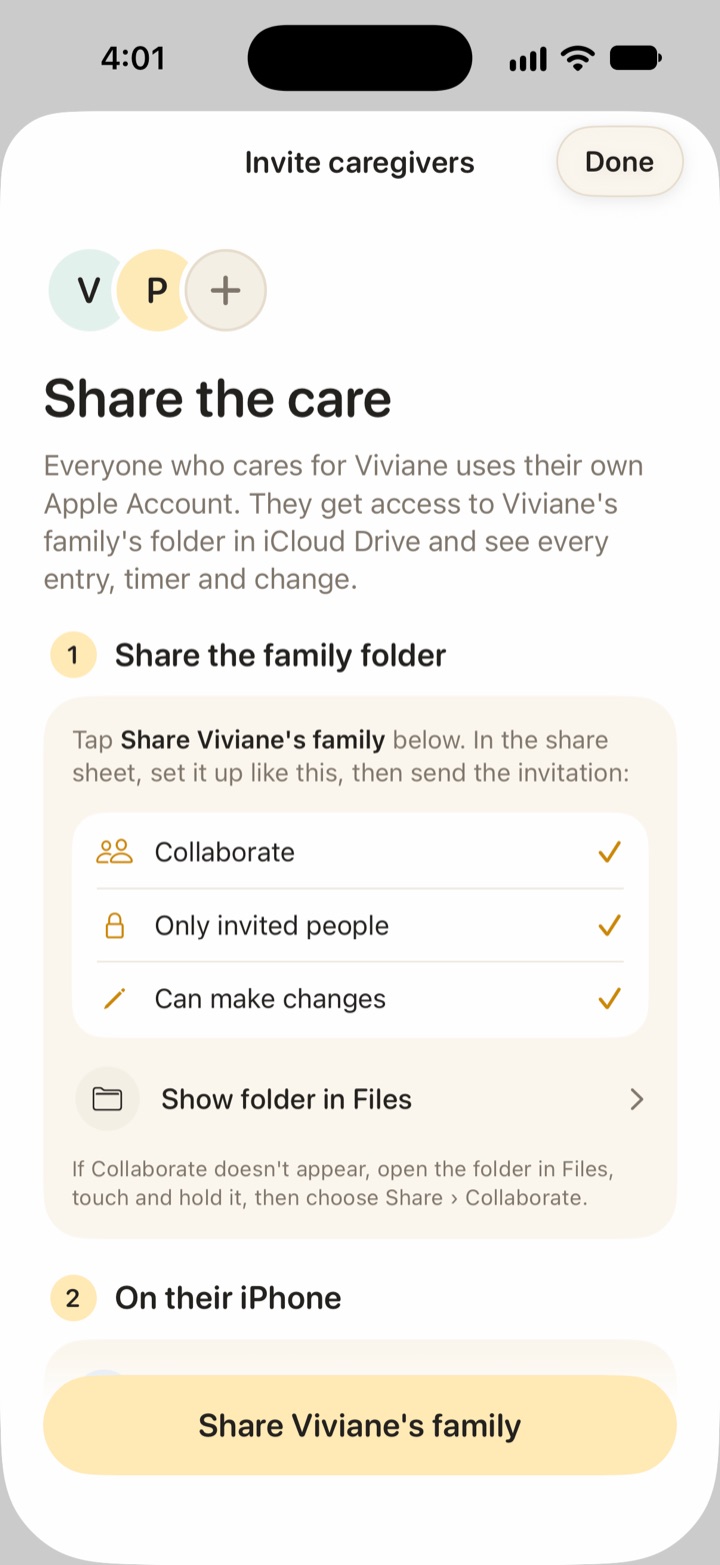
Vivi: you share the family folder in iCloud, set to “Only invited people”. The invited caregiver joins from onboarding with “Join a shared family”. Every invited caregiver can see, add, edit and delete everything in that folder, and there are no roles. A caregiver logs for free. Someone outside your Apple Family Sharing group needs their own subscription only for Plus features. Timers you start show on other phones, and a small relay run by Vivi carries that timer state. More in Vivi as a baby tracker for couples.
Privacy and data storage
In Vivi, your baby’s log is not uploaded to Vivi’s servers. Entries and photos sit in your family’s iCloud Drive, protected by your Apple account. There is no Vivi account, no ads and no tracking. One exception: a small relay run by Vivi carries anonymous timer state and encrypted Live Activity tokens, so a running timer shows on other devices.
Huckleberry keeps your log in its own service. The table below sets the two apps side by side. The Huckleberry column comes from its privacy policy and its App Store privacy label, both read on 2026-10-01.
| What each app says about your data | Vivi Baby | Huckleberry |
|---|---|---|
| What is collected | No Vivi account. The baby’s log is in your iCloud Drive and Vivi cannot see it. | Policy: your name, email and password, and your child’s name, birthdate, gender, time zone, sleep, feeding and bathroom data. It also records IP address, device details and in-app actions. |
| Where it is kept | Your own iCloud Drive. A small relay run by Vivi carries anonymous timer state. | Policy: servers “managed by us and hosted by several third party companies”. It may be stored or processed in the United States or other countries. |
| Advertising and analytics | No ads. No tracking. | Label: usage data “may be used to track you across apps and websites owned by other companies”, and analytics data is linked to you. Policy: it uses advertising networks to show ads on third party sites, and shares data with “web analytics services”. |
| Sale or sharing | We do not sell or share your baby’s log. We cannot: it is in your iCloud Drive and we have no access to it. | Policy: “we do not trade, rent, or share your Personal Information with third parties”, except as the policy states, such as service providers, legal demands and a sale of the business. It does not use the word “sell” for personal data. |
| Deletion | Delete the files in your iCloud Drive. The relay keeps only anonymous timer state, and timers expire after 48 hours. | Policy: email support@huckleberry-labs.com to request deletion. Some data may be kept if the law requires it, and anonymous data derived from your use is kept. |
| Policy date | Not applicable | Updated December 9, 2025 |
The App Store label lists health, contact info, photos or videos, identifiers, usage data and crash data as data linked to you. Read both documents before you enter your baby’s details.
Pricing
Huckleberry’s prices explained goes through each plan, the trial and how to cancel.
Huckleberry’s pricing page lists three levels:
- Free: basic tracking, reports and multi-device sync.
- Plus: SweetSpot predictions, Insights tips, Schedule Creator, Enhanced Reports, AI logging, widgets and the Apple Watch app.
- Premium: everything in Plus, plus Berry chat and custom sleep plans.
The pricing page shows Plus at $11.99 per month, or $5.74 per month billed yearly. It shows Premium at $14.99 per month, or $9.99 per month billed yearly. The App Store lists Plus at $11.99 per month and Premium at $14.99 per month. It lists Plus yearly at $58.99 or $68.99, and Premium yearly at $119.99. The two sources differ on yearly cost, so check the price at checkout. The pricing page offers two weeks of free access to paid features.
Vivi has one paid plan. Vivi Plus costs $4.99 per month or $44.99 per year. It adds Sleepy Time, Insights and Checkups. There is a 14-day free trial, and it starts only when you open a Plus feature and choose it. Everything else is free. Full terms are on the Vivi pricing page.
Sleep plans and the chat come only with Huckleberry Premium. If you want nap estimates only, compare Huckleberry Plus with Vivi Plus.
Import and export
For the full steps, see how to export your Huckleberry data.
Export from Vivi: you can export each child’s data as CSV. The Markdown files in iCloud Drive are also yours to copy. Saved checkups stay readable and exportable if Plus ends.
Export from Huckleberry: in the Huckleberry app, open the child profile, scroll down and tap Export tracking data as CSV, then tap Got it! Email it. Huckleberry emails a link to your account address. The link works for 24 hours, and you can request a new one. You get one CSV for each child.
Import into Vivi: Vivi reads a Huckleberry CSV. The file has one row per event with these columns: Type, Start, End, Duration, Start Condition, Start Location, End Condition and Notes. It has no child, caregiver or time zone, so Vivi asks you to pick all three before it writes the entries. Import is also available during onboarding. Vivi also reads Nara Baby and Baby Tracker CSV files. That helps if you’re leaving Nara, which now charges $9.99 a month or $99.99 lifetime once its 7-day trial ends. Without a plan, Nara lets you view and export but not log. Here are Nara Baby’s prices and trial terms.
Import into Huckleberry: We found no import option on Huckleberry’s pages.
Who should choose which app
Choose Huckleberry if:
- Anyone in your household uses Android.
- You want custom sleep plans or a 24/7 parenting chat.
- You want an iPad app, or a contraction timer.
- You have an Apple Watch that cannot run watchOS 26.
Choose Vivi Baby if:
- Everyone who logs uses an iPhone.
- You want the Watch app, widgets and Live Activities without paying.
- You want your baby’s log kept in your own iCloud Drive, without an account.
- You want nap estimates you can inspect, from rules and not AI.
- You are moving from another tracker and want to import your history.
Not sure? Vivi’s logging is free, so you can try it before you decide on Plus. Get Vivi Baby. For a wider view, see Huckleberry alternatives.
Frequently asked questions
Is Vivi Baby a good Huckleberry alternative?
It is if you use an iPhone and want logging, sharing, the Apple Watch app and widgets at no cost, with nap estimates as an optional paid add-on. It is not a match if you need Android, sleep plans or a parenting chat.
Is Vivi Baby cheaper than Huckleberry?
For logging, sharing, Watch and widgets, yes: they are free in Vivi. Huckleberry's help center says its Apple Watch app, widgets and Lock Screen updates come with a Plus or Premium membership. If you want nap predictions, both apps charge, so compare what each plan includes.
Can I move my Huckleberry data into Vivi Baby?
Yes. Vivi Baby can read a Huckleberry CSV export and write it into your family folder as entries. You choose the child, the caregiver and the time zone during the import, because the Huckleberry file does not include them.
Does Vivi Baby work on Android?
No. Vivi Baby is for iPhone and Apple Watch only. Huckleberry also has an Android app.
Does Vivi Baby need an account?
No. Your data is kept in your own iCloud Drive, so there is no Vivi account to create. iCloud Drive is needed only to sync and share. Without it, Vivi keeps your log on that iPhone.
Does Vivi Baby use AI for nap predictions?
No. Sleepy Time uses rules that run on your phone: a usual wake window for your baby's age, adjusted by your baby's recent pattern. It is an estimate, not a promise.
Do both parents need to pay?
In Vivi, no. A caregiver logs for free. Plus features follow the Apple subscription: one Vivi Plus subscription covers your Apple Family Sharing group, and someone outside that group needs their own for Plus features only.
Sources
- Nara Baby app FAQs (paid plans, trial, read-only)
- Huckleberry help: Can I export my data from the app?
- Huckleberry help: How do I share my account with a partner or caregiver?
- Huckleberry help: What can I track with Huckleberry on Apple Watch?
- Huckleberry help: How do the Apple Watch timers work?
- Huckleberry help: iOS Widgets FAQ
- Huckleberry help: Lock Screen Updates FAQ
- Huckleberry pricing
- Huckleberry privacy policy
- Huckleberry on the App Store
- Huckleberry home page
- Huckleberry: How sleep plans work
Details about other apps come from their own websites and app listings, and they change often. Found a mistake? Write to support@vivibaby.app and we will fix it.