
Apple Watch Baby Tracker: Log From Your Wrist
Vivi Baby has an Apple Watch app that logs sleep, breastfeeding, pumping, bottles and diapers from your wrist. Timers count on the Watch, entries go to your iPhone, and the other caregivers see them. It needs an iPhone (iOS 18 or later) and an Apple Watch (watchOS 26 or later), and it is free. The watch-face complication only opens the app.
What the Vivi Baby Watch app does
The Watch app is a short list of cards. Each card is one job. The first card is Sleep. The others follow the order of the Today log dock on your iPhone: Breastfeed, Bottle Feed, Pump and Diaper. Cards for things you removed from the dock still appear, after the ones you kept.
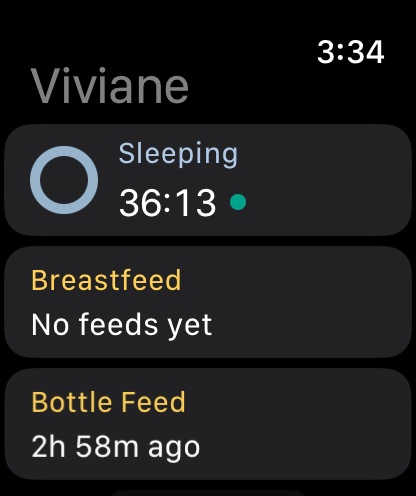
Each card shows what you usually check at 3 a.m.:
- Sleep shows a small ring, then “Woke” and the time since, or a live timer with a dot while the baby sleeps.
- Breastfeed shows the running timer and side, or the last side and how long ago.
- Bottle Feed shows time since the last feed.
- Pump shows time since the last session.
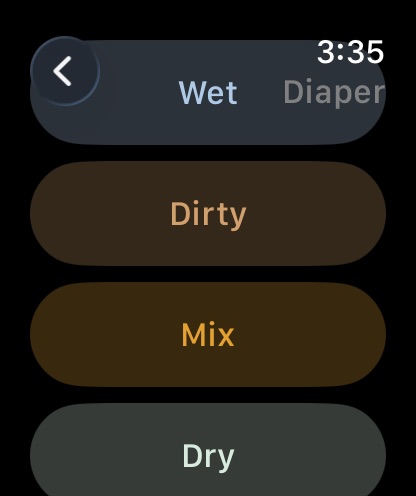
- Diaper shows time since the last change and its kind (wet, dirty, mix or dry).
The title of the list is your child’s name. If you have not opened Vivi Baby on the iPhone yet, the list says “Open Vivi Baby on your iPhone to connect.”
How to log each action on the Watch
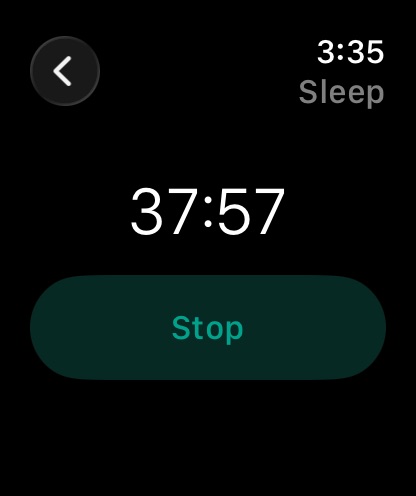
Sleep timer
- Tap the Sleep card.
- Tap Start. The Watch goes back to the list and the card shows a running timer.
- When the baby wakes, tap the card again and tap Stop.
The timer counts from the moment you tapped Start. On the iPhone, the stop saves the nap with that start and end.
Breastfeeding timer and side switch
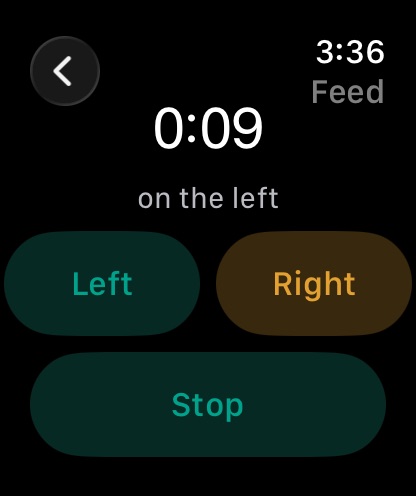
- Tap the Breastfeed card.
- Tap Left or Right. The timer starts on that side.
- To switch, tap the other side. The timer keeps running and the side changes.
- To pause, tap the side that is running. Tap it again to resume.
- Tap Stop to end the feed.
The screen shows the timer and “on the left” or “on the right” under it.
Vivi has a combo entry (breast and bottle together). The Watch cannot start one. It shows the timer of a combo feed that you started on the iPhone, and its Stop button ends that feed.
Pump timer
- Tap the Pump card.
- Tap Start.
- Tap Stop when the session ends.
The Pump screen tells you to add the amount on your iPhone. The Watch does not take pump amounts.
Bottle
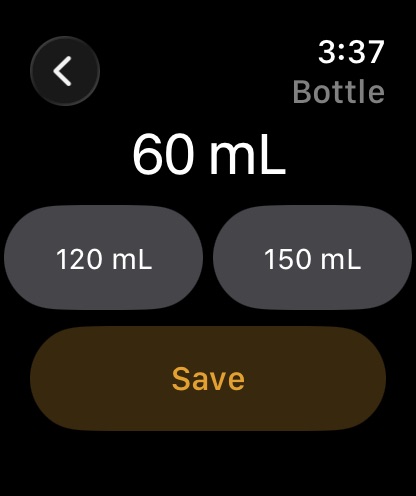
- Tap the Bottle Feed card.
- Turn the Digital Crown to set the amount. It moves in steps of 5 mL, from 5 to 300 mL. If your iPhone uses fluid ounces, the Watch shows fluid ounces.
- Tap Save.
Vivi also shows up to three recent bottle sizes as buttons. Tap one to log it at once, with no crown.
The entry is saved with the time you tapped. It does not record what was in the bottle (formula or breast milk). You can add that on the iPhone.
Diaper
Tap the Diaper card, then tap one button: Wet, Dirty, Mix or Dry. The entry is saved and the Watch goes back to the list. There is no Save step.
What syncs, and when
Every action on the Watch becomes a command. The Watch shows the change at once, so the card looks right without a wait. It sends the command to your iPhone. The iPhone writes the entry to the family’s folder in iCloud Drive, the same way it saves an entry you make on the iPhone.
Three details help when you are tired:
- The time is the Watch’s time. Each command carries the moment it happened. If it arrives late, Vivi still records the right time.
- Offline is fine. If the iPhone is asleep or out of range, the Watch queues the command and hands it over when it can. The list shows “waiting to sync” with a count, but only for about a minute. The queued command is still sent after that.
- A repeat does nothing. Each command has its own id. If the same one arrives twice, the second is ignored.
The Watch asks the iPhone for fresh data each time you open the app. If the “waiting to sync” line stays, open Vivi Baby on the iPhone once.
The Watch does not read the family folder itself. It shows a snapshot that the iPhone sends. That is why it needs the iPhone for everything, including the first connection.
Other caregivers
A timer you start on the Watch is saved as a timer on the iPhone, and Vivi shares it with the other caregivers. Vivi runs a small relay that carries anonymous timer state, so the timer can show on a partner’s phone. Your baby’s log is not uploaded to Vivi’s servers. For the full setup, see sharing a baby log with a partner.
Complication and Smart Stack
Vivi has a watch-face complication in three shapes: circular, corner and inline. It shows a moon icon and the name “Vivi Baby”. Tap it to open the Watch app. It shows no data, such as time since the last feed. A complication that shows data is not built yet.
Vivi’s timer Live Activity and the next-nap Live Activity both have a small layout made for the Watch. When a Live Activity runs on your iPhone, the Watch can show it in the Smart Stack. Turning Live Activities on or off is a per-child setting on the iPhone. The next-nap Live Activity comes from Sleepy Time, so it needs Plus. To see what the phone-side widgets do, read about Vivi Baby widgets.
What needs the iPhone
- The first connection, and every entry (the iPhone writes the file).
- Pump amounts.
- The contents of a bottle.
- Editing or deleting an entry, and changing a time.
- Starting a combo feed.
- Switching to another child. The Watch shows the child selected on the iPhone.
- Notes, health, growth and everything else outside the five cards.
What needs Vivi Plus
The Watch app, timers and Live Activities are free. Vivi Plus adds Sleepy Time. Only one part of the Watch depends on it: the sleep card shows the next-nap estimate line only with Plus. See pricing for the terms.
Sleepy Time is an estimate that runs as rules on the device. It is not medical advice.
Limits
- The Watch app is not a stand-alone tracker. Without the iPhone it queues entries and shows “waiting to sync”.
- The list shows one child at a time.
- No complication shows baby data yet.
- Bottle amounts use 5 mL steps.
- The queued “waiting to sync” line clears after a snapshot arrives from the iPhone or after a minute, so an old queue is not shown forever.
- Vivi does not work on Android or iPad.
For step-by-step help with night feeds, see how to track baby feeding with Apple Watch. For nap and night logging, see the Apple Watch sleep tracker page. For feed timers and bottles in more depth, see the Apple Watch feeding tracker page.
How other baby trackers handle the Apple Watch
This section uses each app’s own App Store listing or help pages, read on 2026-09-30. It says “not listed” where a page shows nothing. Each app can change its Watch support, so check the listing before you choose.
| App | Watch app requirement | What its pages say about the Watch |
|---|---|---|
| Vivi Baby | watchOS 26 | Cards for sleep, breastfeed, bottle, pump and diaper; launcher complication; Live Activities |
| Huckleberry | watchOS 10.2 | Tracks sleep, nursing, bottle, pumping, diaper and potty; timers sync with the phone in real time; needs Plus or Premium |
| Nara Baby | watchOS 8.1 | Live Activities, Siri, real-time updates between caregivers |
| Baby Tracker (Nighp) | watchOS 10.0 | “Record and review activities from Apple Watch”; Live Activities |
| Talli | Not listed | No Watch app listed in compatibility |
Huckleberry’s App Store listing states watchOS 10.2 as the Watch requirement. It says Live Activities are more reliable and that changes made from the Lock Screen or Siri sync across devices. A Huckleberry help article says that with an Apple Watch and notifications allowed, reminders reach your watch. We did not find an official page that lists the Watch screens or which actions you can log there. For a full comparison, see Vivi vs Huckleberry.
The Nara Baby listing says watchOS 8.1 or later, which is far lower than Vivi’s watchOS 26. It describes Live Activities that let you stop and start tracking without unlocking your phone. It also lists Siri commands for diapers, feeding, breastfeeding, pumping and sleep. It says you can use the app on multiple devices, including an Apple Watch. The listing does not describe the Watch screens. Keep in mind that Nara isn’t free anymore. After the 7-day trial it costs $9.99 a month or $99.99 lifetime, and without a plan you can only view and export. Nara Baby’s prices and trial explains the change, and Vivi vs Nara Baby compares the two apps in full.
The Baby Tracker listing by Nighp states watchOS 10.0 or later and says you can record and review activities from Apple Watch. Nighp’s FAQ says nothing about the Watch. The listing does not list which activities the Watch can log.
Talli’s App Store listing shows no Apple Watch or watchOS support in its compatibility list.
Vivi falls short in these ways. Nara Baby and Huckleberry run on older Watches, and Vivi needs watchOS 26. Vivi’s complication also shows no data, and its Watch app cannot work without the iPhone. The other apps’ pages do not say whether theirs can.
Try Vivi Baby on your wrist
The Watch app installs with Vivi Baby on the iPhone. Get Vivi Baby to log a night feed without picking up the phone.
Frequently asked questions
Can I log a baby's feed, nap and diaper from an Apple Watch?
Yes, in Vivi Baby. The Watch app has cards for sleep, breastfeeding, bottle, pump and diaper. Sleep, breastfeeding and pump use timers. Diapers take one tap. Bottles take a Digital Crown amount.
Does the Vivi Baby Watch app work without my iPhone?
Not on its own. The Watch sends each entry to the iPhone, which writes it to the family's log. If the iPhone is out of reach, the Watch queues the entry and delivers it later, with the time the entry happened.
Do I need to pay to use Vivi Baby on Apple Watch?
No. The Watch app, timers and Live Activities are free. Vivi Plus only adds the Sleepy Time next-nap estimate, Insights and Checkups. The estimate line on the Watch's sleep card needs Plus.
Which Apple Watch and iPhone do I need for Vivi Baby?
An iPhone with iOS 18 or later and an Apple Watch with watchOS 26 or later. Some features need a newer iPhone system: the running-timer bar above the tab bar needs iOS 26.1 or later.
Does the Vivi Baby complication show my baby's last feed?
No. The watch-face complication is a launcher. It shows an icon and opens the Watch app when you tap it. It shows no baby data.
Can a partner see a timer I start on my Watch?
Yes. A timer started on the Watch is saved on the iPhone and shared with the other caregivers. Vivi uses a small relay for anonymous timer state, so a running timer can show on their devices. Your baby's log is not uploaded to Vivi's servers.
Sources
- Nara Baby app FAQs (paid plans, trial, read-only)
- Huckleberry help: What can I track with Huckleberry on Apple Watch?
- Huckleberry help: How do the Apple Watch timers work?
- Huckleberry on the App Store (watchOS requirement, Live Activities)
- Huckleberry: how to set up reminders (Watch notifications)
- Nara Baby & Pregnancy Tracker on the App Store
- Baby Tracker - Newborn Log (Nighp) on the App Store
- Baby Tracker (Nighp) FAQ
- Talli Baby Tracker Newborn Log on the App Store