
Baby Sleep Tracker for Apple Watch
With Vivi Baby you can start and stop a baby’s nap or night sleep from your Apple Watch with one tap. The Watch shows a running timer, and the same timer appears on the iPhone Lock Screen and on a partner’s phone. Vivi does not sense sleep. It is a manual timer log.
This page covers sleep on the Watch. For the full Watch app, read Vivi Baby on Apple Watch. For feeding, read the Apple Watch feeding tracker page.
What you need
- An iPhone with iOS 18 or later, and an Apple Watch with watchOS 26 or later.
- Vivi Baby open once on the iPhone, so the Watch can connect to it.
- Nothing else. Sleep timers on the Watch are free.
Start and stop a sleep from the wrist
- Open Vivi Baby on the Watch. The Sleep card is at the top of the list.
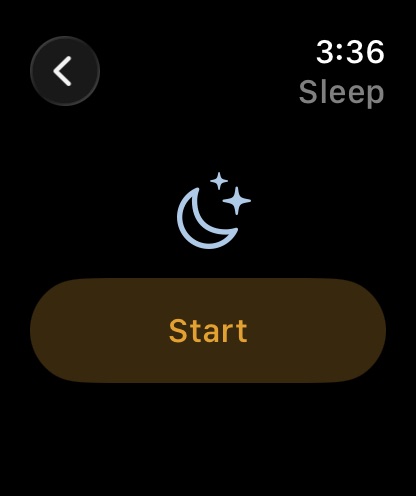
- Tap the Sleep card, then tap Start. The timer starts at that moment.
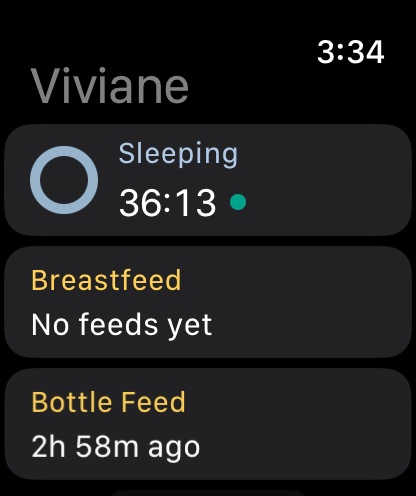
- The screen goes back to the list. The Sleep card now says “Sleeping” and counts up.
- When the baby wakes, tap the Sleep card, then tap Stop. Vivi saves the sleep.
The Watch gives your phone the exact time of each tap. If your phone is out of reach, the Watch keeps the command and shows how many are “waiting to sync”. When the phone is back, Vivi saves the sleep with the times you tapped, not the time it arrived. A command that arrives twice is applied once, so you do not get a double.
There is one sleep timer per child. If a sleep timer already runs, a second Start does nothing.
What the Watch shows while a sleep runs
- The Sleep card: the title changes to “Sleeping” and a large counter counts up. A small dot shows the timer is active.
- The Sleep screen: a big counter and one Stop button.
- A ring: on the list, a ring beside the Sleep card shows the same state as the Today screen on the iPhone. While a sleep runs it is a sleeping ring.
- Smart Stack: the sleep timer Live Activity also appears in the Apple Watch Smart Stack, when Apple chooses to show it. The Watch is always dark, so Vivi draws a dark card there.
When no sleep is running, the Sleep card shows how long ago the baby woke, or “No sleep yet”.
The sleep timer on the iPhone Lock Screen
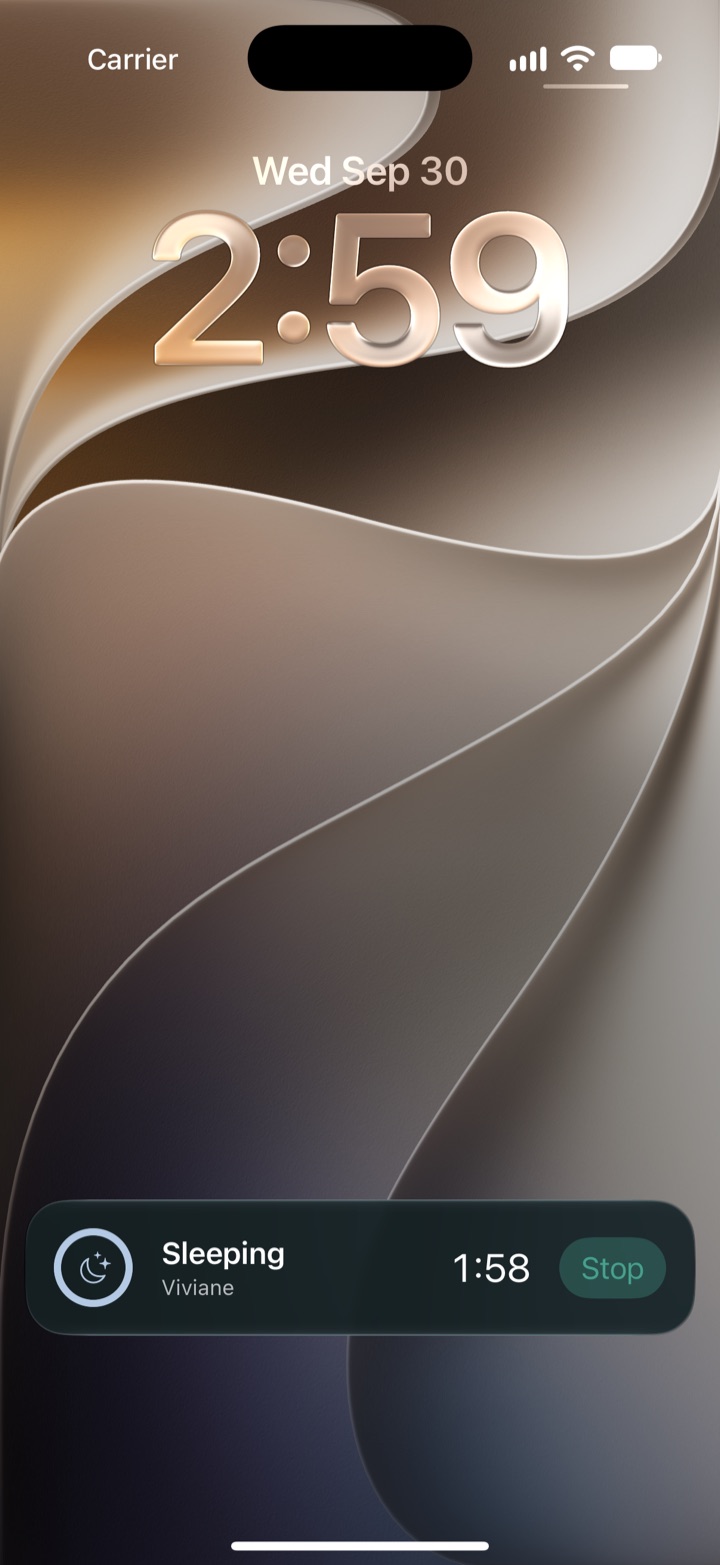
When a sleep timer starts, Vivi can show a Live Activity on the iPhone. On the Lock Screen it shows the child’s name, “Sleeping”, a running counter and a Stop button. In the Dynamic Island it shows a moon icon and a small counter. The counter runs on its own, so it stays right even when the app is closed.
You can turn this off for each child in the child’s settings (“Live Activity while timers run”). The setting is kept on that device only. It is not written to the family folder.
For more on the phone side, read Vivi Baby widgets and Live Activities.
How a partner sees the sleep
Caregivers who join the family share one folder in iCloud Drive. A small relay run by Vivi carries anonymous timer state, and encrypted Live Activity tokens, so a running timer can show on other phones. Your baby’s log is not uploaded to Vivi’s servers.
What that means at night:
- You tap Start on your Watch. Your partner’s iPhone can show the sleep timer on the Lock Screen.
- Your partner can tap Stop on their phone. That stop is meant to end the timer on your devices too.
- The other phone shows a timer before the saved file arrives, so a short delay can happen. Delivery depends on iOS, the network and iCloud. Vivi does not promise a delivery time.
Each person can switch Live Activities off for a child on their own phone. To split night duties, read how to share night feeds with your partner.
Night sleep and naps
You use the same Start button for both. Vivi sorts a sleep into night or day by itself, using the child’s Nighttime Hours in the child’s settings. The default is 7 pm to 7 am. A sleep counts as night sleep when more than half of it is inside those hours. A short sleep at 6:50 pm is a nap in the log. An 8 pm sleep that runs to 6 am is a night.
Night hours change three things:
- The shaded night band in the History grid and the Trends timelines.
- The day and night split in Trends.
- The Sleepy Time estimate, which is Plus. It uses night hours to tell naps from night sleep.
Set night hours to match your house. If bedtime is 8 pm, move the start to 8 pm.
What the Watch cannot do
The Watch starts and stops. It does not edit, and it does not show history.
| Task | Apple Watch | iPhone |
|---|---|---|
| Start a sleep | Yes | Yes |
| Stop a sleep | Yes | Yes |
| Change the start time of a running sleep | No | Yes |
| Change the start or end of a saved sleep | No | Yes |
| Add a sleep you forgot to start | No | Yes |
| Add a note or a photo to a sleep | No | Yes |
| Delete a sleep | No | Yes |
| See past sleeps | No | Yes |
If you forget to tap Start, do not guess on the Watch. Open the sleep on the iPhone and set the real start time. If the baby woke long ago and you forgot to tap Stop, edit the end time on the iPhone. The sleep editor also lets you clear an end time and start the timer again.
The sleep editor also warns you when a running timer looks forgotten.
Sleep history
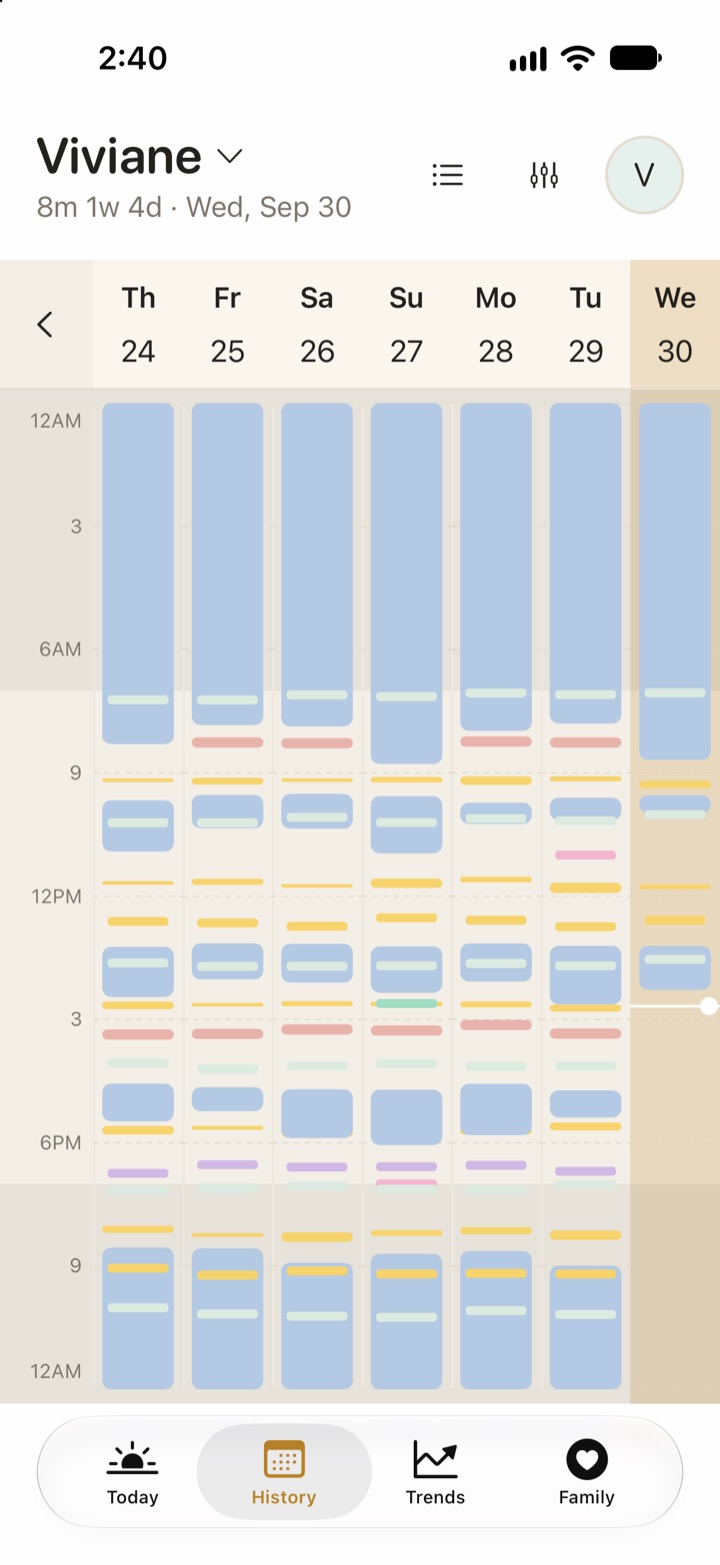
Sleep history is on the iPhone. The History tab shows sleeps in a list or in a week grid. The grid draws each sleep on a day timeline, with the night hours shaded. Trends show sleep patterns over days and weeks. History and Trends are free. To compare your baby’s totals with the official ranges, see how much sleep a baby needs, by age.
Free and Vivi Plus
Free:
- Start and stop sleep on the Watch, iPhone, widgets and Siri.
- The Live Activity on the Lock Screen and Dynamic Island.
- Sharing with caregivers.
- History and Trends.
Vivi Plus adds Sleepy Time: an estimate of the next nap or bedtime. It runs as rules on the device. It is not AI, and it is an estimate, not a promise. The Plus price is $4.99 per month or $44.99 per year, with a 14-day free trial. The trial starts only when you open a Plus feature and choose it. One subscription covers your Apple Family Sharing group. See Vivi Plus pricing for the terms.
The Watch does show one Plus item. When no sleep is running and Plus is active, the Sleep card can show a line with the next nap or bedtime estimate. Without Plus, the Watch does not show any estimate. The estimate also does not show while the baby sleeps, and at night Vivi waits until the morning wake. For how the estimate works, read Sleepy Time and baby sleep predictions.
What to look for in a baby sleep tracker
Manual timers or sensors. A manual timer records what you saw. A sensor tries to measure it. A manual log is simple, and you decide what counts as asleep. Pick the type that matches what you want to do with the data.
A fast way to start. At 3 am you need one tap. Check that the Watch or a widget can start the timer without opening the phone.
Editing. You will forget to tap sometimes. Check that you can fix start and end times afterwards.
Wake windows. If you want wake-window help, check what it needs (paid plan or not), and whether the app says it is an estimate. Wake-window numbers are not set by a medical body.
Sharing. Check that two caregivers see the same running timer, and how each app stores the log.
Night hours. Check that the app splits day and night in a way you can set.
How other apps handle Watch sleep
We read each app’s own pages on 2026-09-30. “Not listed” means the page does not say.
| App | Apple Watch | Sleep timer on the Watch | Live Activity | What the page says about cost |
|---|---|---|---|---|
| Vivi Baby | watchOS 26 or later | Start and stop | Yes, on iPhone and Smart Stack | Free. Estimates are Plus |
| Huckleberry | Supported (watchOS 10.2 or later) | Yes: start and stop sleep timers, synced with the phone | Lock Screen sleep timer; on the Watch, SweetSpot and last feed | Help centre: the Watch app needs Plus or Premium |
| Nara Baby | Supported (watchOS 8.1 or later) | “Stop and start tracking” from the Watch | Live Activities listed | 7-day trial, then $9.99 per month or $99.99 lifetime (Nara FAQ). No free tracking after the trial |
| Baby Tracker by Nighp | Supported | Not listed | Not listed | Core tracking free. Watch tier not listed |
| Talli | Not listed | Not listed | Not listed | Premium subscription |
Huckleberry offers SweetSpot nap predictions in its Plus and Premium memberships. That is a real strength. See the Vivi and Huckleberry comparison. Baby Tracker by Nighp lists Android and iPad as well as iPhone. Vivi is iPhone and Apple Watch only, with no Android and no iPad.
Limits
- Vivi does not measure sleep. It cannot tell you the baby is asleep, awake or breathing.
- The Watch needs the iPhone. It does not save sleeps on its own. It sends them to the phone, and the phone writes the file.
- The Watch app shows what the phone last sent. Open Vivi Baby on the iPhone if it says to connect.
- The Watch does not edit, delete or show history.
- Sleepy Time is an estimate, and it needs Vivi Plus.
- Live Activities depend on iOS. They can be delayed or dismissed.
- Vivi is not medical advice. It does not diagnose sleep problems. Talk to your child’s doctor if you are worried about sleep or breathing.
Frequently asked questions
Can I start a baby's nap from my Apple Watch?
Yes. In Vivi Baby, open the Sleep card on the Watch and tap Start. Tap Stop when the baby wakes. The Watch sends the start and stop time to your iPhone, which saves the sleep.
Does Vivi Baby track sleep with sensors?
No. Vivi is a manual timer log. You start and stop the timer, or add a sleep by hand on the iPhone. It does not measure breathing, heart rate or sleep stages.
Can I edit a sleep on the Apple Watch?
No. The Watch starts and stops sleep only. To change a start time, an end time or a note, or to add a sleep you forgot, open the sleep on your iPhone.
Does my partner see the sleep timer on their phone?
Yes, if they are a caregiver in the same family and Live Activities are on for that child. A running sleep timer can show on their Lock Screen and Dynamic Island. Your baby's log is not uploaded to Vivi's servers.
Do I need Vivi Plus to track sleep on the Watch?
No. Sleep timers, the Watch app, Live Activities and sleep history are free. Vivi Plus adds Sleepy Time, the next nap and bedtime estimate.
How does Vivi decide if a sleep is a nap or night sleep?
Vivi compares the sleep with the child's Nighttime Hours. A sleep counts as night sleep when more than half of it falls inside those hours. The default is 7 pm to 7 am, and you can change it.
Sources
- Huckleberry help: What can I track with Huckleberry on Apple Watch?
- Huckleberry help: How do the Apple Watch timers work?
- Huckleberry pricing (plan features)
- Huckleberry on the App Store
- Nara Baby & Pregnancy Tracker on the App Store
- Baby Tracker by Nighp on the App Store
- Baby Tracker by Nighp website
- Talli Baby Tracker on the App Store