
Is Nara Baby Still Free? Prices and Trial
No, Nara Baby is not free anymore. Nara’s FAQ answers “Is Nara Baby a paid app?” with yes. You get a 7-day free trial, and after that it costs $9.99 per month or $99.99 once for a lifetime plan. Without a plan you can still view and export your data, but you cannot add new entries.
Your history is not lost when the trial ends, because export keeps working. Below are the prices, what happens when the trial ends, how to export, and your options. We checked Nara’s own pages on 2026-10-04.
Nara Baby prices and trial
| What Nara’s pages say | |
|---|---|
| Price to download | Free, with in-app purchases (App Store) |
| Free trial | 7 days with full access. It starts when you log your first track |
| Payment details for the trial | Not needed until you subscribe |
| Monthly plan | $9.99 per month |
| Lifetime plan | $99.99 once. It covers your family for the lifetime of the app, including children you add later |
| Who one plan covers | Your whole caregiver circle: partners, grandparents, babysitters |
| After the trial, with no plan | View and export only. No new entries |
| Free tracking tier | None listed |
Prices are in US dollars. The lifetime plan costs about the same as ten months of the monthly plan.
The App Store lists different in-app prices for the same plans: monthly at $6.99 and $9.99, and lifetime from $49.99 to $99.99. Nara’s second FAQ page mentions “occasional promotions offered to qualifying users”, which may explain the lower prices, but neither page says so. Check the price in the app at checkout.
Nara’s FAQ doesn’t say when the change reaches families who used Nara before it had a paywall. The app, or Nara’s support, can tell you when your own trial ends.
What happens when the trial ends
Nara’s FAQ says you won’t be charged when the 7 days are up unless you choose a plan. Instead, the family goes read-only.
- Everyone can still open the app and view the history.
- Everyone can still export the data.
- Nobody can log a new activity until someone in the family subscribes.
So if you want to keep logging without a gap, decide before the 7 days are up.
Export your Nara data now
Exporting is free, and it still works after the trial ends. It is worth doing now even if you plan to stay, so you have your own copy.
Nara’s FAQ gives these steps:
- Open Nara Baby and go to the main Activity screen.
- Tap the avatar icon next to your child’s name.
- Tap Export Data.
- Save the CSV file somewhere you can reach from your iPhone, such as the Files app.
Repeat this for each child. The export is per child, so twins or siblings mean one file each.
The CSV does not include photos, reminders, hidden activities or nighttime hours. Save any photos from inside Nara yourself before you stop using it.
For more detail on the file and what to check in a new app, read how to export your Nara data and switch.
Your three options
1. Pay for Nara
If Nara does everything you need, paying is a fair choice. One plan covers every caregiver you invited, and the lifetime plan means you pay once. Families with an Android phone in the mix, or who use Nara’s pregnancy and postpartum tracking, have the most reason to stay.
2. Keep Nara as a read-only archive
You can stop paying and keep Nara installed. Your old entries stay viewable and exportable. You would log new entries in another app, so your baby’s history ends up split between two places. That can be awkward when a doctor asks about the past month.
3. Move to another app
Export the CSV and import it into an app that reads it. You keep one continuous history. Not every app can read a Nara file, so check before you commit. Our list of Nara Baby alternatives compares six apps on price and platforms.
How Vivi Baby imports a Nara export
Vivi Baby is our app, so keep that in mind as you read this part. It runs on iPhone (iOS 18 or later) and Apple Watch (watchOS 26 or later). There is no Android or iPad version.
Vivi reads the Nara CSV directly:
- In Vivi, open the Family tab and tap the gear icon to open Preferences. In the Import section, tap Import from Nara Baby. New users can also choose this during setup.
- Pick the CSV file you saved from Nara.
- Check the preview. It shows how many entries of each type the file holds and the date range.
- Map each Nara child to a new child or one you already have, and set nighttime hours, because Nara does not export them.
- Map each Nara caregiver name to a caregiver in Vivi, so entries show who saved them.
- Tap Import.
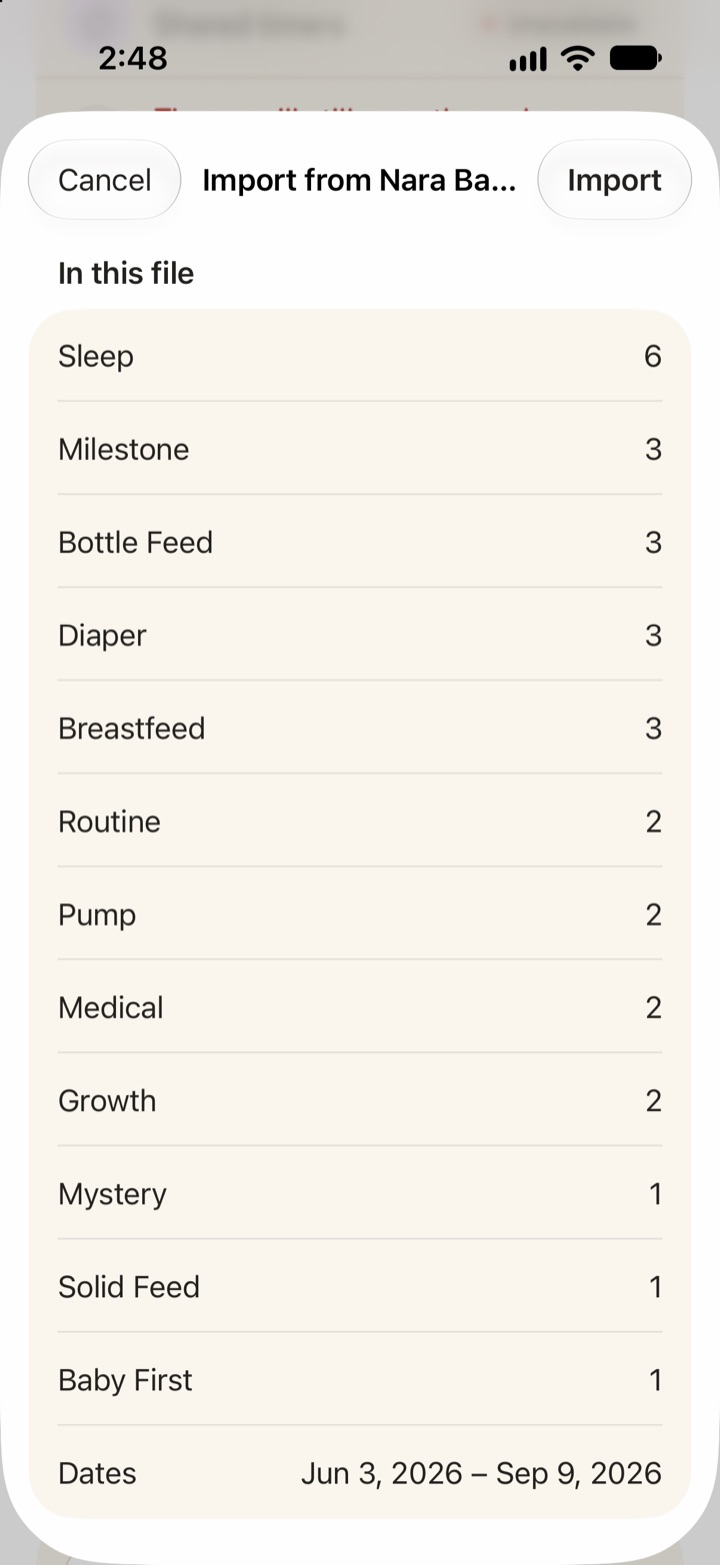
What comes across: sleep, breastfeeding, bottle and combination feeds, solids, pumping, diapers, routines, growth, medical, vaccines, milestones, firsts, journal, teeth and checkups. Photos and reminders do not, because they are not in Nara’s file.
You can import again later, for example after a few more days in Nara while you decide. Entries already in Vivi are recognized and not duplicated, and entries you edited in Vivi keep your edits.
Logging in Vivi Baby is free with no trial limit: feeds, sleep, diapers, pumping, growth, health and more, plus sharing with caregivers, the Apple Watch app, widgets, and import and export. Vivi Plus is optional. It adds Sleepy Time (an estimate of the next nap and bedtime), Insights and Checkups for $4.99 per month or $44.99 per year, and its 14-day free trial starts only when you open a Plus feature and choose it. See Vivi Baby pricing.
There is no account to create. Your entries are files in your family’s own iCloud Drive, and your baby’s log is not uploaded to Vivi’s servers. Read more about a baby tracker with no account.
What Nara Baby does better
Nara is ahead of Vivi on four points:
- Android. Nara’s FAQ says it runs on iOS and Android. Vivi is iPhone and Apple Watch only, so a caregiver with an Android phone cannot use it.
- One plan for every caregiver. Nara’s single payment covers everyone you invited. Vivi’s free features work for every caregiver, but Vivi Plus covers only your Apple Family Sharing group. Someone outside that group needs their own subscription for Plus features.
- A lifetime plan. Nara sells one. Vivi Plus is monthly or yearly.
- Pregnancy and postpartum. Nara’s app page lists pregnancy tracking and postpartum recovery. Vivi tracks the baby only.
For the full side-by-side, read Vivi Baby vs Nara Baby.
Which option fits your family
- Anyone in the family uses Android, or you want pregnancy tracking: stay with Nara and pick the plan that fits your budget.
- You want to stop paying but may need the history: export now and keep Nara as an archive.
- Everyone uses an iPhone and you want free logging: export each child’s CSV and import it into Vivi.
Whatever you choose, export each child’s file first.
Get Vivi Baby and import your Nara history.
Frequently asked questions
How much is a Nara Baby subscription?
Nara's FAQ lists $9.99 per month, or $99.99 once for a lifetime plan, in US dollars. The App Store shows several in-app prices for the same plans, so check the price in the app before you pay.
Does Nara Baby have a lifetime plan?
Yes. Nara's FAQ lists a one-time lifetime plan at $99.99. It says the plan covers your family for the lifetime of the app, including children you add later.
Do I need a credit card to start the Nara Baby trial?
No. Nara's FAQ says you do not give payment details until you subscribe. The 7-day trial starts when you log your first track.
Will Nara Baby charge me automatically when the trial ends?
No. Nara's FAQ says you are not charged unless you actively opt in. Without a plan, the app lets you view and export your data but not add new entries.
Does one Nara Baby plan cover my partner and other caregivers?
Yes. Nara's FAQ says one payment covers your whole caregiver circle, including partners, grandparents and babysitters you already invited.
Can I import Nara Baby data into another app?
Yes. Vivi Baby, an iPhone and Apple Watch tracker, imports the CSV file that Nara's Export Data button creates. It shows a preview first, and importing the same file again does not create duplicates.
Sources
- Nara Baby app FAQs (paid app, prices, trial, read-only, export)
- Nara Baby tracker FAQ (promotions, trial charges, read-only)
- Nara Baby & Pregnancy Tracker on the App Store (in-app purchase prices)
- Nara Baby & Mom Tracker app page
Details about other apps come from their own websites and app listings, and they change often. Found a mistake? Write to support@vivibaby.app and we will fix it.