
How to Export Your Nara Baby Data and Switch
Nara Baby isn’t free anymore. After a 7-day free trial you need a plan, $9.99 per month or $99.99 lifetime, to add new entries. Without one you can still view and export what you logged. Export your history now, one file per child. Then you can pay, keep Nara as an archive, or move to another app such as Vivi Baby.
What Nara’s pages say about the trial and plans
We read Nara’s own pages on 2026-10-04. Its FAQ answers “Is Nara Baby a paid app?” with yes. For a short answer on prices and the lifetime plan, see is Nara Baby still free?.
- Nara’s FAQ describes a 7-day free trial with full access. It starts when you log your first track. You do not give payment details until you subscribe.
- If you do not subscribe after the trial, the app becomes read-only. The FAQ says you can still view and export your existing tracking data, but you cannot add new tracking.
- The FAQ lists a monthly plan at $9.99 and a lifetime plan at $99.99, which also covers children you add later. The App Store listing shows several in-app purchase tiers: monthly at $6.99 and $9.99, and lifetime from $49.99 to $99.99. The FAQ and the listing do not match, so check the price in the app before you buy.
- One payment covers your whole caregiver circle, meaning everyone already invited to your app family.
We could not confirm how the change applies to existing users. Nara’s FAQ does not say when it reaches them. Nara’s app or support can tell you when your own trial ends.
Your data stays viewable and exportable, so there is no deadline to save it. If you want to keep adding entries, decide before your trial or free access ends.
Your options
You have three choices.
- Keep Nara and pay. This makes sense if you like the app and the price is fine for your family. One subscription covers everyone in your Nara family.
- Keep Nara as a read-only archive. Your old entries stay visible and exportable. You would log new entries somewhere else, so your history ends up split in two places.
- Move to another app. Export a CSV from Nara and import it. You keep one continuous history. Vivi Baby is one app that can do this. Our list of Nara Baby alternatives covers the other choices.
Before you choose, read the checklist further down.
How to export your history from Nara Baby
Nara’s FAQ gives these steps.
- Open Nara Baby and go to the main Activity screen.
- Tap the avatar icon next to your child’s name.
- Tap Export Data.
- Nara saves your data into a CSV file. Save that file somewhere you can reach from your iPhone, such as the Files app.
Do this for each child if you have more than one profile. Export first, even if you have not decided where to go. It is free and it works after the trial ends.
The CSV does not hold photos, reminders, hidden activities or nighttime hours. Save photos from inside Nara before you delete anything.
How to bring your Nara history into Vivi Baby
Vivi Baby reads the Nara CSV directly. Vivi Baby is for iPhone and Apple Watch, so you need an iPhone to import.
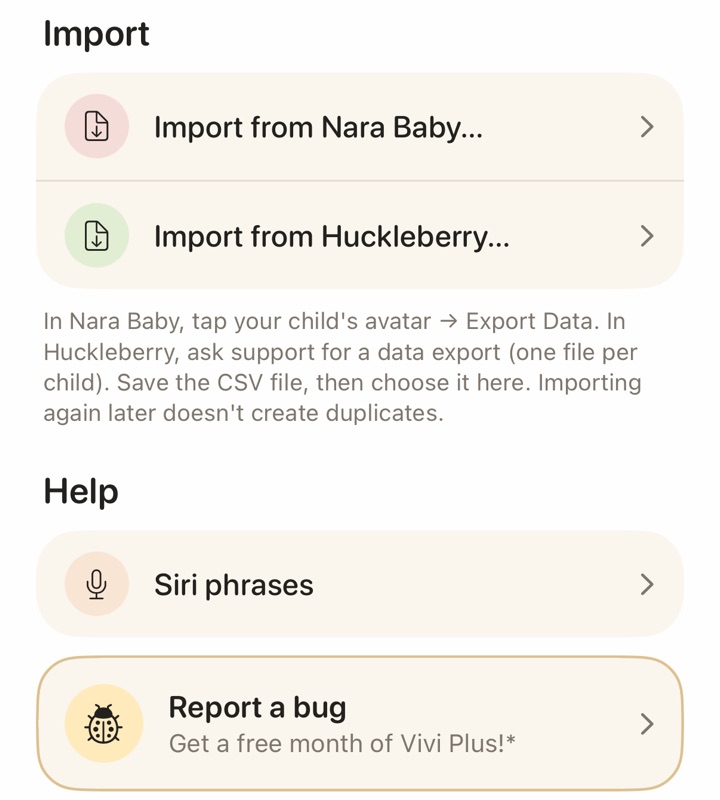
- In Vivi Baby, open the Family tab and tap the gear icon to open Preferences.
- In the Import section, tap Import from Nara Baby. New users can also pick this option while they set up the app.
- Choose the CSV file you saved from Nara.
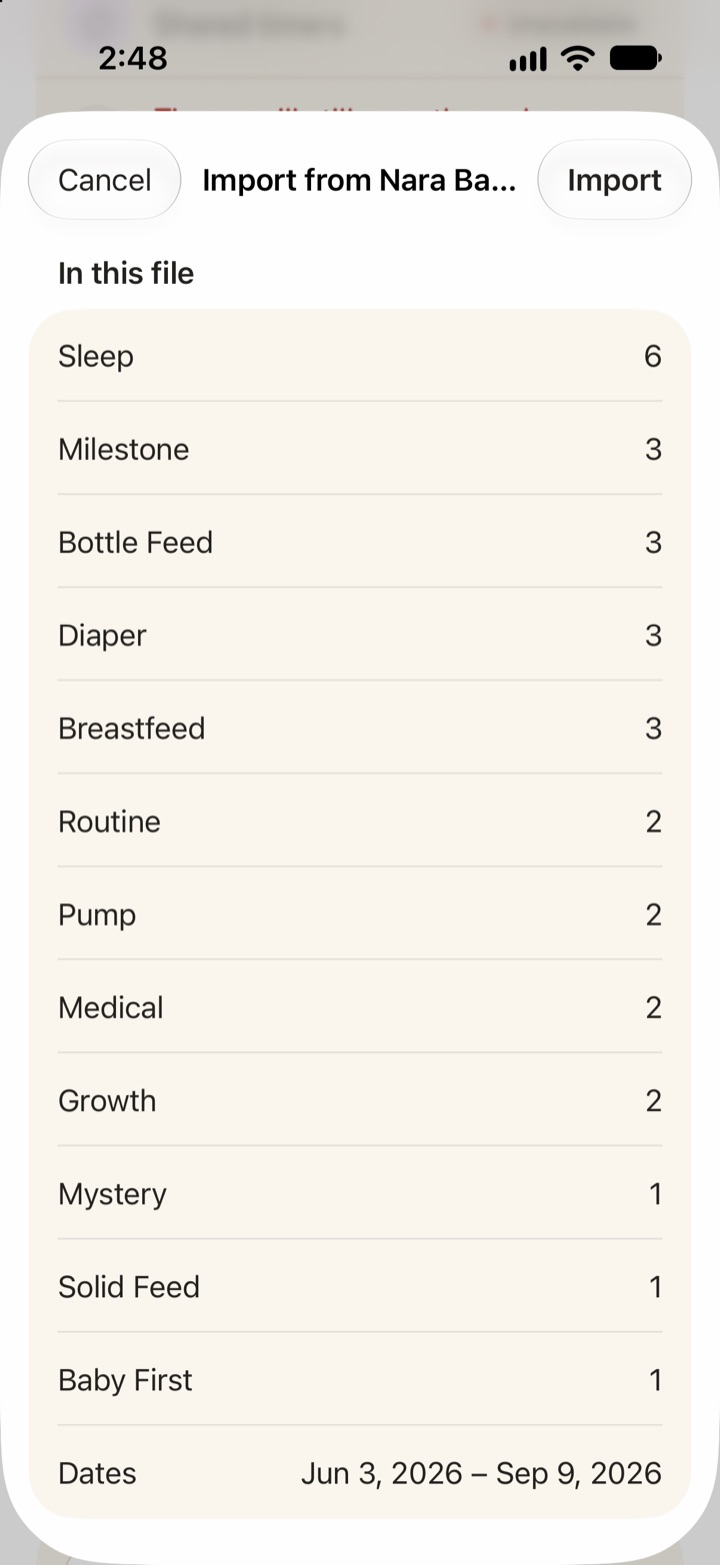
- Review the preview. It shows how many entries of each type the file holds and the date range they cover.
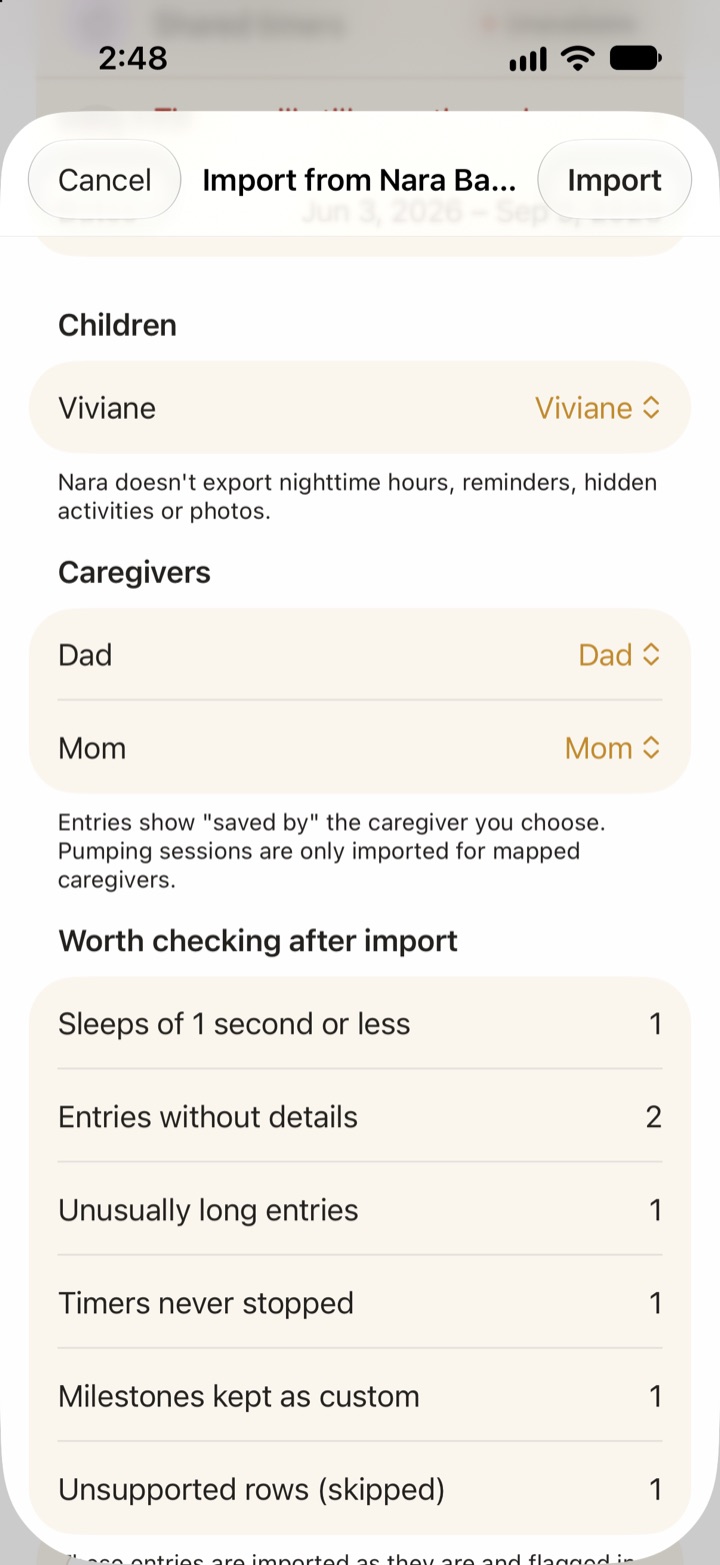
- Choose whether to create a new child or add the entries to a child you already have. Set nighttime hours, because Nara does not export them.
- Match each Nara caregiver name to a Vivi caregiver, or leave it unmapped.
- Read the “Worth checking” list, then tap Import.
What gets imported
Vivi imports these Nara entry types: sleep, breastfeeding, bottle feeds, combo feeds, pumping, diapers, routines, solid feeds, growth, medical, vaccines, milestones, baby firsts, journal entries, teeth and checkups. It also creates the child from the Nara profile, with name, sex and birth date. If Nara holds an adjusted birth date, Vivi keeps it as the adjusted age.
Pumping sessions come in only for caregivers you have mapped. Milestones that do not match one of Vivi’s milestones stay as custom entries, and details that have no field are kept in the entry’s note.
What is not imported
Nara’s export does not carry nighttime hours, reminders, hidden activities or photos, so those do not come across. Rows with a type Vivi does not support, and rows it cannot read, are skipped. The preview lists them before you commit.
Duplicates and repeat imports
Every imported entry gets a stable identity from the Nara data. In practice:
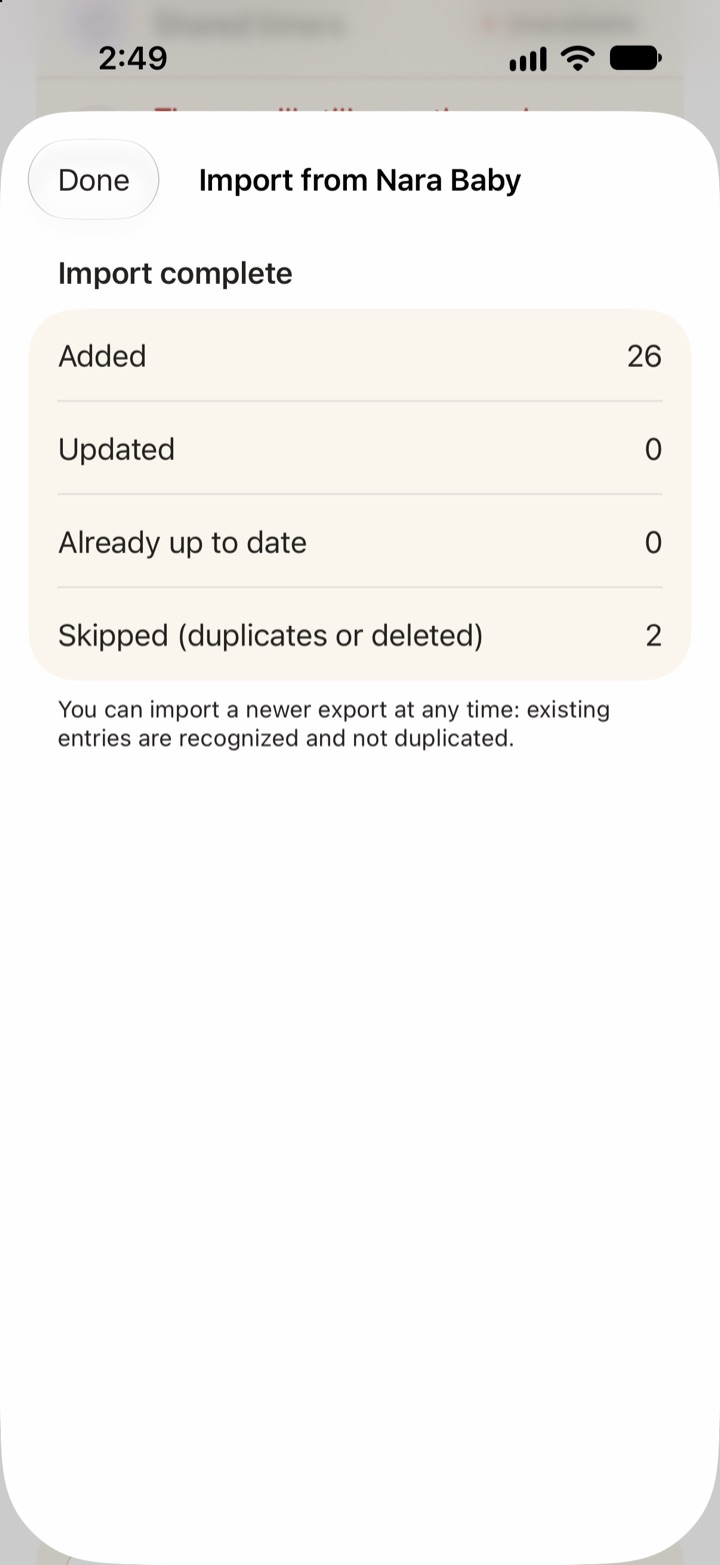
- Importing the same file twice does not create copies. Entries that match are counted as already up to date.
- You can import a newer export later, for example after a few more weeks in Nara. New entries are added and existing ones are recognized.
- If you edited an imported entry in Vivi, your edit is kept. If you did not, the newer file version replaces it, and Vivi saves the old version in your family folder under imports.
Vivi also looks for entries you tracked in both apps. If the file holds an entry of the same kind within 10 minutes of one already in Vivi, it lists it as a possible duplicate and skips it by default. You can turn that off. Entries you deleted after an earlier import stay deleted unless you switch on the restore option.
Flags and limits
Some rows import as they are but get flagged in History: timers that never stopped, sleeps of one second or less, unusually long entries, and entries with no details. Vivi saves a full list in the family folder under imports. Vivi also warns you if the file has entries before the child’s birth date, which usually means the wrong child, or if you already imported this file into a different child. Twins are the main case for that warning.
A large import can take a while. Keep Vivi Baby open and unlocked until it finishes. If the app closes, import the same file again to finish. Nothing is duplicated.
What to check in any replacement
Check these before you move to any app.
- Check that it reads Nara’s CSV. If not, you start with an empty history.
- Check that logging itself is free, and not only a trial again. Nara’s trial is the reason to ask.
- Check that partners and grandparents can log, and whether each of them must pay.
- Ask who holds your baby’s log and whether you can export it. See our note on private baby trackers.
- Check whether you must create an account. Vivi works without one, as explained on the no-account tracker page.
- Nara also runs on Android. Vivi Baby does not.
- Check that you can leave again. Vivi can export your data too.
What Vivi Baby offers
Logging is free in Vivi Baby: feeds, sleep, diapers, pumping, growth, health, vaccines, teeth, firsts, journal and routines. So are History, Trends, search, sharing with caregivers, live timers, Apple Watch, widgets, Live Activities, Siri, and import and export. Invited caregivers can see, add, edit and delete everything in the shared family folder.
Entries are stored as Markdown files with YAML front matter, plus photos, in your family’s own iCloud Drive. There is no account, no ads and no tracking. One exception: a small relay run by Vivi carries anonymous timer state, and encrypted Live Activity tokens, so a running timer shows on other devices. Your baby’s log is not uploaded to Vivi’s servers.
Vivi Plus adds Sleepy Time (an estimate of the next nap and bedtime), Insights and Checkups. It costs $4.99 per month or $44.99 per year, and the 14-day free trial starts only when you open a Plus feature and choose it. Vivi Plus supports Apple Family Sharing, so one subscription covers your Apple Family Sharing group. Someone outside that group logs for free and needs a subscription only for Plus features. See Vivi Baby pricing for the details.
Nara does better in one way: it also runs on Android. If your partner uses Android, Vivi will not work for them. The full list of differences is in Vivi Baby compared with Nara Baby.
Screenshots
What to log first in a new app
If your baby is a newborn, you do not need every feature on day one. Feeds, sleep and diapers are a good place to start. What to track in the newborn weeks explains what is worth the effort and what can wait.
Summary
Coming from another app instead? Here’s how to export Baby Tracker data and how to export Huckleberry data.
Nara Baby now needs a paid plan to add new entries after the trial, and your old data stays viewable and exportable. Export your CSV now, then decide: pay, keep Nara as an archive, or import into an app you prefer. If you pick Vivi Baby, you can run the import again later without creating duplicates.
Frequently asked questions
Nara Baby has a paywall now. What should I do?
Export a CSV for each child first, since export stays free. Then choose: pay Nara ($9.99 per month or $99.99 lifetime, per its FAQ), keep Nara as a read-only archive, or import the CSV into another app.
What happens when my Nara Baby trial ends?
Nara's FAQ says you are not charged unless you choose a plan. You can still view and export everything you logged, but you cannot add new entries until you subscribe or buy the lifetime plan.
How do I export my history from Nara Baby?
On the main Activity screen, tap the avatar icon next to your child's name, then tap Export Data. Nara saves the data as a CSV file.
Can I import Nara Baby data into another app?
Yes, into Vivi Baby. It imports a Nara Baby CSV file from Preferences, and it can ask you to map Nara caregivers to Vivi caregivers. Importing the same file again does not create duplicates.
Does Vivi Baby charge for logging?
No. Logging, History, Trends, sharing with caregivers, Apple Watch, widgets and import and export are free. Vivi Plus adds Sleepy Time, Insights and Checkups for $4.99 per month or $44.99 per year, and it starts with a 14-day free trial.
Does the Nara import bring in photos or reminders?
No. Nara's export does not include photos, reminders, hidden activities or nighttime hours, so Vivi cannot import them. Save your photos from Nara yourself.
Sources
- Nara Baby FAQ (trial, subscription, export)
- Nara Baby tracker FAQ (second page: plans, read-only)
- Nara Baby App Store listing
- Nara Baby and Mom Tracker (nara.com)
Details about other apps come from their own websites and app listings, and they change often. Found a mistake? Write to support@vivibaby.app and we will fix it.